How to Make the GTA 6 Loading Screen AI Video (the GTA Filter)
The fastest way to make the GTA 6 loading screen AI video, the trend people also call the GTA filter, is to upload one photo of yourself to Try a Trend: you see your painted poster free, then get a short vertical video where a realistic photo-style shot of you turns into the poster, plus an HD copy of the poster, with your face kept recognisably yours.
GTA 6 Loading Screen AI Video Generator
1 photo, 5-second vertical video, free preview before you pay. Your first video is $4.99, then $5.99 each.
What is the GTA 6 loading screen trend?
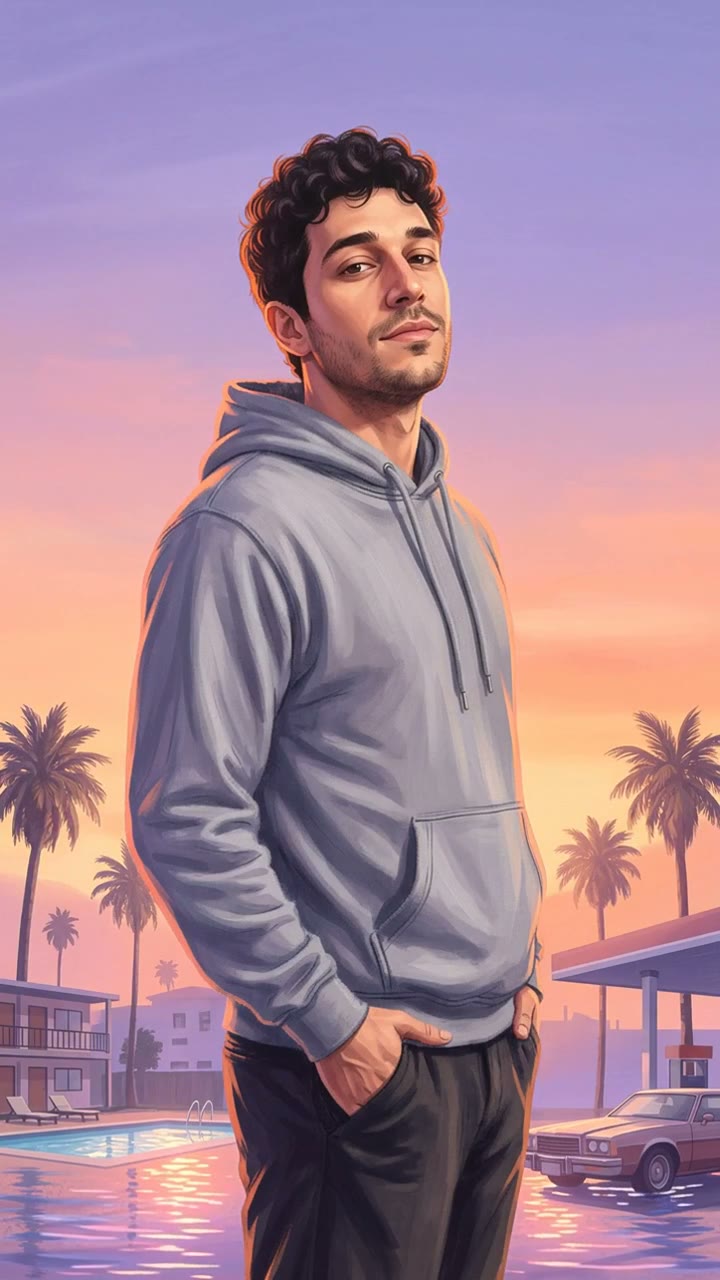
For more than twenty years the Grand Theft Auto games have shown hand-painted character art while they load: one person in the foreground, painted semi-realistically with soft shading and a warm glow along the edges, in front of a hazy sunset city of palm trees, motels and gas stations. When GTA 6 came out in November 2026, people started asking for their own version of that art, and the trend grew in two directions at once.
On TikTok it spread through a CapCut template. The clip opens on an ordinary photo of you, such as a mirror selfie or a holiday snap, and then the painted version of the same picture slides in over it. On Instagram and in search it is usually called the GTA filter or the GTA 6 AI photo: people want the still image to use as a profile picture or a story.
Try a Trend is an independent tool and is not affiliated with Rockstar Games, Take-Two Interactive, TikTok or CapCut. "GTA 6" is only the name people use for the look. Your poster has no game logos, titles, text or game characters: it is just you, painted in that style.
What happens in the video, second by second
The video is about 5 seconds and vertical, made for TikTok, Reels and Shorts:
- 0 to 1.5 seconds: a realistic photo-style shot of you, made by AI from your upload in the same pose as the poster, standing by a motel pool and a roadside gas station at dusk, with palm trees and a parked classic car behind you.
- 1.5 to 3 seconds: a clean graphic wipe sweeps across the frame and the painted poster replaces the photo.
- 3 to 5 seconds: you are now the loading screen: a semi-realistic painting in a soft lavender and peach sunset, a warm glow along your outline, palm trees swaying a little.
The free preview is the poster itself, so you can see exactly how your painted version looks before you decide on the video.
Three ways to make the GTA 6 loading screen AI video
1. A CapCut template
Search CapCut for a GTA 6 loading screen template, pick your photo and let the template build the clip.
- Good: free or cheap, quick, and it gives you the exact TikTok format with the trending sound.
- Not so good: many templates add the game logo, which you may not want on a profile picture, and the quality of the painted version depends on the template's own AI. Some versions only restyle your photo lightly, so the result can look more like a filter than real poster art.
- Best for: people who already edit in CapCut and only want the TikTok clip.
2. ChatGPT or another image tool with a prompt
Paste a long prompt describing the GTA loading screen style into ChatGPT, Gemini or a similar image tool, attach your photo, and try a few times until you like one.
- Good: you have full control over the scene, the clothes and the pose, and you may already pay for the tool.
- Not so good: you have to write or find a prompt, results vary a lot between tries, and the face often drifts until it no longer looks like you. You get a still image only; turning it into the photo-to-poster video means another tool and some editing.
- Best for: people who enjoy experimenting with prompts and only need a picture.
3. A one-photo generator (Try a Trend)
Try a Trend uses one fixed, tested style for everyone, so you don't write anything:
- 1Upload one clear photo of you facing the camera, ideally from the waist up.
- 2Confirm you are 18+ and the photo is of you (or someone who agreed).
- 3Check your free preview. If you like it, get the full video.
- 4See your poster free, then download the video and an HD poster in a few minutes.
- Good: no prompt, no editing, the face is kept the same, you see your poster free first, and you get both the video and an HD poster without the watermark.
- Not so good: the scene is fixed (a motel pool, a gas station, palm trees and a classic car at sunset), so you can't pick a different place. The video opens on an AI photo-style version of you in that scene, not on your original upload as some CapCut templates do. The video is silent, so you add the sound yourself in TikTok or Instagram. The video and HD poster cost Your first video is $4.99, then $5.99 each..
- Best for: anyone who wants the poster and the TikTok clip in a few minutes, looking like themselves.
Tips for a photo that works
- Use a clear, well-lit photo of one person facing the camera. A selfie is fine.
- Waist-up photos work best, because the poster shows you from about mid-thigh up and the outfit is drawn from your top.
- Your top stays the one in your photo, painted in the poster style, so wear the jacket, hoodie or shirt you want to see in the poster.
- Avoid sunglasses, heavy beauty filters and group photos: the face is what makes the poster look like you.
- Glasses, beards and hairstyles are kept, so you don't need to change anything for the picture.
What to post it with
On TikTok, post the video with the sound most GTA 6 loading screen posts are using (open the sound from one of them and tap "Use this sound"), and a short caption such as "my GTA 6 loading screen". Useful hashtags are #gta6, #gtafilter and #gta6loadingscreen. For Instagram, the HD poster works well as a profile picture or a story on its own, and the video works as a Reel.
FAQ
Is there an official GTA filter?
No. "GTA filter" is just what people call the painted loading screen look. There is no official filter from the game's makers, and Try a Trend is an independent tool that is not affiliated with them.
Is it the same as the ChatGPT GTA prompt?
The look is similar, but you don't need a prompt and you get a video as well as the image. The bigger difference is the face: we keep your face, hair and glasses the same in both the photo and the painting, which is where prompt results usually go wrong.
Make yours
Upload a photo and see your own loading screen poster free: make yours here.