How to Make the Talk to Me Doja AI Video (the Shy Anime Dance)
The fastest way to make the Talk to Me Doja AI video, the clip where you tuck both fists under your chin, tilt your head and sway shyly like an anime girl, is to upload one photo of yourself to Try a Trend: you see a free preview, then get a 6-second vertical video that follows a real TikTok clip of the trend shot for shot, with your face and hair, and no filming or practising.
Talk to Me Doja AI Video Generator
1 photo, 6-second vertical video, free preview before you pay. Each video is $7.99.
What is the Talk to Me Doja trend?
Talk to Me Doja is a TikTok dance trend that took off in the second week of November 2026. The sound is a sped-up clip of the song "Like That", and the dance copies a short scene from an anime: a shy girl tucks her fists under her chin, tilts her head and wiggles from side to side with a little pout. People film themselves doing the same pose and paste the anime clip in a corner of the screen so viewers can judge how close they got. Captions like "accuracy: 90%" are part of the joke.
The appeal is that it's tiny. There are no real steps to learn, just one cute pose held for a few seconds, which is why everyone from teenagers to their dads (and at least one mattress store owner) has done it. Within a few days, AI versions appeared too, made from a single photo by people who wanted the clip without filming it.
What happens in the video, second by second
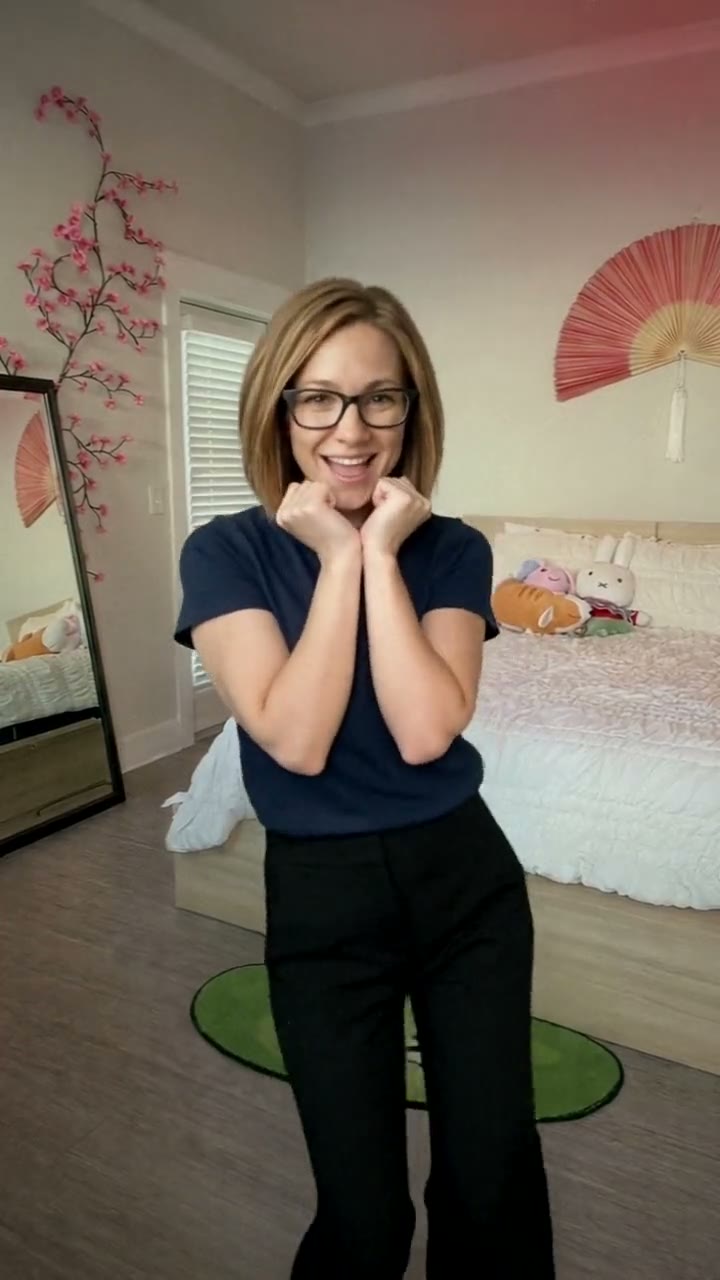
The clip we follow is about six seconds, one fixed shot from a phone on a tripod in a bright bedroom with cherry-blossom wall decals, a big red paper fan and a bed full of plush toys. The camera never moves. Try a Trend's video keeps every beat:
- 0 to 1 second: you're already in the pose, both fists tucked under your chin and elbows together, swaying to one side with a pout.
- 1 to 3 seconds: you tilt your head the other way and sway back, breaking into a smile.
- 3 to 5 seconds: more of the same shy rocking from side to side, head tilting with each sway, pouting and grinning at the camera.
- 5 to 6 seconds: a last tilt and a wink-and-grin to finish.
It's short on purpose: the trend is a loop, and the sound repeats on TikTok.
Three ways to make the Talk to Me Doja AI video
1. Film it yourself, or use a CapCut template
The trend started as a real-life dance, so the classic way is to film it.
- Set your phone on a tripod or prop it on a shelf, framed from about the knees up.
- Play the sound, tuck your fists under your chin and sway for a few seconds. Try a pout and a head tilt on each side.
- Trim it, paste the anime clip in a corner if you like, and post. CapCut also has AI templates where you pick a photo instead of filming.
Good: it's free, it takes a minute, and it's genuinely you.
Not so good: you need to be comfortable doing a cute pose on camera, and getting the timing to feel natural can take a few takes. Templates are fast, but they tend to look the same for everyone, and the motion is often a generic dance rather than this exact pose.
Best for: people who are happy to film themselves and want the real thing.
2. A general AI video tool like Kling or Runway
General AI video tools can turn a photo into a short clip from a written description. For this trend you would describe the whole thing yourself: the room, the framing, the pose, the head tilts and the timing of the sway.
- Upload your photo as the reference image.
- Write a prompt that walks through the pose and each sway with timings, and say that the camera stays still.
- Generate, check the face and the hands, and adjust the prompt.
Good: full control over the setting, the outfit and the style.
Not so good: small, specific movements are hard to get from text. The model may invent its own dance, move the camera or lose the fists-under-chin pose halfway through, and hands are still where AI video slips. These tools usually give you a few free credits, then sell plans or credit packs, so every retry counts.
Best for: people who already pay for an AI video tool and enjoy tuning prompts.
3. A one-photo generator (Try a Trend)
Try a Trend has the Talk to Me Doja dance already set up, so there is no prompt to write and nothing to film. It starts from our own reference video, a recreation of a real TikTok clip of the trend with a fictional person, and swaps that person for you: your face, hair and glasses, and a T-shirt in the colour of your top, with the same room, camera and moves on the same beats.
- 1Upload one clear photo of you, face to the camera, ideally from the waist up so your top shows.
- 2Confirm you are 18+ and the photo is of you (or someone who agreed).
- 3Check your free preview. If you like it, get the full video.
- 4Download in a few minutes: one with the original sound, one silent for adding the sound on TikTok.
You get a 6-second vertical video ready to post, with the original sound and a silent copy. Each video is $7.99.
Good: no filming, tripod or practising, the pose and the sway land on the same beats as the clip it follows, and you see a free preview photo of you in the pose before paying. The video is ready in a few minutes.
Not so good: the scene is fixed: the same bedroom and the same moves every time, and you wear a T-shirt and black wide-leg trousers rather than your own outfit. The anime clip in the corner isn't included. The full video is paid. It's AI, so it's a take on you rather than real footage of you.
Best for: anyone who wants the clip today without filming themselves.
Tips for a photo that works
- Use one clear photo of you facing the camera, ideally from the waist up so the colour of your top shows. A selfie works too.
- Good, even light keeps your face and skin tone true. Daylight near a window is ideal.
- Skip sunglasses, heavy beauty filters and photos where your face is partly covered. Use the original photo rather than a screenshot.
- Your top's colour carries over to the T-shirt in the video, so pick a photo in a colour you like.
- One person per photo. Only upload a photo of yourself, or of someone who agreed to it, and everyone pictured must be 18 or older.
What to post it with
- Caption: "talk to me doja 🥺👉👈" is the classic. If you want the joke, add your own "accuracy: 95%" rating.
- Sound: use the silent version and add the sped-up "Like That" sound inside TikTok or Reels, so your post shows up on that sound's page. The download with sound is there for sharing anywhere else.
- Hashtags: #talktomedoja and #talktomedojatrend.
- Want the anime clip in the corner like the originals? Add it in the app's editor; it isn't part of our video.
FAQ
Is this the official Talk to Me Doja video?
No. Try a Trend is an independent AI tool that recreates the look of the trend with your own photo. We're not affiliated with the singer, her record label, the anime the clip comes from, the creators of the viral TikToks, TikTok or CapCut. Your video is AI-generated: it follows a real TikTok clip of the trend shot for shot, with the person swapped for you.
Does it work for guys?
Yes, and some of the most-liked versions are guys doing the cutest pose they can manage. Whoever is in your photo does the same moves in the same room.
Why is it only six seconds?
Because the trend is. The dance is one short pose and sway that loops with the sound, so a six-second clip matches the originals.
Make yours
Want the Talk to Me Doja dance without filming yourself? Upload one photo and check the free preview. Make your Talk to Me Doja video here.