How to Make the Thanksgiving Dance AI Video (Thanksgiving Bend)
The fastest way to make the Thanksgiving dance AI video is to upload one photo to Try a Trend: you, your kid or anyone in the family who said yes does the whole routine, move for move and on the beat, in a living room dressed up for Thanksgiving, and you get a 13-second vertical video with a free preview before you pay.
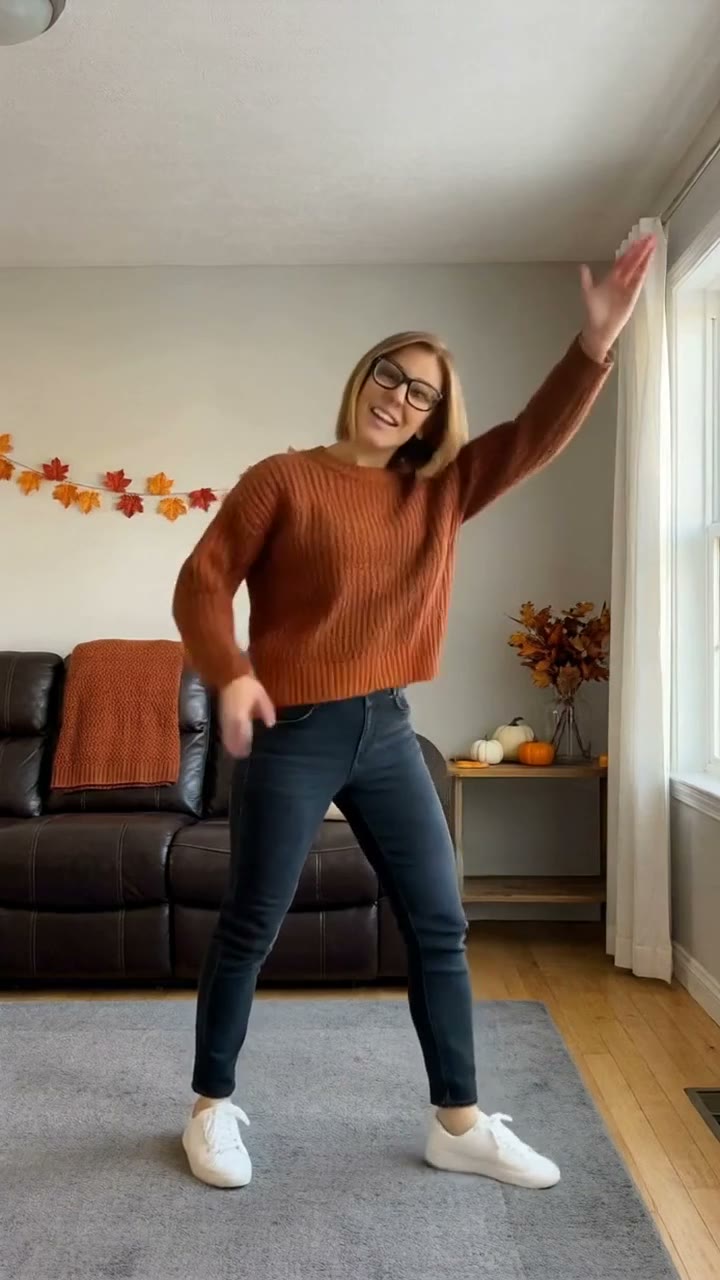
Thanksgiving Dance AI Video Generator
1 photo, 13-second vertical video, free preview before you pay. Each video is $7.99.
What is the Thanksgiving dance trend?
The Thanksgiving dance, also called the Thanksgiving bend, is a TikTok dance that took off in early November 2026. It's set to a new remix of the old beans, greens, potatoes, tomatoes Thanksgiving chant. A DJ turned the chant into a bouncy track, dancers started making up routines to it, and one solo routine filmed in a living room became the version most people copy.
What makes it work is that every move lands on a word of the chant. You tap your shoulders on the food, you drop into the bend in the middle, you fling an arm to the sky at the big finish of the line, and you end with your hands on your hips like you just won Thanksgiving. It's silly, it's short, and it looks best when the person dancing is the one nobody expects: a grandpa, a mom, a seven-year-old who takes it very seriously.
The AI version skips the practice. One photo, and that person does every move.
What happens in the video, second by second
Our version follows that viral living-room routine. The camera sits on the floor, the dancer is in full view from head to shoes, and it never cuts or moves:
- 0 to 4 seconds: arms cross to tap one shoulder, then the other, then fling down and open, one move per word, with little bounces in the knees.
- 4 to 6 seconds: the bend: one knee comes up, both hands go on the head, and the dancer dips low with a twist at the waist.
- 6 to 8 seconds: back to the crossed-arm shoulder taps and the fling down.
- 8 to 10 seconds: arms point out to both sides, then one arm is flung straight up to the sky, and both hands go up high.
- 10 to 13 seconds: fast arm swings down to the left and right, a couple of punches, and the hands-on-hips finish.
The order of the moves and the timing are what make people recognize it. The bend on its own doesn't read as this trend; the shoulder taps, the arm to the sky and the finish together do.
Three ways to make the Thanksgiving dance AI video
1. Film it yourself, then edit with CapCut
Most Thanksgiving bend videos are still real people dancing: learn the routine from a tutorial, prop a phone on the floor, film a few takes and trim the best one in CapCut or right inside TikTok.
Good: free, it's really you dancing, and it's a fun thing to film with the whole family before dinner.
Not so good: the routine is quick and the moves change on every word, so expect a few tries before the bend and the arm flings land on the beat. Someone has to set up the shot and keep everyone out of frame, and getting a grandparent or a shy teenager to do it is a project of its own.
Best for: families who want to dance together and don't mind practicing.
2. A general AI video tool like Kling or Runway
General AI video tools have motion-control features: you give them a photo of a person and a dance video, and they make the person in the photo copy the moves. You'd need a dance clip you have the right to use as the reference, then a few rounds of fixing what the tool gets wrong.
Good: you choose the outfit, the room and the length, and the same tool works for other dances.
Not so good: the bend has hands on the head, a knee up and a low dip, which is exactly where hands blur and faces drift, so expect retries, and each retry uses credits. These tools usually give a few free credits, then sell monthly plans or credit packs.
Best for: people who already pay for an AI video tool and want a custom version.
3. A one-photo generator (Try a Trend)
Try a Trend has the living room, the outfit and the whole routine already set up. The moves come from our own reference video, performed by a fictional AI dancer, so no footage from the viral TikToks is used. The dancer is the person in your photo.
- 1Upload one clear, front-facing photo of you, or of your kid, your mom or anyone in the family who said yes. No Thanksgiving outfit needed: we dress them in a cozy fall sweater.
- 2Confirm the photo is of you or someone who agreed. If they're under 18, confirm you're their parent or legal guardian.
- 3Check your free preview. If you like it, get the full video.
- 4Download in a few minutes and add the Thanksgiving bend sound on TikTok, starting from the beginning.
You get a 13-second vertical video. It opens with the dancer standing in a cozy fall living room, with a leather sofa, an autumn-leaf garland and little pumpkins on the shelf, wearing a chunky rust-orange sweater, dark jeans and white sneakers. Then they do every move in order, right on the beat, until the hands-on-hips finish. Their face and hair stay theirs, and a child stays a child: the video keeps their age and size. Each video is $7.99.
Good: the moves and their timing match the viral routine, there's no app branding, it works for kids with a parent's okay, and the free preview shows the dancer in the Thanksgiving living room before you pay.
Not so good: one living room and one outfit for everyone, and one dancer per video. The camera never moves, like the original. The video is silent, so you add the sound yourself.
Best for: a Thanksgiving post, the family group chat, or getting the person who never dances to finally do the bend.
Tips for a photo that works
- Use a clear, front-facing photo of the face. A selfie is fine; you don't need a full-body shot or a fall outfit.
- Keep the face uncovered: no sunglasses, no hat pulled low, no hand over the face.
- Pick good, even light, like daylight from a window. Avoid harsh sun, strong flash and very dark rooms.
- One person per photo. If there are other people in it, crop them out.
- Only upload a photo of yourself or of someone who agreed to it. For a child under 18, you need to be their parent or legal guardian, and the photo has to show them fully dressed.
- Want the whole family? Make one video per person. They all get the same room and the same moves, so they look great side by side.
What to post it with
- Sound: use the Thanksgiving bend sound that the viral videos use, added inside TikTok or Instagram, where it is licensed. Leave it at the beginning (0:00): the first move lands on the first beat. If it feels a little early or late, nudge the start.
- Caption idea: "had to do the thanksgiving bend before the turkey" or "grandpa said he doesn't dance. grandpa lied."
- Hashtags: #thanksgivingbend, #thanksgivingdance and #thanksgiving.
- Turn on the platform's AI-generated content label when you post. It's an AI video, and saying so keeps it honest.
- For a family post, put two or three videos side by side, or one after another in a single post, oldest to youngest.
FAQ
Is this the official Thanksgiving dance video?
No. Try a Trend is an independent AI tool that recreates the moves of the viral Thanksgiving bend with your own photo. We're not affiliated with the chant's original singer, the remix's creator, the dancers of the viral TikToks, or TikTok. Your video uses no footage or music from the originals.
Can I put the whole family in one video?
Not yet. Each video has one dancer: whoever is in the photo. Make one for each person and put them together when you post.
Does the video come with the song?
No. The video is silent so you can add the sound inside TikTok or Instagram, where it's licensed.
Make yours
Upload one photo, check the free preview, and get the Thanksgiving bend in a few minutes. Make your Thanksgiving dance video here.