How to Make the Gangnam Style AI Video (Seoul Night Selfie Trend)
The fastest way to make the Gangnam Style AI video is to upload one photo of yourself to Try a Trend: it puts you in the middle of the Seoul street selfie, next to two AI-generated friends, with the same moves and camera swings as the viral clip, and gives you a 22-second horizontal video in about 18 minutes, with a free preview before you pay.
Gangnam Style AI Video Generator
1 photo, 22-second horizontal video, free preview before you pay. Your first video is $4.99, then $5.99 each.
What is the Gangnam Style trend?
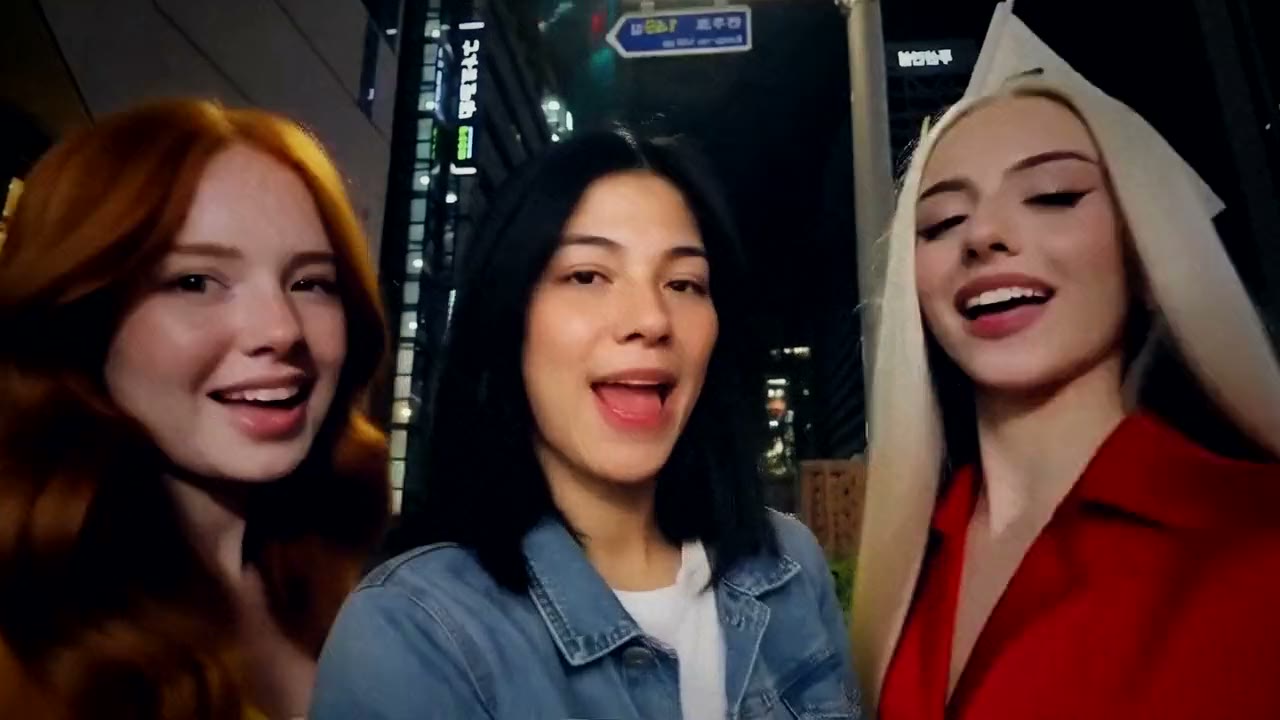
The trend started with a TikTok filmed on a street corner in Gangnam, the Seoul district the 2012 K-pop hit is named after. Three friends stand under the street lights at night, a Korean flag on the lamp post behind them, and take turns in front of a wide-angle phone camera, lip-syncing the chorus. There are no cuts: the camera simply swings from one face to the next, so the whole thing feels like a night out you were part of.
It blew up in October 2026, and within days people started using AI to put themselves into it. Most versions keep the street, the two friends and every camera swing, and swap only the person in the middle, the one who gets the most screen time. That's the version this guide covers.
What happens in the video, second by second
The original is a horizontal clip of a little under 22 seconds, filmed in one take:
- 0 to 2 seconds: all three friends are pressed together in front of the lens, chest up, laughing and mouthing the words.
- 2 to 5 seconds: the two on the sides drop out and the one in the middle has the camera to herself: a close-up with raised eyebrows and a thumbs-up.
- 5 to 5.5 seconds: a fast whip to the right, and the friend on that side swings her long hair into the shot.
- 5.5 to 8.5 seconds: she dances in a waist-up shot, with traffic and a giant screen across the road, pointing at herself.
- 8.5 to 9 seconds: another whip, this time left, to the third friend.
- 9 to 12 seconds: a close-up of her grabbing her head with both hands, then singing and tossing her hair.
- 12 to 16 seconds: the camera whips back to the middle for one more close-up.
- 16 to 22 seconds: the other two squeeze back in from both sides and all three laugh and wave until the end.
The whip pans, the close-ups and the group shot at both ends are what make it recognizable. A version where three people just stand side by side and sway doesn't read as this trend.
Three ways to make the Gangnam Style AI video
1. A CapCut template
CapCut templates appear for most AI trends. If you find one for this clip, you open it from the creator's video, tap the button to use it in CapCut, pick your photo and let the app render it.
Good: often free to try, it runs on your phone, and the music timing is usually built in.
Not so good: templates come and go, and you depend on whichever one is around that week. Many templates animate a single photo, so the two friends and the camera swings may not be there at all, and you have little control over how your face looks in the fast moves.
Best for: people who already use CapCut and don't mind a looser version.
2. A general AI video tool like Kling or Runway
General AI video tools can animate a photo or edit an existing video. For this trend you would need a copy of the clip you have the right to use, then ask the tool to replace one person with you, or describe the whole scene in a prompt and hope the moves come out right.
Good: you control the outfit, the setting and the length, and the same tools work for other trends.
Not so good: this clip is hard for them. Three people share the frame and the camera keeps swinging, so tools that copy motion from a video often move only one person, swap the wrong face, or let the street drift. Each retry uses credits, and these tools usually give a few free credits, then sell monthly plans or credit packs.
Best for: people who already pay for an AI video tool and want a custom version.
3. A one-photo generator (Try a Trend)
Try a Trend has the street, the two friends and every camera swing already set up. The moves come from our own reference video, performed by fictional AI actors on a redrawn Seoul street, so no footage from the original clip is used, and the person in the middle is you.
- 1Upload one clear, front-facing photo of you.
- 2Confirm you are 18+ and the photo is of you (or someone who agreed).
- 3Check your free preview. If you like it, get the full video.
- 4Download in about 18 minutes and add the Gangnam Style sound on TikTok.
You get a 22-second horizontal video in 720p, the same shape as the original. You start pressed together with your two friends under the street lights, get a close-up of your own, the camera whips to one friend flipping her hair and to the other holding her head, comes back to you, and the three of you finish laughing and waving. Your face stays yours, and you wear the clothes from your photo. Your first video is $4.99, then $5.99 each.
Good: the two friends and all three camera swings move exactly like the original, the video is horizontal like the clip people know, there's no app branding, and the free preview shows you in the scene before you pay.
Not so good: one street, one pair of friends, and you always take the middle spot. It takes about 18 minutes because the AI redraws you frame by frame in several parts at once. The video is silent, so you add the song yourself, and it's an AI recreation, not a real trip to Seoul.
Best for: anyone who wants the full clip, with the friends and the whip pans, from a single photo.
Tips for a photo that works
- A clear, front-facing photo of your face and shoulders works best: you appear chest up for most of the video.
- Wear what you'd want to be seen in. The clothes in your photo are the clothes in your video.
- Pick good, even light, like daylight or a window. Avoid harsh sun, strong flash and very dark rooms.
- Skip sunglasses and keep one person in the photo.
- Use the original photo rather than a screenshot or a photo of a screen.
- Only upload a photo of yourself, or of someone who agreed to it. Everyone pictured must be 18 or older.
What to post it with
- Sound: most posts use the chorus of Gangnam Style, added inside TikTok or Instagram where it is licensed. Start it on the chorus so the lip-sync lands.
- Format: the video is horizontal, like the original, so it plays with space above and below on a phone held upright. That's how the viral clip looks too.
- Caption idea: "gangnam style but i'm the main character".
- Hashtags: #gangnamstyle, #gangnamstyleai and #kpop.
- It's even funnier with someone you'd never expect on a Seoul street at night: put your dad or your best friend in the middle (with their OK).
FAQ
Is this the official Gangnam Style video?
No. Try a Trend is an independent AI tool that recreates the look and moves of the trend with your own photo. We're not affiliated with the song, its artist or label, the creators of the viral TikTok, or TikTok itself, and your video doesn't use any footage from the original clip.
Can I be one of the friends on the side instead?
Not right now. The middle spot is the one with the most screen time and two close-ups of its own, so that's the one you take. The two friends are AI-generated, fictional people and stay the same in every video.
Make yours
Upload one photo, check the free preview and get your Seoul night selfie in about 18 minutes. Make your Gangnam Style video here.