How to Make the Flying Car AI Video (Giant Ramp Car Trend)
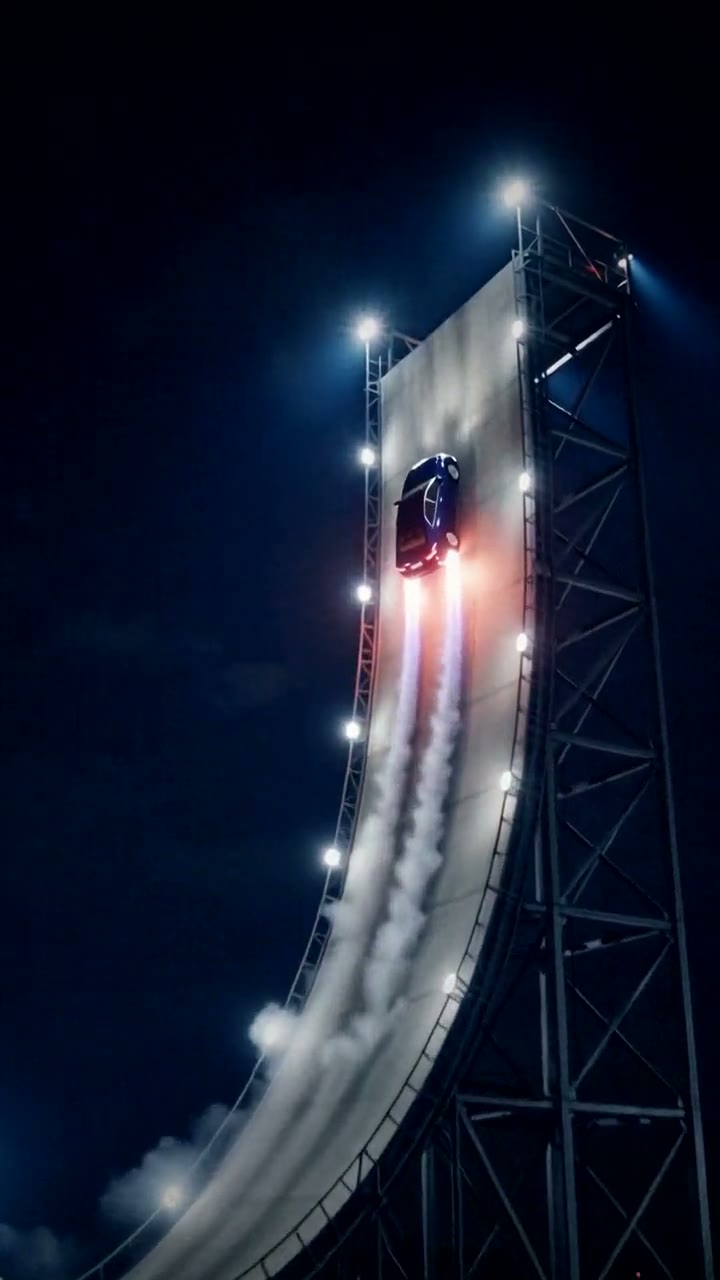
The fastest way to make the Flying Car AI video is to upload one photo of your own car, truck or bike to Try a Trend: you get a 10-second vertical video of your vehicle climbing a giant curved ramp at night, flying off the top on blue jets and landing in a cloud of white smoke, with a free preview before you pay.
Flying Car AI Video Generator
1 car photo, 10-second vertical video, free preview before you pay. Your first video is $4.99, then $5.99 each.
What is the Flying Car trend?
The flying car AI trend took off on TikTok in October 2026, after a night-time demo of a sports car went viral: the car drives up an enormous curved ramp, climbs the vertical section, shoots off the top and comes back down on blue jet flames. Re-posts and edits of that demo went viral too, with captions like "we finally got flying cars".
Then people started making their own versions with AI, using the car they actually drive. That's the charm of the trend: the stunt looks like a big-budget car launch, and the car doing it is a small hatchback, a family sedan or a pickup with a dent in the door. Tutorials on "how to make the flying car AI video" started appearing a day or two later.
What happens in the video, second by second
The template version we studied is about 15 seconds long and uses three shots joined by two hard cuts:
- 0 to 1 second: a low, close shot from right behind the car as it waits at the foot of a pale concrete ramp in grey haze, tail lights glowing red.
- 1 to 8 seconds: hard cut to a wide, almost still shot of the whole ramp at night: steel lattice towers, thin red lights along the edges, white and blue searchlight beams. The car is tiny as it drives up the curve and climbs the vertical wall.
- 8 to 10 seconds: the car shoots off the top and the camera pans up to follow it. Four blue jet flames fire underneath and it sinks slowly toward the ground.
- 10 to 12.5 seconds: it lands, swallowed by billowing white smoke, while the camera slowly pushes in.
- 12.5 to 15 seconds: hard cut to a low side shot at ground level as the car emerges from the smoke and heads off to the right.
Try a Trend's version fits the same three shots and two cuts into 10 seconds, so the climb is quicker than the original, and your car comes down facing the camera instead of being seen side-on as it lands.
Three ways to make the Flying Car AI video
1. A CapCut template
CapCut is the free video editor from the company behind TikTok. This is one stunt you can't film for real, so a CapCut route only works if someone has published an AI template for it.
- Search "flying car" in CapCut's Templates tab, or look for a template link on flying car posts on TikTok.
- If you find one, tap "Use template" and add a photo of your car.
- Export and post with the trending sound.
Good: quick and often free to try, if a template exists.
Not so good: you may not find a template that does this exact ramp stunt, and templates come and go. Some templates only add effects to your photo rather than generate a new scene, so your car may not actually climb a ramp.
Best for: people who already use CapCut and spot a working template link.
2. A general AI video tool like Kling or Runway
General AI video tools can animate a photo of your car from a text prompt. You describe the whole stunt: the ramp, the night setting, the climb, the launch, the blue jets, the smoke and the final drive-off, plus the camera for each part.
- Upload a photo of your car as the reference image.
- Write a prompt shot by shot, with timings and hard cuts, and ask for the car to stay the same model and colour.
- Generate, check that your car still looks like your car, and try again if the cuts or the landing go wrong.
Good: full control: a daytime ramp, a different city, a longer flight, whatever you like.
Not so good: you write and tune the prompt yourself. Multi-shot stunts can come out as one long shot, and the car can change shape or colour mid-flight. Each try uses credits: these tools usually give you a few free credits, then sell monthly plans or credit packs.
Best for: people who already pay for an AI video tool and want a custom stunt.
3. A one-photo generator (Try a Trend)
Try a Trend has the ramp stunt already set up, with the same three shots and two cuts as the template version. You upload one photo of your vehicle, and the AI keeps its shape, colour and wheels.
- 1Upload one photo of your car, bike or anything on wheels, with the whole vehicle in the shot.
- 2Confirm it's your vehicle (or you have permission to use the photo).
- 3Check your free preview. If you like it, get the full video.
- 4Download in a few minutes and add the trending sound on TikTok.
You get a 10-second vertical video in 720p: the close shot at the foot of the ramp, the wide shot of the climb, launch, blue jets and smoky landing, then the low side shot as your car drives off. Your first video is $4.99, then $5.99 each.
Good: no prompt, no template hunting, and it works with almost anything on wheels: sedans, hatchbacks, pickups, SUVs, vans and motorbikes, old or new. You see a free preview of your car at the ramp before paying, and the video is ready in a few minutes.
Not so good: the ramp scene is fixed and always at night. Small details like badges, number plates and stickers can come out slightly different from your photo, because the AI fills in the angles your photo doesn't show. The video is silent, so you add the sound in TikTok, and the full video is paid.
Best for: anyone who wants their everyday car in the stunt today.
Tips for a photo that works
- Get the whole vehicle in the shot. A side view or a front corner (three-quarter view) works best.
- Shoot in good light: daylight or a well-lit car park, not a dark garage.
- Avoid close-ups of one part of the car and photos of the interior. The AI needs to see the body, the colour and the wheels.
- Use a real photo, not a drawing, a render or a screenshot.
- Use your own vehicle, or one you have permission to use. A photo with just the car and no people is the simplest.
What to post it with
- Sound: open a flying car post you like on TikTok and use its sound, so you add it where it's licensed. The video itself is silent.
- Caption: something like "my car said it's done with traffic".
- Hashtags: #flyingcar and #flyingcartrend.
- Tip: the funnier the gap between your car and the stunt, the better. Mention the car's age or nickname in the caption.
FAQ
Will it still look like my car?
It keeps your car's shape, colour and wheels from your photo. Small details like badges, number plates and stickers can come out slightly different.
Is this the official flying car video?
No. Try a Trend is an independent AI tool that recreates the look of the trend with a photo of your vehicle. We're not affiliated with any car maker, TikTok or the creators of the original videos.
Does it work with any car?
Yes. Anything on wheels will take the ramp, from small hatchbacks to vans and motorbikes, as long as the whole vehicle is in your photo.
Make yours
Want to see your own car fly off a giant ramp? Upload one photo of it and check the free preview. Make your Flying Car video here.