How to Make the Color Changing Clown Makeup AI Video
The fastest way to make the Color Changing Clown Makeup AI video is to upload one photo of your face to Try a Trend: AI paints you as a grinning clown under red light and a crying clown under blue, cuts between the two about twice a second, and gives you a 9-second vertical video in a few minutes, with a free preview before you pay and no makeup or lights needed.
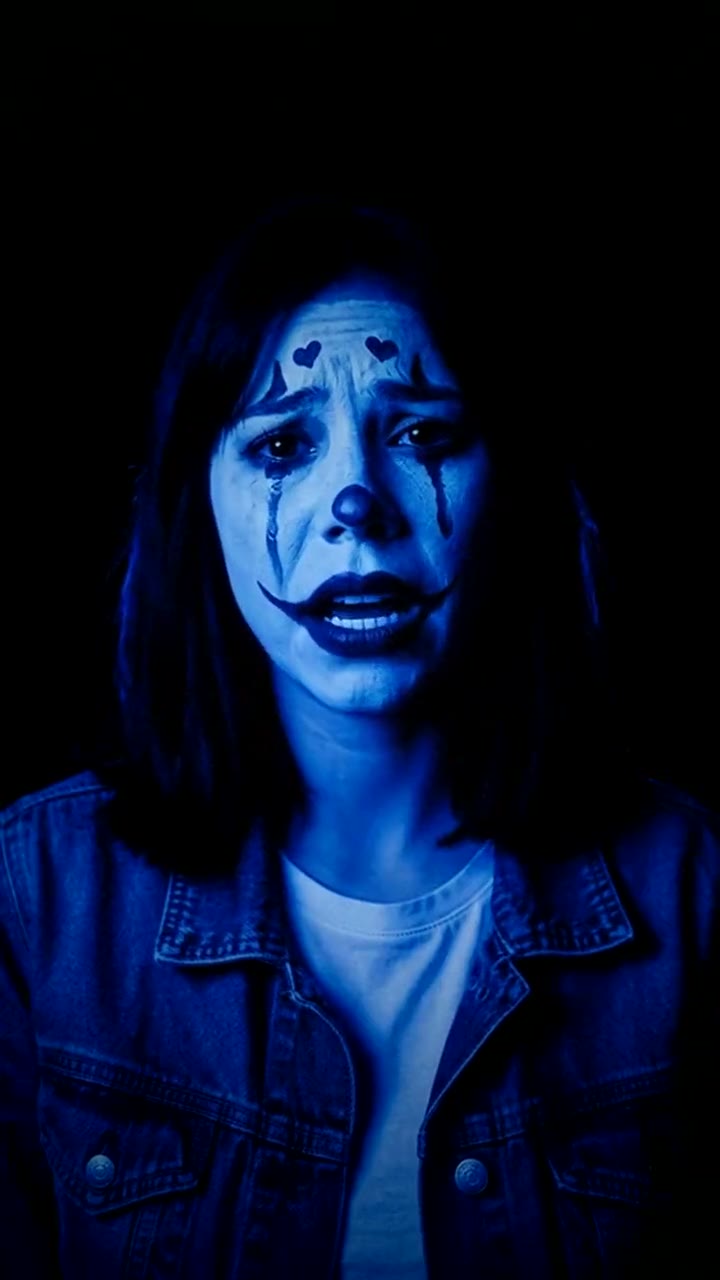
Color Changing Clown Makeup AI Video Generator
1 photo, 9-second vertical video, free preview before you pay. Your first video is $4.99, then $5.99 each.
What is the Color Changing Clown Makeup trend?
The color changing clown makeup trend (colour changing clown makeup, if you spell it that way) blew up on TikTok in October 2026. You might also see it called the red light blue light clown, the happy to sad clown or the two-faced clown. The original is real makeup and a clever lighting trick, which is why so many comments on the original ask some version of "how did you do that?"
Here is the trick. On top of a white base, the artist paints two clown designs at once: one in red paint and one in blue. Under a red light, the red lines disappear into the skin and only the blue lines show up, dark and sharp, so you see a happy circus clown. Under a blue light it flips: the blue lines vanish, the red ones turn dark, and a crying clown appears on the same face. The hair, the outfit and the base never change. Only the visible lines and the expression do.
What happens in the video, second by second
The most-liked clip we studied is about 11 seconds long. Every switch between red and blue is a hard cut between two separate takes, one filmed under each light, not a light being switched on and off:
- 0 to 5.5 seconds: an extreme close-up from the nose to the chin. Red and blue alternate roughly a dozen times, every half second or so. Under red the smile lines curl up; under blue they seem to droop, and the mouth keeps moving as if talking or singing.
- At about 5.5 seconds: one cut changes everything at once. The camera is suddenly further back, showing the whole face and shoulders against a pitch-black background, and the light flips from red to blue.
- 5.5 to 11 seconds: red and blue keep alternating about twice a second. Red is the smiling clown with arched brows and cheek swirls; blue is the sad one with painted tear streaks and a pout. The head tilts a little differently on every cut.
The video flashes, and the original carried a flash warning.
Three ways to make the Color Changing Clown Makeup AI video
1. Real makeup, red and blue lights, then edit in CapCut
This is how the original was made. On TikTok, searches like "color changing clown makeup tutorial" and "color changing clown lighting tutorial" bring up step-by-step videos. Search CapCut's Templates tab as well: if someone has published a template with the cuts timed, you can drop your clips in.
- Paint a white base, then a happy clown design in one colour and a sad clown design in the other, layered on the same face.
- In a dark room, film one take under a red light and one under a blue light, with the phone fixed in place. Smile in the red take, pout in the blue one.
- Film a close-up of your mouth and a wider shot of your face for each light.
- In CapCut, cut between red and blue every half second or so, then add the sound.
Good: it's really you and a real illusion, and a well-done version gets people asking how you did it.
Not so good: you need face paint in the right shades, coloured LED lights, a dark room and a lot of practice. If the paint colours don't match the lights, the lines don't vanish.
Best for: people who enjoy makeup and want to show off the skill.
2. A general AI video tool like Kling or Runway
General AI video tools can turn a photo into a short clip from a text prompt.
- Make two starting images of your face in clown makeup: a happy design under red light and a sad design under blue.
- Generate a short clip from each, with the lips moving and the expression matching the light.
- Cut the clips together every half second in an editor, close-ups first, then the wider shots.
Good: no paint, and you can push the look in any direction you like.
Not so good: you write the prompts and keep both clown designs on the same recognisable face, which takes retries. A one-clip prompt tends to blend the colours instead of hard-cutting, so you usually need several clips and an editor. Every try uses credits; these tools usually give you a few free credits, then sell monthly plans or credit packs.
Best for: people who already use an AI video tool and want their own variation.
3. A one-photo generator (Try a Trend)
Try a Trend has the whole illusion set up: the two clown designs, the lighting and the cuts.
- 1Upload one clear, front-facing photo of you without heavy makeup.
- 2Confirm you are 18+ and the photo is of you (or someone who agreed).
- 3Check your free preview. If you like it, get the full video.
- 4Download in a few minutes and add the trending sound on TikTok.
You get a 9-second vertical video in 720p. It opens on an extreme close-up of your lips under red light, a grinning clown singing along to a song you can't hear. Hard cuts about every half second switch to blue, where the paint turns into a crying clown and your mouth pulls into a trembling pout. Partway through the shot pulls back once to show your whole face against black, then red and blue keep alternating to the end. No blood and no scary clown. Your first video is $4.99, then $5.99 each.
Good: no face paint, no LED lights, no editing, and a free preview of your clown look before you pay.
Not so good: one clown design and one setting. It's an AI recreation, not real makeup, so it won't impress anyone who wants to see the technique. The video is silent, so you add the sound yourself.
Best for: anyone who wants the look for Halloween without buying makeup and lights.
Tips for a photo that works
- Use one clear, front-facing photo from about the shoulders up, looking at the camera.
- Go without heavy makeup or existing face paint, so the clown design has a clean face to work with.
- Pick good, even light, like daylight or a window. Avoid sunglasses, heavy filters and group shots.
- Use the original photo rather than a screenshot, with one person in it.
- Only upload a photo of yourself, or of an adult who agreed to it. Everyone pictured must be 18 or older.
What to post it with
- Sound: the trending sound under #colorchangingclown, added inside TikTok where it is licensed. The cuts land about twice a second, so a song with a clear beat suits it.
- Caption idea: "red light happy, blue light sad. did this trip you out?"
- Hashtags: #colorchangingclown, #clownmakeup and #halloweenmakeup.
- Flash warning: the light changes about twice per second. Adding "flash warning" to the caption is a kind touch.
- More spooky looks for the season are on our Halloween page.
FAQ
Is this the official color changing clown makeup trend?
No. Try a Trend is an independent AI tool that recreates the look of the trend with your own photo. We're not affiliated with TikTok, CapCut, any makeup brand or the creators of the original videos.
Do I need real clown makeup or red and blue lights?
No. Upload a normal photo without heavy makeup. The face paint, the red and blue lights and the fast cuts are all made by AI.
Is it a scary clown?
No. It's a cute circus clown on a white base: arched brows, cheek swirls and a big smile under red, then drooping brows, painted tears and little hearts under blue.
Make yours
Upload one photo, check your clown in the free preview and post it tonight. Make your color changing clown video here.