How to Make the Hotel Lobby AI Video (Migos AI Trend)
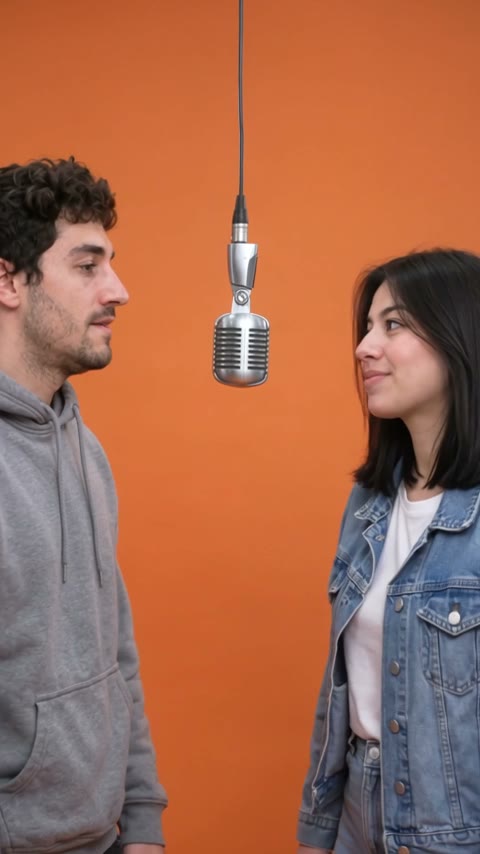
The fastest way to make the Hotel Lobby AI video is to upload two photos, one of you and one of a friend, to Try a Trend: you get a 10-second vertical video of the two of you performing a rap duet around a single hanging microphone in a bright orange studio, with a free preview before you pay and no need to meet up and film.
Hotel Lobby AI Video Generator
2 photos, 10-second vertical video, free preview before you pay. Your first video is $4.99, then $5.99 each.
What is the Hotel Lobby trend?
The Hotel Lobby trend is a two-person rap duet staged like a music video performance: a seamless bright orange backdrop, one silver vintage microphone hanging from a thin cable in the middle, and two performers turned sideways toward each other, trading the mic. It went viral on TikTok in late September 2026, named after the song people use as the sound. Many people also call it the Migos AI trend, after the rappers in the original performance; it is the same trend.
What made it spread is that almost anyone can be dropped into the booth with AI. The most-liked version we studied isn't even people: it is an AI clip of a black cat and an orange cat taking turns at the mic. People then started making versions with themselves and a friend, which is why the trend is built for two.
What happens in the video, second by second
The clip we studied is about 20 seconds long, filmed as if from a tripod in a fixed medium shot. There are no fast zooms, whip pans or close-ups: the performance does all the work.
- 0 to about 2 seconds: the orange booth, the hanging mic in the centre. The performer on the left raps toward the mic while the one on the right listens, side-on, and raises a hand.
- About 2.5 to 6 seconds: the right side takes over the rhythm with big hand gestures while the left nods along.
- About 7.5 to 9 seconds: they keep trading turns, one deadpan and gesturing, the other swaying.
- About 11 to 12.5 seconds: the right performer spins to face away, then turns back, while the left keeps going.
- About 14 to 16 seconds: the most animated moment, with a hand over the mouth and raised arms.
- About 17.5 seconds to the end: the camera eases back to a full-body shot of both performers in front of the orange wall, still going.
The key details are the side-on pose around one shared mic, the steady camera and the back-and-forth. If you change those, it stops looking like this trend.
Three ways to make the Hotel Lobby AI video
1. CapCut (template or your own footage)
CapCut is the free video editor from the company behind TikTok. Search "hotel lobby" in its Templates tab: if a creator has published a template for this trend, use it. If not, film the duet yourself and edit it in CapCut.
- Find a plain orange wall or hang an orange sheet, and hang a microphone (or something mic-shaped) between you at mouth height.
- Set the phone on a tripod in a medium shot, stand side-on facing each other, and perform to the sound.
- Trim the take in CapCut, add the sound, and post.
Good: it is the real you and your friend, and the energy of a real performance is hard to beat.
Not so good: you both need to be in the same place at the same time, with an orange backdrop, a hanging mic and a few takes until neither of you laughs.
Best for: friends who live close by and enjoy performing on camera.
2. A general AI video tool like Kling or Runway
General AI video tools can generate a clip from a reference image and a text prompt. For a two-person trend, you usually first make a still image of both people in the booth, then animate it.
- Create a starting image with both of you side-on around a hanging mic in an orange studio, from your two photos.
- Write a prompt for the performance: who raps first, when you switch, and the slow pull-back at the end.
- Generate, review and adjust until both faces and the timing look right.
Good: you control everything, including the backdrop, outfits and length.
Not so good: two faces are harder than one. Keeping both people recognisable through the whole clip, and stopping the tool from adding fast camera moves the original doesn't have, can take several tries. Each try uses credits; these tools usually give you a few free credits, then sell monthly plans or credit packs.
Best for: people who already use an AI video tool and want to customise the scene.
3. A one-photo-each generator (Try a Trend)
Try a Trend has the booth already set up: the orange backdrop, the hanging vintage mic, the side-on duet and the steady camera. You upload one photo per person. The first photo becomes the person on the left, the second the person on the right.
- 1Upload a clear, front-facing photo of each person.
- 2Confirm everyone pictured is 18+ and agreed to be in the video.
- 3Check your free preview. If you like it, get the full video.
- 4Wait about 4 minutes, then download and add the trending sound on TikTok.
Your 10-second video follows the original's structure in a shorter cut. First the left side raps into the mic while the right side nods along, then you swap and the right side takes over, and in the last couple of seconds the camera eases back to a full-body shot of you both against the orange wall. Your first video is $4.99, then $5.99 each.
Good: you don't have to meet up, build a set or film anything, and there is no prompt to write. Both faces come from your photos, and you see a free preview before you pay.
Not so good: the booth, camera and choreography are fixed, and it is a 10-second version rather than the full clip. The video is silent, so you add the song in TikTok yourself. It is AI-generated, not a real performance, and it needs a photo of a real person for each side.
Best for: long-distance friends, couples, or anyone who wants the duet without the set-up.
Tips for photos that work
- One clear, front-facing photo per person, ideally face and shoulders. Each photo should show only one person, so avoid group shots.
- Good, even light, like daylight or near a window. Skip sunglasses, heavy filters and extreme close-ups.
- Decide who stands where before you upload: the first photo is the left side of the booth, the second is the right.
- Use the original photos, not screenshots or saved thumbnails.
- Only upload photos of yourself and people who agreed to be in the video. Everyone pictured must be 18 or older, and photos of public figures are rejected.
What to post it with
- Sound: search "Hotel Lobby" in TikTok's sound library and use the trending version, where it is licensed.
- Tag your duet partner in the caption so it shows up for their friends too.
- Hashtags: #hotellobby, #hotellobbytrend and #besties.
- A caption that fits: "finally did the hotel lobby trend with my bestie".
FAQ
Is this the official Hotel Lobby video?
No. Try a Trend is an independent AI tool that recreates the look of the trend with your own photos. We're not affiliated with TikTok, CapCut, the song or the artists.
Do we need to be in the same photo?
No. Upload two separate photos, one of each person. The video puts you side by side in the booth.
Can I choose who is on the left?
Yes. The first photo you upload is the person on the left, and the second is the person on the right.
Make yours
If you want the orange-booth duet without building a set or meeting up to film, upload two photos and check the free preview. Make your Hotel Lobby video here.