How to Make the Happy Birthday in Heaven AI Video (Heavenly Birthday)
The fastest way to make a happy birthday in heaven AI video is to upload one photo of the person you miss to Try a Trend: you get a 10-second vertical video of them celebrating their birthday above the clouds, beside a tall birthday cake inside the golden gates under the words "Happy Heavenly Birthday", making a wish, blowing out the candles and waving to you, and you see a free preview of them with their cake before you pay.
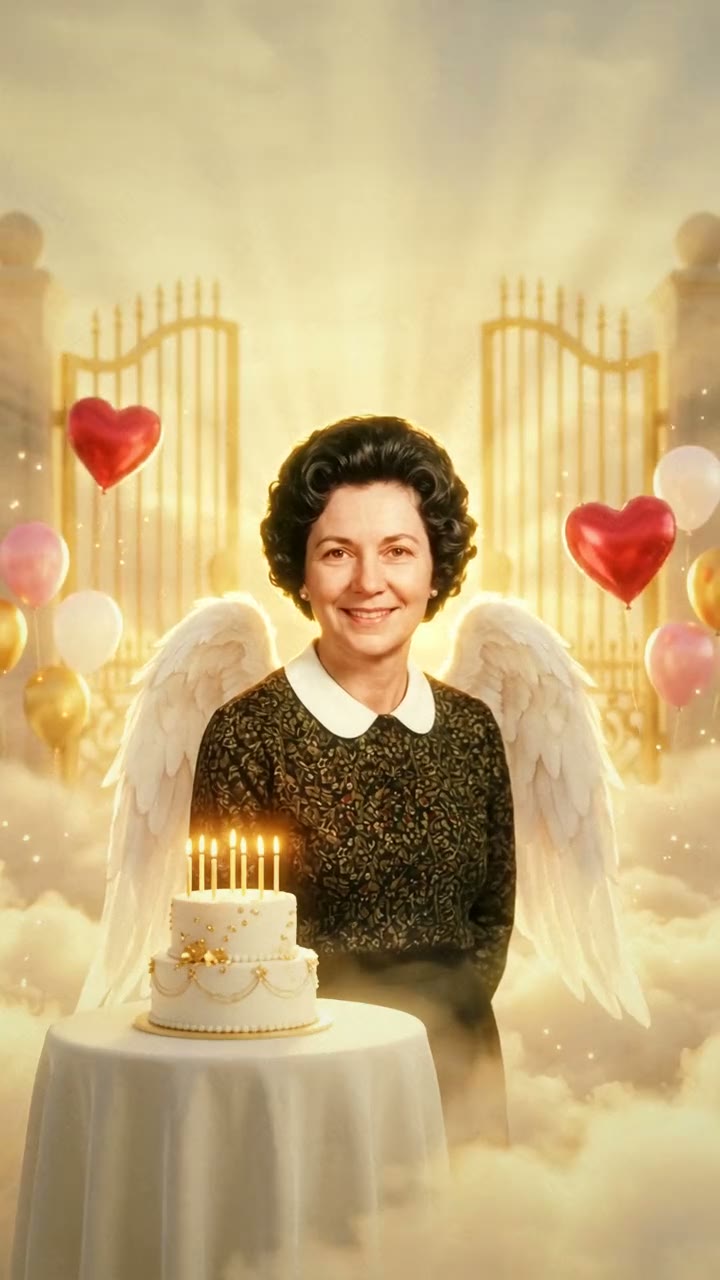
Happy Birthday in Heaven AI Video Generator
1 photo, 10-second vertical video, free preview before you pay. Each video is $7.99.
What is the happy birthday in heaven trend?
"Happy birthday in heaven" is what people write on the birthday of a mom, dad, grandparent, husband, wife, brother, sister or friend who has passed away. It isn't one viral clip. It's a ritual that happens every single day, all year, and it has its own pictures: a birthday cake sitting on the clouds, the golden gates of heaven, red heart balloons floating up into the sky, "Happy Heavenly Birthday" in gold script, and the loved one smiling down, often drawn as an angel with soft white wings. In Spanish the same posts say "feliz cumpleaños hasta el cielo", a happy birthday sent all the way up to heaven.
For years those posts were photo slideshows, quote cards and template videos with a photo dropped into a frame of clouds. AI changed what people can make. Instead of a picture in a frame, you can now show the person themselves in that scene, celebrating, looking well, and looking back at you. People post it on the day itself, on the first birthday without them, on a milestone birthday they didn't get to see, or they send it to the family who miss them too.
It's a way of saying "we haven't forgotten your day". It doesn't pretend to bring anyone back.
What happens in the video, second by second
Our version uses the pictures people already search for, put into one short scene.
- 0 to 2 seconds: a sea of soft clouds in warm golden light, a pair of tall golden gates at the top of a few glowing steps, and "Happy Heavenly Birthday" in gold script in the sky above them. The gates swing open and light pours out, while balloons, two of them red hearts, drift up from below.
- About 2 to 4 seconds: just inside the gates, beside a tall white birthday cake with candles burning, your loved one turns and smiles.
- About 4 to 5 seconds: cut to a closer shot of them standing beside their cake, the candlelight warm on their face. They smile at you, then look down at the candles.
- About 5 to 6 seconds: they close their eyes and make a wish.
- About 6 to 7 seconds: they blow the candles out in one breath, and thin curls of smoke drift up.
- About 7 to 8 seconds: they look straight back at you with a big, bright smile and give a small wave.
- About 8 to 10 seconds: the camera drifts back and up until they're a small figure beside the cake at the golden gates, balloons rising past them into the sky, high above the clouds.
The moments that carry it are the balloons reaching the gates, the wish, and that last smile and wave, which feels like an answer to your birthday message.
Three ways to make a happy birthday in heaven video
1. A CapCut template
CapCut, the free video editor from the company behind TikTok, has a whole shelf of birthday in heaven templates. Search "happy birthday in heaven", "heavenly birthday" or "para un ángel" in its Templates tab, pick one, add your photos and export.
Good: free to try, quick, and most come with text and music already in place.
Not so good: almost all of them place your photo as it is inside a frame of clouds, hearts or sparkles, so the person doesn't move or do anything. Some templates add an ending card, and the most popular ones are used so often that yours can look like everyone else's.
Best for: a quick slideshow-style tribute with several photos and a written message.
2. A general AI video tool like Kling or Runway
General AI video tools can turn a photo into a moving scene from a text description, so you can describe the clouds, the gates, the cake and what your loved one does.
- Upload their photo and describe the setting and the look: realistic, warm golden light, clouds, a birthday cake with candles.
- Write the moments in order: the balloons rising, the wish, blowing out the candles, the smile at the end.
- Generate, then try again until the face still looks like them.
Good: you control every detail, from the colour of the balloons to the shape of the cake.
Not so good: you write and tune the prompt yourself, an old or black-and-white photo can come out flat or change the face, and every attempt uses paid credits.
Best for: people who enjoy fine-tuning and already pay for an AI video tool.
3. A one-photo generator (Try a Trend)
Try a Trend has the scene set up, so you only add one photo.
- 1Upload a clear photo of the loved one whose birthday it is; an old or black-and-white photo is fine if the face is sharp.
- 2Pick the look and the words, and confirm the photo is of your family member or loved one, 18 or older in it.
- 3Check your free preview. If you like it, get the full video.
- 4Download in a few minutes and add a soft song or the trending sound on TikTok.
You choose two things first: whether your loved one appears as an angel with soft white wings (there's no halo) or just as they were, and whether the gold words in the sky say "Happy Heavenly Birthday", "Feliz cumpleaños hasta el cielo" or nothing at all. The rest of the scene is the same: the gates opening, the balloons, their birthday cake, the wish and the wave. Each video is $7.99.
Good: no template hunting, no photo restoration and no editing. An old, faded or black-and-white photo is fine, and the video shows them in natural colour with their own face, hair and clothes. You see a free preview before you pay, the words in the sky are spelled right, and the cake has no name or numbers on it, so it fits any birthday.
Not so good: the scene is set, the video is silent so you add the music yourself, and it is an AI-made tribute, not real footage of the person.
Best for: anyone who wants a finished, gentle birthday tribute to post on the day or send to family.
Tips for a photo that works
- One person, with the face sharp and looking toward the camera. If others are in the photo, crop them out first.
- A printed photo is fine. Photograph it straight on in daylight, without glare, and crop out the border.
- Black-and-white and faded photos work too, as long as the face is clear. A tiny or blurry photo gives the AI less to work with.
- The clothes in the photo are the clothes they wear in the video, so pick one where they look the way you remember them.
- Use a photo of them as an adult, 18 or older, that you have the right to use. No celebrities or public figures.
What to post it with
- Sound: a soft piano or acoustic song, or the trending sound from TikTok's sound library, where it is licensed.
- Caption: their name, their age this year, and what you'd tell them today. "Happy birthday in heaven, Mom" says it all; in Spanish, "feliz cumpleaños hasta el cielo".
- Hashtags: #happybirthdayinheaven, #heavenlybirthday, #mominheaven or #dadinheaven, and in Spanish #felizcumpleañoshastaelcielo.
- When: on their birthday, or the evening before so family see it first thing. It also works for a birthday you missed.
FAQ
Is this an official birthday in heaven template?
No. Try a Trend is an independent AI tool that makes its own happy birthday in heaven video from your photo. We're not affiliated with CapCut, TikTok or any template creator.
Can I put myself in the video with them?
This one is just your loved one, the way the birthday in heaven pictures usually are. If you'd like to be in the scene with them, the Mom & Dad in Heaven video takes your photo and theirs and ends in a hug, and you can pick a bright, warm mood for a birthday.
Is there a Spanish version of this page?
Yes. You can make the same video from the Spanish page.
Make yours
If their birthday is coming up, or it was today, add their photo and look at the free preview. Make your happy birthday in heaven video here.