How to Make the I'm So Sorry I Lied AI Video (Sorry I Lied Trend)
The fastest way to make the I'm So Sorry I Lied AI video, also called the Sorry I Lied trend, is to upload one photo of yourself as you are today to Try a Trend: it imagines you as a little kid in a flawless Halloween costume, hard-cuts to the "real" homemade-costume photo, and gives you a 9-second vertical video in about a minute, with a free preview before you pay.
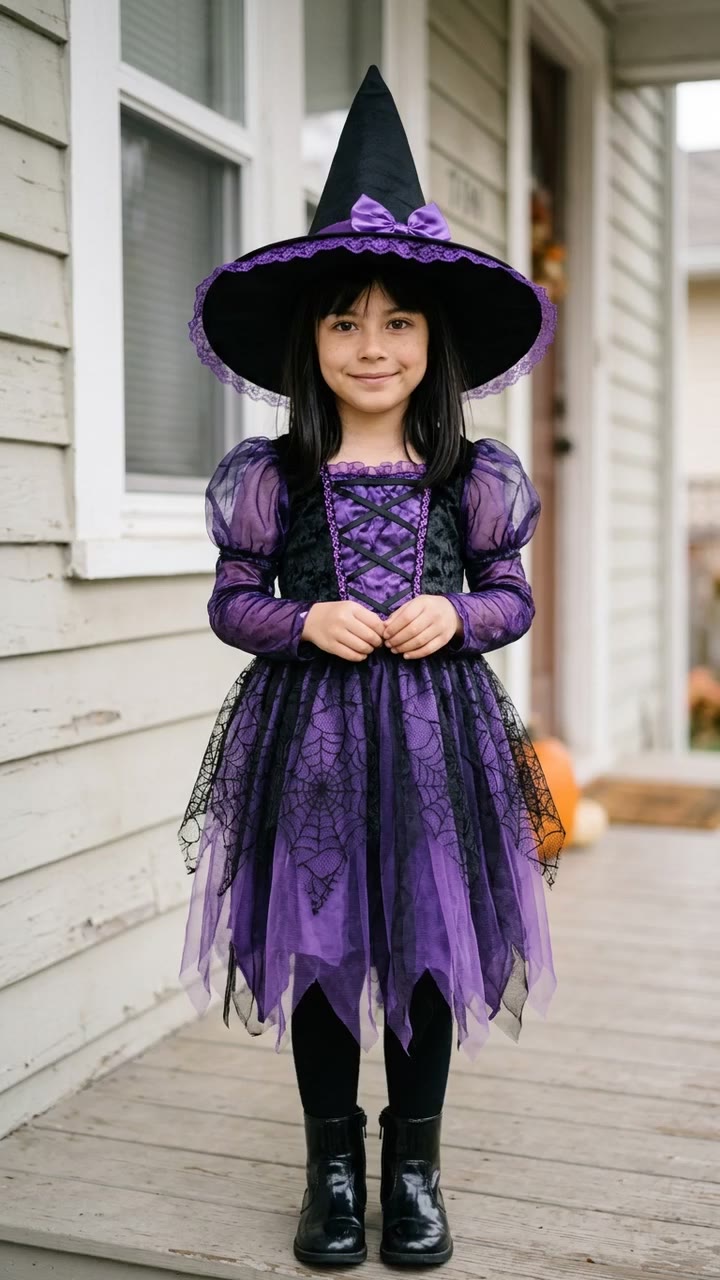
I'm So Sorry I Lied Costume AI Video Generator
1 photo, 9-second vertical video, free preview before you pay. Your first video is $4.99, then $5.99 each.
What is the I'm So Sorry I Lied trend?
The "I'm so sorry I lied" trend is a Halloween photo dump that took off on TikTok in October 2026. People search for it as the "sorry i lied trend", and on TikTok the sound is usually tagged #imsorryilied. Either way it is the same joke: you show a picture-perfect photo of yourself as a child in a beautiful costume, captioned something like "When I was little I was a witch for Halloween". Then the caption admits "Sorry I lied" and the video cuts to the real photo from that night: smeared face paint, a costume made from whatever was in the house, and a harsh old camera flash.
The joke works because everyone has that second photo somewhere. The first photo is the fantasy. More and more people now make the too-perfect first photo with AI, which is where the AI version of the trend comes from.
What happens in the video, second by second
The most-liked clip we studied is a 16-second slideshow of four still photos, each on screen for about four seconds, with plain hard cuts and no zoom or transition:
- 0 to 4 seconds: a polished full-length photo of a little girl, about six, on a sunny white porch in a purple and black witch dress and a wide pointed hat, hands clasped, smiling sweetly. The caption says she was a witch for Halloween.
- 4 to 8 seconds: the same photo, but now her face is green. The caption apologises: her face was green.
- 8 to 12 seconds: the same photo again, now with a black dress. Another apology.
- 12 to 16 seconds: the real photo. Thick green face paint, a huge black hat with the tip poking out of the frame, a baggy black robe, a plush cat, a pumpkin bucket and a broom, all lit by a direct flash against an old wooden door. The final caption is "I'm so freaking sorry".
Many versions skip the middle steps and go straight from the perfect photo to the real one. That two-photo version is what most CapCut templates use, and it is what Try a Trend makes.
Three ways to make the I'm So Sorry I Lied AI video
1. A CapCut template
CapCut is the free video editor from the company behind TikTok, and creators publish templates for trends like this one. The Sorry I Lied templates we saw hold two photos for about a second and a half each, with a quick slide or zoom between them.
- On TikTok, open a Sorry I Lied post that shows a CapCut template link, or search "sorry i lied" in CapCut's Templates tab.
- Tap "Use template" and add your two photos: the perfect one first, the real one second.
- Adjust the captions, export, and post with the trending sound.
Good: free, quick, and the timing is done for you. If you have a real childhood Halloween photo, the reveal is genuinely yours, which is the funniest version of this trend.
Not so good: you need both photos. The real one has to be scanned or dug out of a family album, and the perfect one still has to come from somewhere, usually an AI photo app. Templates also come and go, so the one you saw last week may be gone.
Best for: anyone who already has a scanned photo of their real childhood costume.
2. A general AI video tool like Kling or Runway
General AI tools can make each photo for you. You describe the scene in a text prompt, give the tool a reference photo, and generate an image (or animate it into a short clip). Then you put the two pictures together in an editor.
- Generate the perfect photo: you as a small child in a polished costume, on a sunny porch, soft light.
- Generate the real photo: the same child in a cheap homemade version of the costume, lit by a harsh flash.
- Line them up in an editor with a hard cut at about four seconds, then add captions and the sound.
Good: total control over the costume, setting and style, and you can use the same tools for other projects.
Not so good: you write and rewrite the prompts yourself. The hardest part is keeping the same child's face in both pictures, which often takes several tries, and every try uses credits. Most of these tools give you a few free credits, then sell monthly plans or credit packs, and you still have to assemble the video yourself.
Best for: people who already pay for an AI tool and enjoy tweaking prompts.
3. A one-photo generator (Try a Trend)
Try a Trend is built for this one format. You upload a single photo of yourself as an adult today and pick a costume: witch, fairy, princess, pirate or vampire. The AI makes both photos of the same little you, so the face matches across the cut.
- 1Upload one clear, front-facing photo of you as you are today, and pick the costume.
- 2Confirm you are 18+ and the photo is of you (or someone who agreed).
- 3Check your free preview. If you like it, get the full video.
- 4Download in about a minute, then add the captions and the trending sound on TikTok.
You get a 9-second video: the perfect photo holds for four seconds, then a hard cut to the real photo, which holds for five, so there is room for two or three captions. Both are still photos, like the original. Your first video is $4.99, then $5.99 each.
Good: no childhood photo needed, no prompt to write, the same face in both photos, and you see the perfect photo as a free preview before paying. It is ready in about a minute.
Not so good: the "real" photo is AI-imagined, not your actual childhood. There are five costumes, the scene is fixed, and the video is silent, so you add the captions and the sound in TikTok yourself.
Best for: people who want the joke without hunting through old albums, or who never had a costume photo in the first place.
Tips for a photo that works
- Use one clear, front-facing photo of you as you are today, from about the shoulders up. Childhood photos are not accepted: the AI does the de-aging.
- Pick good, even light. Daylight or a spot near a window works best, without harsh sun or a strong flash.
- Skip beauty filters and extreme close-ups. A natural photo keeps your features, skin tone and hair colour recognisable in the kid version.
- One person per photo, and use the original file rather than a screenshot or a saved thumbnail.
- Only upload a photo of yourself, or of someone who agreed to it. Everyone pictured must be 18 or older.
What to post it with
The video has no text, so you add captions in TikTok like everyone else does.
- On the first photo: "When I was little I was a witch for Halloween" (or a fairy, princess, pirate or vampire).
- When the cut happens at four seconds: "Sorry I lied", then "I'm so freaking sorry". In TikTok's text tool you can set when each caption appears, so the apology lands right on the cut.
- Sound: use the trending sound tagged #imsorryilied inside TikTok, where it is licensed.
- Hashtags: #sorryilied, #imsorryilied and #halloweencostume.
- A caption that fits: "when i was little i had the cutest halloween costume... sorry i lied".
FAQ
Is "I'm so sorry I lied" the same as the Sorry I Lied trend?
Yes. Some people call it by the caption, some by the sound. It is the same Halloween costume photo dump: a too-perfect photo of you as a kid, then the real homemade one.
Is this the official I'm So Sorry I Lied video?
No. Try a Trend is an independent AI tool that recreates the look of the trend with your own photo. We're not affiliated with TikTok, CapCut or the creators who started the trend, and the video doesn't use anyone else's photos.
Can I use my real childhood Halloween photo?
Not on Try a Trend: it only accepts a photo of you as an adult today. If you have the real photo, the CapCut route above is the way to go, and it will probably be even funnier.
Make yours
If you want the perfect-then-real reveal without digging through old albums, upload one photo, pick a costume and check the free preview. Make your I'm So Sorry I Lied video here.