How to Make the AI Halloween Costume Photo and Video From a Selfie
The fastest way to make an AI Halloween costume photo and video is to upload one selfie to Try a Trend and pick a costume: you see a free photo of you in it first, then get that photo in HD plus a 6-second vertical video of you on a candlelit Halloween porch.
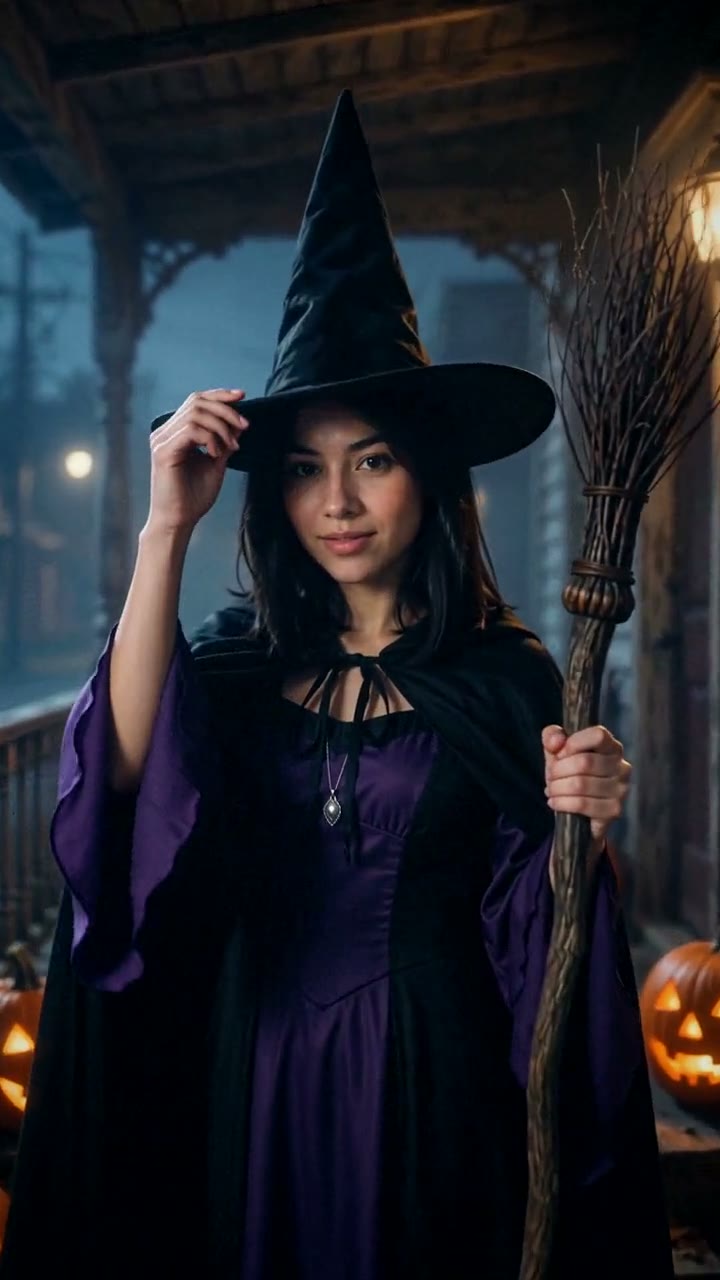
AI Halloween Costume Video Generator
1 photo, 6-second vertical video, free preview before you pay. Your first video is $4.99, then $5.99 each.
What is the AI Halloween Costume trend?
Every October a lot of people go looking for the same thing: a way to see themselves in a Halloween costume without buying one first. Searches for "AI Halloween costume" climb in the weeks before Halloween, together with "AI Halloween photo" and "AI Halloween costume generator". The idea is simple. You upload a selfie, choose a look, and the AI puts you into a full costume.
People use it in a few ways:
- To decide what to dress up as before spending money on a costume.
- To post a costume photo when they aren't dressing up at all, or can't make it to a party.
- As a Halloween profile picture, or a spooky post for friends.
It isn't one viral clip with a fixed script, so there is no single right version. A good AI Halloween costume photo keeps your face recognizable, looks like a real, well-made costume rather than a cartoon, and puts you somewhere that feels like Halloween night.
What happens in the video, second by second
The Try a Trend video is 6 seconds long and filmed as one continuous shot, with no cuts:
- 0 to 1.5 seconds: you stand in your costume on an old wooden porch at night, glowing pumpkins on the steps and mist around your feet, looking away down the dark street.
- 1.5 to 2.5 seconds: you turn and look straight at the camera as it moves slowly toward you.
- 2.5 to 5 seconds: the costume's signature move. The witch tips the hat brim with the broom in hand, the vampire hides behind the cape and then smiles with tiny fangs, the zombie lurches forward, the skeleton crosses its arms and grins, the devil plants the pitchfork, and the ghost reaches toward the lens.
- 5 to 6 seconds: the shot ends close on your face, still in character, with candlelight flickering across it.
Three ways to make an AI Halloween costume photo or video
1. A template or AI effect in a video app
Video apps like CapCut have photo templates and AI effects, and you can search them for Halloween looks. You pick one, add a selfie and export.
Good: free or close to it, quick, and already inside the apps many people post from.
Not so good: you take whatever style the effect gives you. Many effects are closer to a filter or a cartoon than a real costume photo, you usually can't choose the costume itself, and the selection changes from week to week.
Best for: a quick, playful post when the exact costume doesn't matter.
2. A general AI image or video tool like Kling or Runway
General AI tools can make almost anything if you describe it well. You give the tool your photo, write a prompt for the costume, the setting and the light, and generate an image. For a video, you animate that image in the same tool or another one.
- Write a prompt describing the costume and the scene, with your selfie as the reference.
- Generate until the face still looks like you and the costume looks right.
- Animate the best image into a short clip and export it.
Good: total freedom. Any costume, any setting, any style.
Not so good: you write and rewrite the prompts yourself, and keeping your face recognizable often takes several tries. Every try uses credits, and most of these tools sell monthly plans or credit packs.
Best for: people who already pay for an AI tool and enjoy experimenting.
3. A one-photo generator (Try a Trend)
Try a Trend is set up for exactly this. You upload one selfie and pick one of six classic costumes: witch, vampire, zombie, skeleton, devil or ghost. The scene, the lighting and the camera move are already done, and each costume is styled to match you.
- 1Upload one clear, front-facing photo of you and pick a costume.
- 2Confirm you are 18+ and the photo is of you (or someone who agreed).
- 3Check your free preview. If you like it, get the full video.
- 4Download your HD costume photo and the video in a few minutes, then post them for Halloween.
The free preview is the costume photo itself, so you know what you're getting before you pay. If you like it, you get that photo in HD with no watermark, plus the 6-second video in 720p. Your first video is $4.99, then $5.99 each.
Good: no prompt to write, no costume to buy, and a free look at the photo first. Your face stays recognizable, and every costume is modest, with no blood or gore.
Not so good: six costumes and one setting, so you can't ask for a specific character or location. The video is silent, so you add a sound when you post, and the HD photo and video are paid.
Best for: anyone who wants to see themselves in costume quickly, or wants a polished Halloween post without dressing up.
Picking a costume
- Witch: a tall pointed hat, a long hooded cloak and a broom. For a man it becomes a warlock's robe.
- Vampire: a high-collared cape with a red lining and two small, neat fangs, over a velvet gown or a tailcoat.
- Zombie: ashen makeup and worn-out old clothes. Creepy, but with no blood or wounds.
- Skeleton: a bone-print outfit with skull face paint over your own features.
- Devil: little red horns, a deep-red outfit, a black cape and a pitchfork.
- Ghost: a pale, tattered Victorian look that seems to glow in the mist.
Each free preview shows one costume, and you can make up to five free previews a day, so you can try a few before you choose.
Tips for a photo that works
- Use one clear, front-facing photo of your face, like a selfie in good light. It doesn't need to show your whole body: the AI dresses you and frames you from the waist up.
- Daylight or a spot near a window works best. Avoid harsh shadows, heavy beauty filters and sunglasses.
- One person per photo, and use the original file rather than a screenshot or a saved thumbnail.
- Only upload a photo of yourself, or of someone who agreed to it. Everyone pictured must be 18 or older.
What to post it with
The photo and the video have no text, so you add your own caption when you post.
- A caption that fits: "ai put me in a halloween costume and honestly i'm keeping it". Or ask your followers which costume you should wear for real.
- Post the HD photo as your Halloween profile picture, and the video as the post.
- Sound: pick a spooky trending sound inside TikTok or Instagram, where it is licensed.
- Hashtags: #aihalloween, #halloweencostume and #halloween.
FAQ
Is Try a Trend an official Halloween costume app?
No. Try a Trend is an independent AI tool. The costumes are classic Halloween looks, not characters from any movie, show or brand, and we're not affiliated with any costume company, TikTok, CapCut or Instagram.
How is this different from the Sorry I Lied trend?
The Sorry I Lied trend is a joke about childhood costume photos: a too-perfect photo of you as a kid, then the real homemade costume from that night. The AI Halloween costume is you today, as an adult, in a proper costume.
Make yours
Want to see yourself as a witch, a vampire or a ghost before Halloween? Upload one selfie, pick a costume and check the free photo. Make your AI Halloween costume photo and video here. For more ideas, see all our Halloween trends.