How to Make the Crazy Frog AI Video (Invisible Bike Chase Trend)
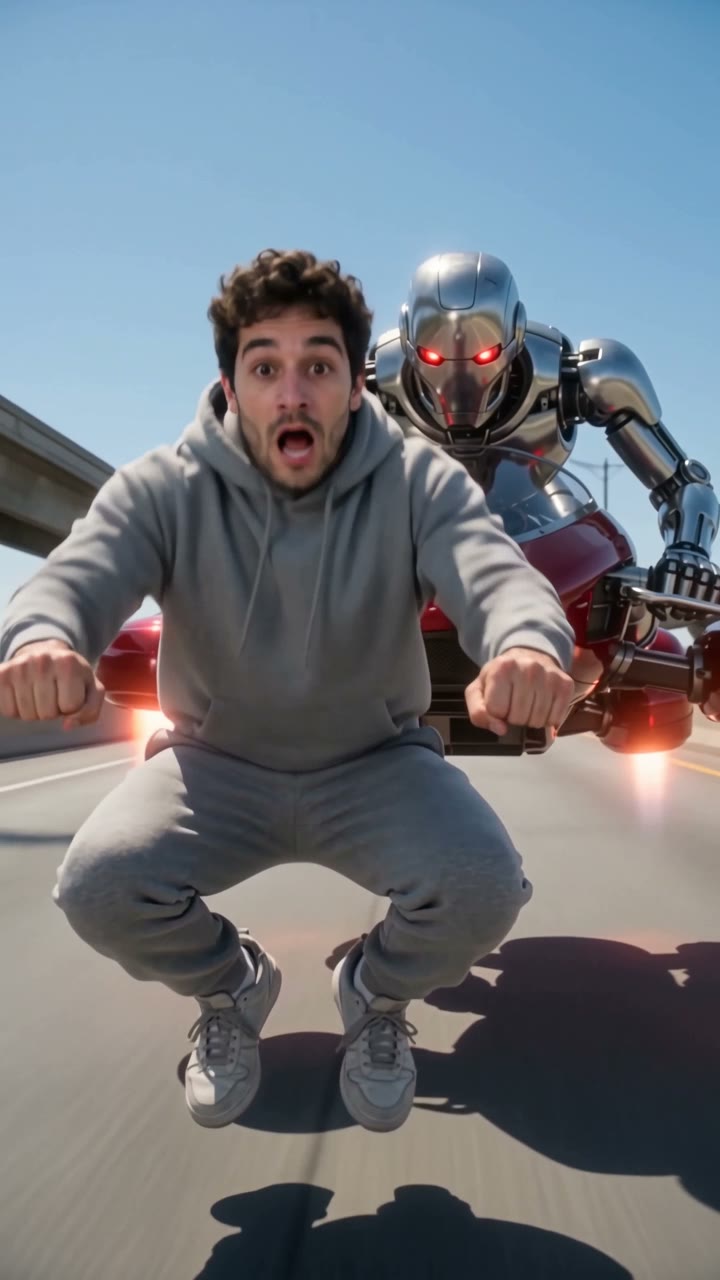
The fastest way to make the Crazy Frog AI video is to upload one photo of yourself to Try a Trend: you get a 10-second vertical video of you riding an invisible motorbike down a sunny freeway while a robot on a red hover-bike chases you, with the same camera cuts as the viral clip and a free preview before you pay.
Crazy Frog AI Video Generator
1 photo, 10-second vertical video, free preview before you pay. Your first video is $4.99, then $5.99 each.
What is the Crazy Frog trend?
The Crazy Frog AI trend took off on TikTok in October 2026. It remakes the freeway chase from the 2005 Axel F music video, the one with the cartoon frog riding an invisible motorbike, but with real faces. Someone crouches in mid-air as if they're on a bike that isn't there, races down a sunny elevated freeway, laughs, and then realises a rider on a hover-bike is right behind them.
The most popular versions follow the same storyboard from the music video, shot for shot. That's part of the fun: people recognise the moves and the camera angles immediately, and the only thing that changes is who is on the invisible bike. Nobody turns into a frog. You stay you, the pose and the chase are borrowed.
What happens in the video, second by second
The most-liked clip we studied is about 17 seconds long and has ten shots. The first four, which carry the joke, go like this:
- 0 to 2.6 seconds: a low tracking shot on a sunny freeway with concrete barriers and city buildings. The rider glides in from the side, crouched in mid-air with knees bent, arms forward and fists gripping invisible handlebars, about a metre above the road. The camera swings around to the front.
- 2.6 to 5.1 seconds: hard cut to a knees-up front view, with the camera leading them down the road. They're laughing, very pleased with themselves. At about 4.5 seconds a red dot appears far behind: the chaser.
- 5.1 to 6.6 seconds: hard cut to a close-up of the chaser, hunched behind the curved windscreen of a red hover-bike, glaring into the camera.
- 6.6 to 10.3 seconds: hard cut to a wide front shot. The chaser is right behind them. They glance back, panic, turn around to scream at the camera, then duck down to go faster.
After that the original turns into a chase montage: a first-person drone shot along the road, the hover-bike whooshing past the lens, and a final push into the rider's face.
Three ways to make the Crazy Frog AI video
1. Film it yourself and edit in CapCut
CapCut is the free video editor from the company behind TikTok. Search "crazy frog trend" in its Templates tab first: if someone has published a template for this trend, you can use it. If not, you can film the pose yourself and fake the ride.
- Film yourself crouching in the bike pose against a plain wall or a green screen, from the side and from the front. Hold the pose as if you're gripping handlebars.
- In CapCut, remove or key out the background and place your clips over freeway footage you have the right to use.
- Cut between the angles in the same order as the original, add motion blur, and post with the sound.
Good: it's really you, and the editing tools are free. Done well, the homemade look can be part of the joke.
Not so good: holding a mid-air crouch convincingly is hard without a stunt rig, background removal around hair and hands is fiddly, and there's no chaser unless a friend plays one. Expect an evening of editing.
Best for: people who like editing and want a handmade version.
2. A general AI video tool like Kling or Runway
General AI video tools can animate a photo of you from a text prompt. For this trend you write the storyboard yourself: the freeway, the invisible-bike pose, the chaser and the four shots with hard cuts at the right moments.
- Upload your photo as the reference image.
- Write a prompt that lists each shot with its timing and asks for hard cuts between them.
- Generate, check that the cuts happen and the face holds up, and adjust.
Good: you can make it your own: a different chaser, a different city, a longer chase montage.
Not so good: you write and tune the prompt yourself, and multi-shot prompts are hit and miss. Cuts can turn into one long camera move, the pose can drift into a real motorbike, and a chaser can end up wearing your face. Each try uses credits: these tools usually give you a few free credits, then sell monthly plans or credit packs.
Best for: people who already pay for an AI video tool and want a custom version.
3. A one-photo generator (Try a Trend)
Try a Trend has the Crazy Frog chase already set up shot by shot: the sunny freeway, the invisible-bike pose, a silver robot on a red hover-bike, and the cuts in the same places as the viral clip.
- 1Upload one clear, front-facing photo of you.
- 2Confirm you are 18+ and the photo is of you (or someone who agreed).
- 3Check your free preview. If you like it, get the full video.
- 4Download in a few minutes and add the trending sound on TikTok.
You get a 10-second vertical video in 720p that follows the first four shots of the original: the swing around you, the laugh, the close-up of the robot, and the look back and scream. Your first video is $4.99, then $5.99 each.
Good: no green screen, no stunt rig and no prompt. The cuts are already timed, your face stays yours, and you see a free preview before paying. It's ready in a few minutes.
Not so good: it covers the first ten seconds, not the full chase montage. The chaser is always the same robot, the scene is fixed, and the video is silent, so you add the sound in TikTok. It's AI, not real footage, and the full video is paid.
Best for: anyone who wants the chase with their own face today.
Tips for a photo that works
- Use one clear, front-facing photo of you with your face and shoulders in the shot. It doesn't have to be full body: the AI poses you on the invisible bike.
- Good light helps: daylight or a window, without harsh sun or a strong flash.
- Skip beauty filters and extreme close-ups, and upload the original photo rather than a screenshot.
- Your outfit comes from your photo, so whatever you're wearing is what you ride in.
- One person per photo. Only upload a photo of yourself or of someone who agreed to it, and everyone pictured must be 18 or older.
What to post it with
- Sound: search "Axel F" in TikTok's sounds and pick the version used by the trend. Adding it inside TikTok keeps it licensed.
- Caption: something like "me on my invisible bike running from my responsibilities".
- Hashtags: #crazyfrog, #crazyfrogtrend and #axelf.
- The robot close-up comes at about five seconds, which is a good spot for a text reaction if you add one.
FAQ
Do I turn into a frog?
No. Your face, hair and outfit come from your photo. Only the chase is borrowed: the invisible motorbike, the freeway and the robot on your tail.
Is this the official Crazy Frog video?
No. Try a Trend is an independent AI tool that recreates the look of the trend with your own photo. We're not affiliated with the Crazy Frog character or its owners, the Axel F song, its artists or TikTok, and the video doesn't show the frog or use any footage from the music video.
Who is chasing me?
A silver robot on a red hover-bike, the same in every video. Putting a friend or a pet on the hover-bike isn't available yet.
Make yours
Ready to outrun the robot without leaving the house? Upload one photo and check the free preview. Make your Crazy Frog video here.