How to Make the Halloween Makeup Transition AI Video (Skeleton)
The fastest way to make the Halloween Makeup Transition AI video is to upload one photo of your face to Try a Trend: you stare into the camera bare-faced, snap your head down, and whip back up in full black-and-white skeleton face paint, in a 10-second vertical video that's ready in a few minutes, with a free preview before you pay.
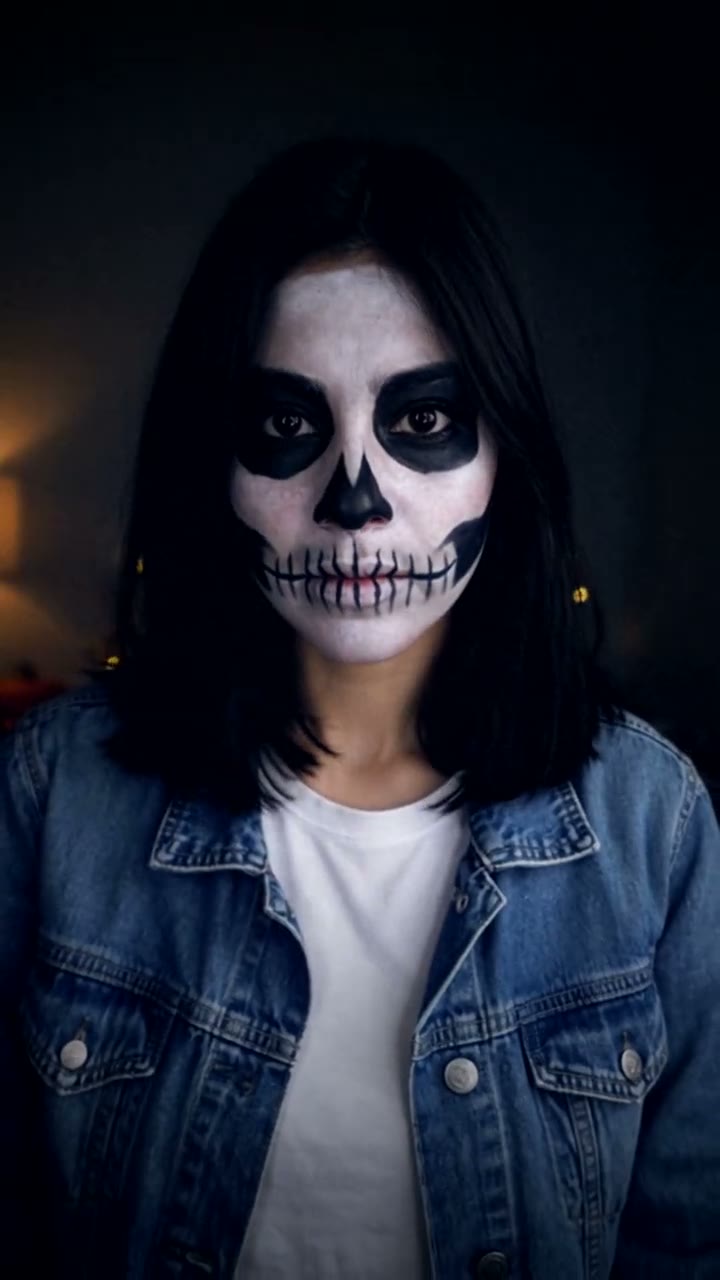
Halloween Makeup Transition AI Video Generator
1 photo, 10-second vertical video, free preview before you pay. Your first video is $4.99, then $5.99 each.
What is the Halloween Makeup Transition trend?
The Halloween makeup transition is a TikTok format that took off in early October 2026. The idea is simple and very satisfying to watch: you start with a plain face and a cold stare, hide your face for a split second with a fast movement, and come back in full Halloween makeup. The phone never moves, so the change looks instant. People search for it as the skeleton makeup transition, the skull makeup transition or the Halloween makeup transformation.
The viral versions are real makeup. The cut is hidden inside the head flip: the creator films the bare-faced half, does the face paint without moving the phone, then films the second half starting from the same head-down position. Looks vary from clowns to sugar-skull styles, and the black-and-white skeleton is a common choice.
What happens in the video, second by second
The most-liked single-transition clip we studied is about eight seconds long, filmed on a phone that never moves, framed from the chest up in a dim bedroom:
- 0 to 2.3 seconds: a bare face with no expression, staring straight into the camera and barely moving. The cold stare is the hook.
- About 2.5 seconds: the head snaps down and the frame blurs. That blur is where the cut hides.
- 2.75 to 3.5 seconds: the face comes back upside down, already in full makeup, and sways for a moment.
- 3.75 to 4.75 seconds: a hair flip, so for a moment we only see the back of the head and long dark hair.
- 5 to 6 seconds: a look back over the shoulder, showing the made-up face with a challenging stare.
- 6.25 seconds to the end: facing the camera again, a small head tilt and the hint of a smile.
Slow, then one very fast move, then slow again. That rhythm is what makes the transition land.
Three ways to make the Halloween Makeup Transition AI video
1. Real makeup, filmed and edited in CapCut
This is how the originals were made, and the trend is full of makeup tutorials if you want to learn the skeleton look. Search CapCut's Templates tab for "halloween makeup transition" too: if someone has published a template with the cut timed, you can drop in your two clips.
- Put your phone on a stand and frame yourself from the chest up. Mark where you sit.
- Film the bare-faced part: a few seconds of cold stare, then snap your head down.
- Without moving the phone, do your skeleton face paint: white base, black eye sockets and nose, teeth drawn across the lips and out along the cheeks.
- Sit in the same spot, start head-down, and flip back up. In CapCut, cut the two clips together right on the blur, then add the sound.
Good: free, and the makeup is genuinely yours. A clean transition with real face paint is impressive.
Not so good: you need face paint, makeup skills, time, and the patience to line up both halves. If the phone or your seat moves, the cut gives itself away.
Best for: makeup lovers who want to show their work.
2. A general AI video tool like Kling or Runway
General AI video tools can animate a photo from a text prompt.
- Start from a photo of your bare face in a dim room.
- Write a prompt for the stare, the head snap and the reveal, describing the skeleton paint in detail.
- Retry until the transition happens at the right moment and the face under the paint still looks like you.
Good: no makeup, and you can try any look: skeleton, vampire, anything you can describe.
Not so good: you write and tune the prompt yourself. Fast movements and hidden-face transitions are hard to time, and keeping your features recognisable under heavy paint can take several tries. Every retry uses credits; these tools usually give you a few free credits, then sell monthly plans or credit packs.
Best for: people who already use an AI video tool and want a look we don't offer.
3. A one-photo generator (Try a Trend)
Try a Trend has the skeleton look, the room and the timing set up. You upload a normal photo; the paint, the transition and the camera work are made by AI.
- 1Upload one clear, front-facing photo of you without heavy makeup.
- 2Confirm you are 18+ and the photo is of you (or someone who agreed).
- 3Check your free preview. If you like it, get the full video.
- 4Download in a few minutes and add the trending sound on TikTok.
You get a 10-second vertical video in 720p. You stare into the camera bare-faced, lips pressed flat, in a dim room with fairy lights and a glowing jack-o'-lantern behind you. Just after two seconds your head snaps down and your hair falls over your face, and you come back up in full black-and-white skeleton face paint. A cold stare into the lens, a look back over your shoulder, then you face the camera again, tilt your head and finish on a sly grin. No blood or gore. Your first video is $4.99, then $5.99 each.
Good: no face paint, no makeup skills and no transition editing. Your hair, eyes, face shape and outfit stay the same, so it's clearly you.
Not so good: it's always the skeleton look, in one setting. The free preview shows your bare-faced opening shot, so you see the paint only in the full video. It's silent, and it's an AI recreation rather than real makeup.
Best for: anyone who wants the transition for Halloween without buying makeup.
Tips for a photo that works
- Use one clear, front-facing photo from about the shoulders up, looking at the camera.
- Go without heavy makeup or existing face paint: the video starts bare-faced, so a natural photo matches best.
- Pick good, even light, like daylight or a window. Avoid sunglasses, heavy filters and group shots.
- Use the original photo rather than a screenshot, with one person in it.
- Only upload a photo of yourself, or of an adult who agreed to it. Everyone pictured must be 18 or older.
What to post it with
- Sound: a trending sound from #halloweenmakeup, added inside TikTok where it is licensed. Pick one with a clear drop and line the drop up with the head snap just after two seconds.
- Caption idea: "zero makeup skills, full skeleton".
- Hashtags: #halloweenmakeup, #skeletonmakeup and #halloweentransition.
- Want a different spooky look? The color changing clown and the zombie love story are on our Halloween page.
FAQ
Is this the official Halloween makeup transition?
No. Try a Trend is an independent AI tool that recreates the look of the trend with your own photo. We're not affiliated with TikTok, CapCut, any makeup brand or the creators of the original videos.
Can I pick a different Halloween look?
Not in this trend: it always makes the black-and-white skeleton. For a clown look, try the color changing clown makeup instead.
Do I need makeup skills?
No. Upload a normal photo. The skeleton paint, the head flip and the timing are all done for you.
Make yours
Upload one photo, check your opening shot in the free preview and get the full transition in a few minutes. Make your Halloween makeup transition here.