How to Make the AI Crying Video (Viral Crying Trend)
The fastest way to make the AI Crying video is to upload one photo of yourself to Try a Trend: your photo comes to life on a night street, your smile fades, your eyes fill and a tear rolls down, then you look down and turn away, in a 10-second vertical video that's ready in a few minutes, with a free preview before you pay.
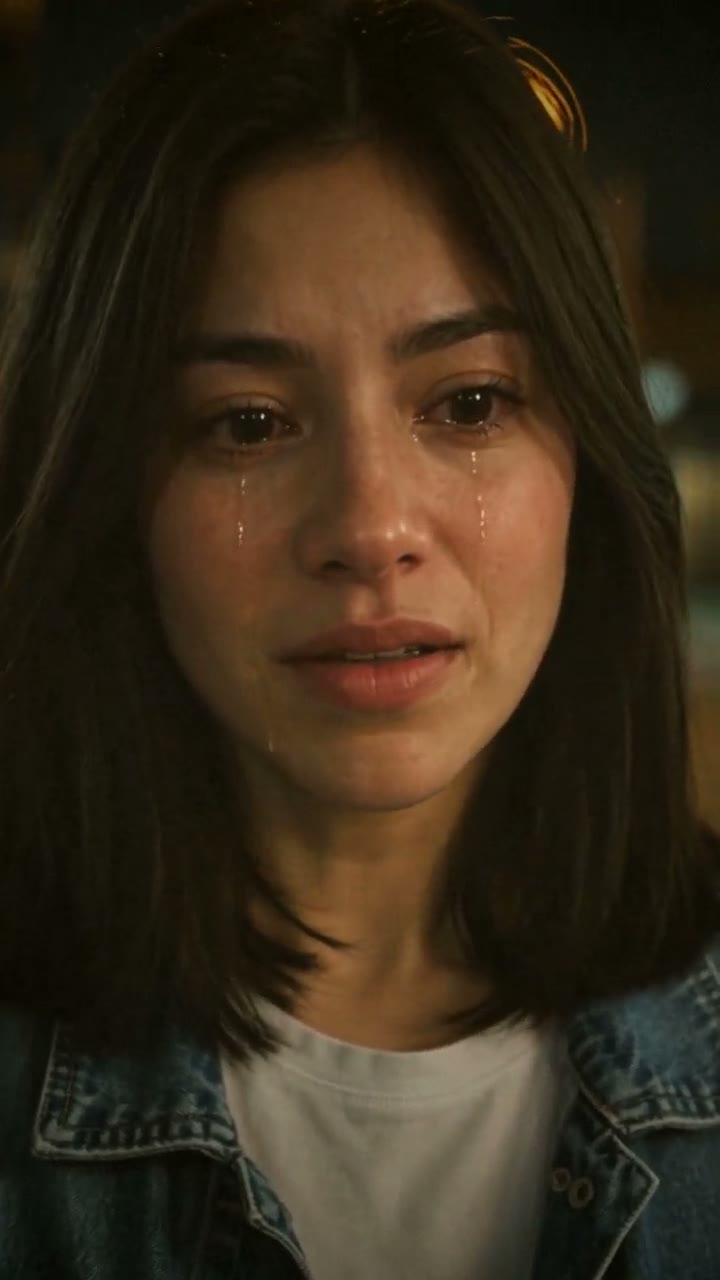
AI Crying Video Generator
1 photo, 10-second vertical video, free preview before you pay. Your first video is $4.99, then $5.99 each.
What is the AI Crying trend?
The AI crying trend took off on TikTok in late September 2026. A still photo comes to life: the person smiles, the smile slowly fades, their eyes go red and fill with tears, and they look down and turn away. It's usually posted with a sad song and a caption that sets up a story, like a breakup or a memory. People also call it the AI crying filter, the crying trend or crying AI.
Despite the name, the "AI crying filter" isn't a live camera filter. The most-liked version we studied was made from a single photo with a CapCut template, and tutorials in several languages showed people how to do the same thing. The appeal is the acting: it's quiet, believable crying rather than dramatic sobbing, which makes the photo feel like a real moment.
What happens in the video, second by second
The most-liked clip we studied is about 16 seconds long. The camera barely moves, as if filming over the shoulder of someone standing across from the person, on a street at night with warm lights blurred behind them:
- 0 to 2 seconds: a soft, warm smile, eyes bright. The blurry shoulder of the other person sits at the edge of the frame.
- About 3 seconds: a small laugh looking down, and the smile starts to fade.
- 4.5 to 6 seconds: the lips press together, the eyes turn red and start to fill with tears.
- 7 to 9 seconds: tears sit in the eyes; the person looks down, trying to hold them back.
- 10 to 11 seconds: they step back a little, head down, the corners of the mouth turned down.
- 12.5 seconds: they turn their face away.
- 14 seconds to the end: they turn their back to the camera and slowly walk away.
Three ways to make the AI Crying video
1. A CapCut template
This is how the most-liked original was made. CapCut, the free video editor from the company behind TikTok, has free templates for this trend.
- On TikTok, open an AI crying post that shows a CapCut template link, or search "AI crying" or "crying trend" in CapCut's Templates tab.
- Tap "Use template" and pick one photo of yourself.
- Let the template process, then export and post it with the sound.
Good: free and quick, made for exactly this trend, and it works from one photo.
Not so good: the scene and the acting come from the template, so you can't change them, and your post looks like many others using the same template. Templates come and go, and some are marked Pro, which needs a paid CapCut plan.
Best for: most people who want a quick version. It's worth trying first.
2. A general AI video tool like Kling or Runway
General AI video tools turn a photo into a short clip from a text prompt, so you can design your own version of the scene.
- Start from a clear photo of your face.
- Write a prompt describing the setting, the light and the emotional arc: smile, fading smile, tears, looking down, turning away.
- Retry until the tears are clearly visible and the expression actually changes.
Good: you choose the setting, the story and the length, and can make something nobody else has.
Not so good: AI video models can stick to the expression in your photo, so a smiling selfie may stay smiling. Getting visible tears without over-the-top sobbing usually takes several prompt rewrites, and every retry uses credits. These tools usually give you a few free credits, then sell monthly plans or credit packs.
Best for: people who already use an AI video tool and want a custom scene.
3. A one-photo generator (Try a Trend)
Try a Trend has the night-street scene, the light and the acting set up, tuned so the tears really show on a phone screen.
- 1Upload one clear, front-facing photo of you.
- 2Confirm you are 18+ and the photo is of you (or someone who agreed).
- 3Check your free preview. If you like it, get the full video.
- 4Download in a few minutes and add the trending sound on TikTok.
You get a 10-second vertical video in 720p, styled with warm, slightly hazy colour like a film. You start with a faint smile, looking over the blurred shoulder of someone across from you on a city street at night. The camera stays close with a slight handheld drift as the smile drains away, your brows pull together, your eyes well up and a tear rolls down your cheek. Then you look down, turn your face to the side and turn away, ending on the back of your head against the street lights. Your first video is $4.99, then $5.99 each.
Good: visible, believable tears and a cinematic look from one photo, with no prompt to write. You see a free preview of the opening shot before paying.
Not so good: one scene, a 10-second version of the arc rather than the full 16 seconds, and you don't walk off into the distance. The video is silent, and it's paid per video while a CapCut template is free.
Best for: people who want the cinematic night-street version, or whose template results didn't look right.
Tips for a photo that works
- Use a clear, well-lit close-up of one face looking at the camera. The crying happens in close-up, so your face should fill a good part of the photo.
- A relaxed or neutral expression works best. A huge grin can carry over into the video.
- Pick good, even light like daylight or a window. Avoid sunglasses, heavy filters and group shots.
- Use the original photo rather than a screenshot.
- Only upload a photo of yourself, or of an adult who agreed to it. Please don't use the trend to embarrass or mislead anyone.
What to post it with
- Sound: a sad trending sound from #cryingtrend, added inside TikTok where it is licensed.
- Caption: the trend works best with a one-line story. Something like "I was fine 3 seconds ago" works, or a line about a memory or a goodbye.
- Hashtags: #cryingtrend, #aicrying and #cryingai.
- If you post on TikTok, turn on the AI-generated content label so nobody thinks it's real footage.
FAQ
Is this the official AI crying filter?
No. Try a Trend is an independent AI tool that recreates the look of the trend with your own photo. We're not affiliated with TikTok, CapCut, any editing app or the creators of the original videos.
Can I make a video of someone else crying?
Only with a photo of yourself or of an adult who agreed to it. Please don't use it to embarrass or mislead anyone.
Does it look like real crying?
It's subtle acting: red-rimmed eyes, pooled tears and a tear running down the cheek, with no loud sobbing. It's still AI, so label it as AI-generated when you post.
Make yours
Upload one photo, check the free preview and get your crying video in a few minutes. Make your AI crying video here.