How to Make the Tiny Desk AI Video (Outstanding Concert Meme)
The fastest way to make the Tiny Desk AI video is to upload two photos to Try a Trend: one person becomes the lead singer in the famous laughing close-up, the other plays the sax solo, and you get an 18-second vertical video cut shot for shot like the viral clip, with a free preview before you pay.
Tiny Desk AI Video Generator
2 photos, 18-second vertical video, free preview before you pay. Each video is $7.99.
What is the Tiny Desk trend?
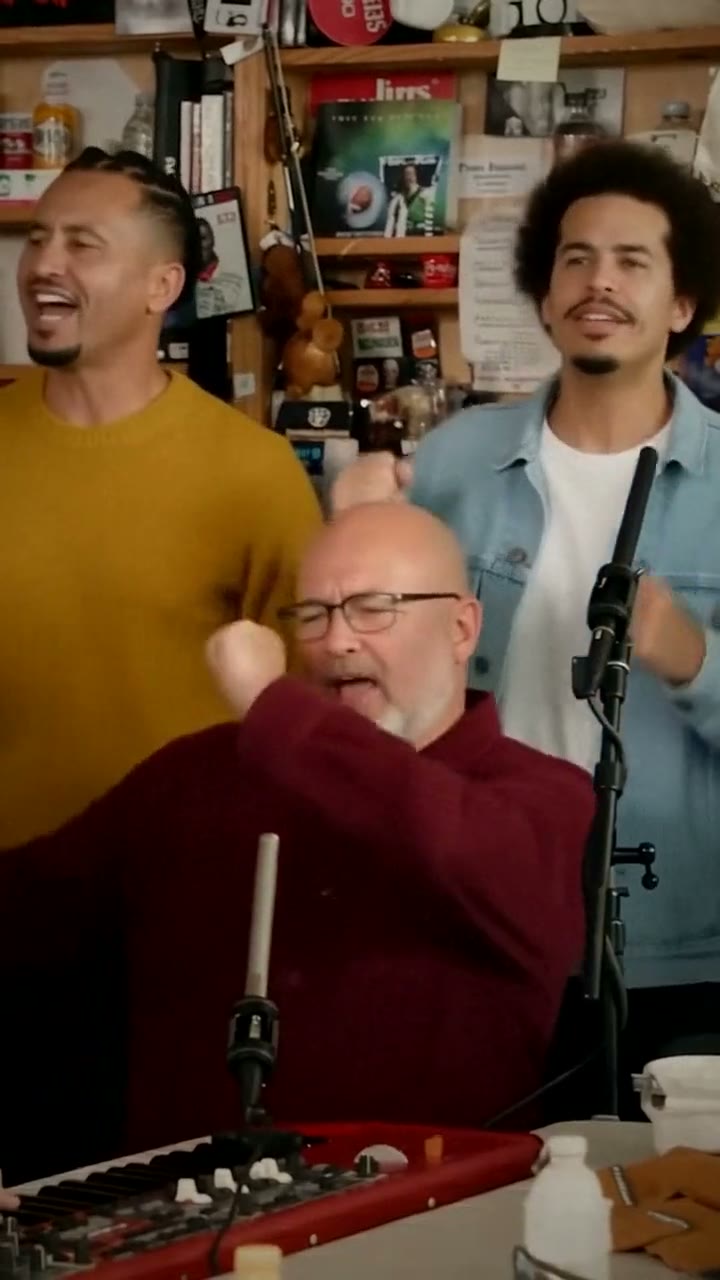
The trend comes from a real office concert: a funk band crammed behind a desk in a corner full of bookshelves, records and toys, playing the early-1980s funk classic "Outstanding". A few seconds of it became a meme because of one moment: the lead singer throws his head back on a high note, turns to the camera and bursts out laughing, as if even he can't believe how good it sounds. Then the camera cuts to a quick sax solo and back to the band grooving.
In mid-October 2026 a TikTok swapped the faces of college football coaches who had just lost into that band, and it took off. Sports teams and big accounts followed, and the format settled into a way to roast whoever just lost the big game. People also use it to put their friends, coworkers or family on stage for no reason at all.
What happens in the video, second by second
The viral versions are vertical clips of about 18 seconds, cut from the concert in four shots:
- 0 to 5 seconds: the band behind the desk: one musician sitting at a red keyboard singing into a thin microphone, two more standing behind and singing along.
- 5 to 11.5 seconds: a chest-up close-up of the lead singer. He sings with his head tilted back, turns toward the camera and breaks into a huge laugh, then waves a hand beside his face to the beat.
- 11.5 to 15 seconds: a close-up of the sax player taking a short solo, eyes closed, a microphone stand in front of the horn.
- 15 to 18 seconds: back to the band, everyone belting the line and bobbing their heads.
The laughing close-up and the sax solo are the two moments people put their friends into. A version without those cuts, just a band standing still, doesn't read as this trend.
Three ways to make the Tiny Desk AI video
1. A CapCut template
CapCut templates show up for most AI trends. If you find one for this clip, you open it from the creator's video, tap the button to use it in CapCut, choose your photos and let the app render it.
Good: often free to try, it runs on your phone, and the music timing is usually built in.
Not so good: templates come and go, and you depend on whichever one is around that week. Many of them animate a single photo, so the four shots and the cuts may not be there, and the laugh and the sax solo are hard to get right from one still.
Best for: people who already use CapCut and don't mind a looser version.
2. A general AI video tool like Kling or Runway
General AI video tools can animate a photo or replace a person in a video. For this trend you would need a copy of the clip you have the right to use, then ask the tool to swap each face, one shot at a time, and cut the shots back together yourself.
Good: you control who goes where, the outfits and the length, and the same tools work for other trends.
Not so good: it's several jobs, not one. Close-ups with a big laugh and a saxophone in front of the face are where faces drift or hands melt, so expect retries, and each retry uses credits. These tools usually give a few free credits, then sell monthly plans or credit packs.
Best for: people who already pay for an AI video tool and want a custom version.
3. A two-photo generator (Try a Trend)
Try a Trend has the band, the office corner and all four shots already set up. The moves come from our own reference video, performed by fictional AI musicians, so no footage from the original concert is used. The singer and the sax player are the two people in your photos.
- 1Upload a clear, front-facing photo of each person: the singer first, then the sax player.
- 2Confirm everyone pictured is 18+ and agreed to be in the video.
- 3Check your free preview. If you like it, get the full video.
- 4Download your video and add the Outstanding sound on TikTok.
You get an 18-second vertical video in 720p. It opens on the band behind the desk, cuts to your first photo in the lead-vocal close-up, laughing at the camera and waving to the beat, then to your second photo taking the sax solo, and ends on the band grooving. Faces stay yours, and each person wears the clothes from their photo. Each video is $7.99.
Good: the laugh, the hand wave and the sax solo move like the original, the cuts land where people expect them, there's no app branding, and the free preview shows the singer close-up before you pay.
Not so good: one band and one room, and the two of you always take the singer and sax spots; the musicians in the wide shots stay the same AI-generated band. It takes about 15 minutes because the AI redraws each person frame by frame. The video is silent, so you add the song yourself.
Best for: roasting a friend after the game, or putting two friends on stage in under a minute of effort.
Tips for photos that work
- Use a clear, front-facing photo of each person's face and shoulders: both close-ups are framed chest up.
- The singer goes first, the sax player second. Pick the person who would laugh the hardest for the singer spot.
- Wear what you'd want to be seen in. The clothes in each photo are the clothes in the video.
- Pick good, even light, like daylight or a window. Avoid harsh sun, strong flash and very dark rooms.
- Skip sunglasses and keep one person per photo.
- Only upload photos of people who agreed to it. Everyone pictured must be 18 or older.
What to post it with
- Sound: most posts use the original "Outstanding" sound, added inside TikTok or Instagram where it is licensed. Line the cut to the close-up up with the chorus.
- Caption idea: "we finally started a band" or, after the game, "my friend's team this weekend".
- Hashtags: #tinydesk, #outstandingtrend and #tinydeskconcertai.
- Post it right after the game, while the loss still stings. That's when this format travels.
FAQ
Is this the official Tiny Desk video?
No. Try a Trend is an independent AI tool that recreates the shots and timing of the trend with your own photos. We're not affiliated with NPR, the Tiny Desk series, Charlie Wilson, The Gap Band, the creators of the viral TikToks, TikTok or CapCut, and your video doesn't use any footage from the original concert.
Can I put more than two people in the band?
Not right now. The two close-ups are the shots people recognize, so those are the spots you fill. The musicians in the wide shots are AI-generated, fictional people and stay the same in every video.
Make yours
Upload two photos, check the free preview and get your band video in about 15 minutes. Make your Tiny Desk video here.