How to Make the Ceiling Fan AI Video (Ceiling Fan Outfit Change)
The fastest way to make the Ceiling Fan AI video is to upload one photo of yourself to Try a Trend: you get a 10-second vertical video shot from above, where you drop onto a rug under a spinning ceiling fan and switch into a new couture look every time a blade sweeps past, with a free preview before you pay and no ladder, gowns or editing.
Ceiling Fan AI Video Generator
1 photo, 10-second vertical video, free preview before you pay. Your first video is $4.99, then $5.99 each.
What is the Ceiling Fan trend?
The ceiling fan trend is an outfit-change video filmed straight down from the ceiling. Someone fixes a phone next to a ceiling fan, lies on the rug below, and every time a fan blade passes over the lens and hides them for a moment, they reappear in a different outfit. It went viral on TikTok and Instagram in late September 2026, and people tag it #ceilingfantrend.
The appeal is the transition itself. The blade works like a free wipe effect, so the outfit changes look seamless without any editing tricks. The catch is that doing it for real means climbing a ladder to mount the phone, owning several statement outfits, and nailing the same spot on the floor after every change.
What happens in the video, second by second
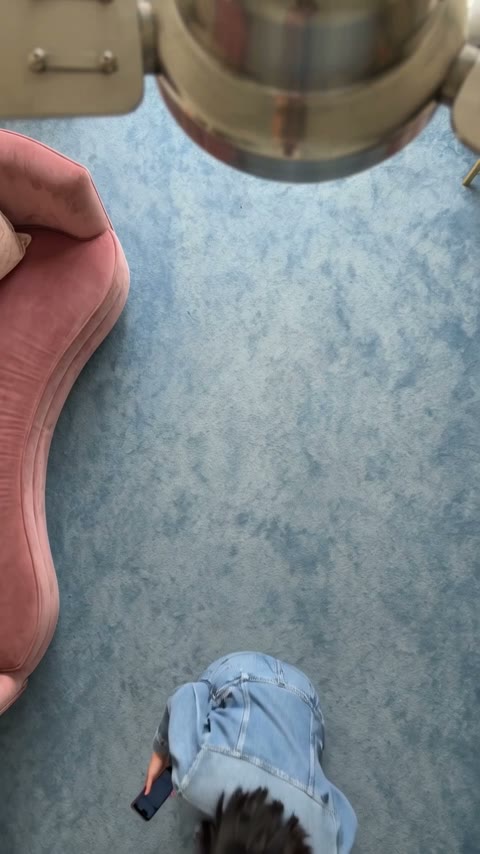
The clip we studied runs just under 13 seconds, filmed from a phone fixed beside the fan that never moves or turns. Below is a blue rug with a curvy pink velvet sofa on the left, and you can see the fan's hub peeking in at the top.
- Around 0 to 1 second: the creator drops onto the rug and rolls onto their back into frame, already in a black outfit.
- About 1.5 to 6 seconds: a long, lazy build-up. They settle into relaxed poses with a phone in hand, still in their own outfit.
- Around 7 seconds: a wide fan blade passes right over the lens and hides them for a split second.
- About 8 to 9 seconds: they reappear in a huge black-and-gold embroidered couture gown and a new pose.
- About 10 to 11 seconds: the next blade passes and the look switches to sculpted denim couture with a corset.
- Around 12 seconds: one more blade, and the final look is a voluminous champagne ruffled gown.
The rhythm matters: most of the video is the slow build-up, then three outfits arrive in quick succession at the end. That speed-up is what makes people replay it.
Three ways to make the Ceiling Fan AI video
1. CapCut (template or your own footage)
CapCut is the free video editor from the company behind TikTok. Search "ceiling fan" in its Templates tab: if a creator has published a template for this trend, it will handle the timing for you. If not, you film the clips yourself and edit them in CapCut.
- Mount your phone on or next to the ceiling fan, pointing straight down, and lock it so it cannot move.
- Turn the fan on low and film yourself lying in the same spot, once per outfit.
- In CapCut, cut each clip at the moment a blade covers the lens and join them, so the blade hides every change.
- Add the trending sound and post.
Good: it is really you in your real clothes, and CapCut is free.
Not so good: this is the hardest version of the trend. You need a ladder, a safe way to fix the phone near a moving fan, several outfits that read well from above, and patience to land in the same pose every take. Any camera wobble breaks the effect.
Best for: people with a great wardrobe, a sturdy phone mount and an afternoon to spare.
2. A general AI video tool like Kling or Runway
General AI video tools can turn a photo into a short clip from a text prompt. You upload your photo, describe the overhead shot, the fan, the room and each outfit change, and generate.
- Upload a clear photo of yourself and write a prompt for a locked overhead camera beside a ceiling fan.
- Describe the timing: when you drop into frame, how long you pose, and which outfit appears after each blade.
- Generate, check the result, and adjust the prompt until the camera stays still and your face stays the same.
Good: full control over the room, the outfits and the number of changes.
Not so good: you write and tune the prompt yourself. The whole room can end up slowly rotating along with the fan, or the outfit can change at random moments instead of on the blade. Fixing that takes retries, and each retry uses credits. These tools usually give you a few free credits, then sell monthly plans or credit packs.
Best for: people who already use an AI video tool and want a custom version, for example with their own outfits.
3. A one-photo generator (Try a Trend)
Try a Trend has the scene already set up: the locked overhead camera, the blue rug, the pink sofa, the slow fan and the three couture looks. You only bring the photo.
- 1Upload one clear photo of you. Head to toe works best, but a selfie works too.
- 2Confirm you are 18+ and the photo is of you (or someone who agreed).
- 3Check your free preview. If you like it, get the full video.
- 4Download in a few minutes and post it with the trending sound.
Your 10-second video follows the same rhythm as the viral clip. You drop onto the rug and roll into frame, pose in the outfit from your photo for a few seconds, then from the six-second mark each passing blade switches you into a new look: black-and-gold embroidery, bold denim, then champagne ruffles. Your first video is $4.99, then $5.99 each.
Good: no ladder, no outfits to buy or borrow, no prompt to write, and the camera stays still. You see a free preview of yourself in the scene before you pay.
Not so good: the room and the three looks are fixed, so you can't pick your own outfits. The video is silent, so you add the sound in TikTok yourself, and it is AI-generated rather than real footage of you.
Best for: anyone who loves the trend but doesn't have a ceiling fan, a ladder or three couture gowns.
Tips for a photo that works
- A clear photo of just you. Head to toe works best because the video shows your whole body, but a selfie works too: the AI fills in the rest.
- Good, even light, like daylight or a spot near a window. Avoid harsh sun or a strong flash.
- Skip beauty filters and extreme close-ups. Your face and hair carry through every outfit change, so a natural photo keeps you recognisable.
- One person per photo, and use the original file rather than a screenshot.
- Only upload a photo of yourself, or of someone who agreed to it. Everyone pictured must be 18 or older.
What to post it with
- Sound: open the #ceilingfantrend hashtag in TikTok and use the sound from the popular videos there, so it is licensed inside the app.
- Timing: the outfit changes start around six seconds in. If your sound has a beat drop, line it up with the first blade.
- Hashtags: #ceilingfantrend, #ceilingfan and #outfitchange.
- A caption that fits: "3 outfits, 1 ceiling fan, 0 ladders".
FAQ
Is this the official ceiling fan trend?
No. Try a Trend is an independent AI tool that recreates the look of the trend with your own photo. We're not affiliated with TikTok, Instagram, CapCut or the creators of the original videos.
Do I need a full-body photo?
It helps but isn't required. From a selfie, the AI fills in the rest of your body and the scene. A clear, well-lit photo of one person works best.
Which outfits will I wear?
You start in the outfit from your photo, then switch into three dramatic couture looks, one per fan blade: black-and-gold embroidery, bold denim and voluminous champagne ruffles.
Make yours
If you want the overhead outfit change without climbing a ladder, upload one photo and check the free preview. Make your Ceiling Fan video here.