How to Make the Rumpelstiltskin Tiptoe AI Video (Tiptoe Trend)
The fastest way to make the Rumpelstiltskin Tiptoe AI video is to upload one photo of yourself to Try a Trend: it dresses you as the grinning fairy-tale imp and has you tiptoe through a hay barn with the same moves and camera cuts as the viral clip, then gives you a 9-second vertical video in a few minutes, with a free preview before you pay.
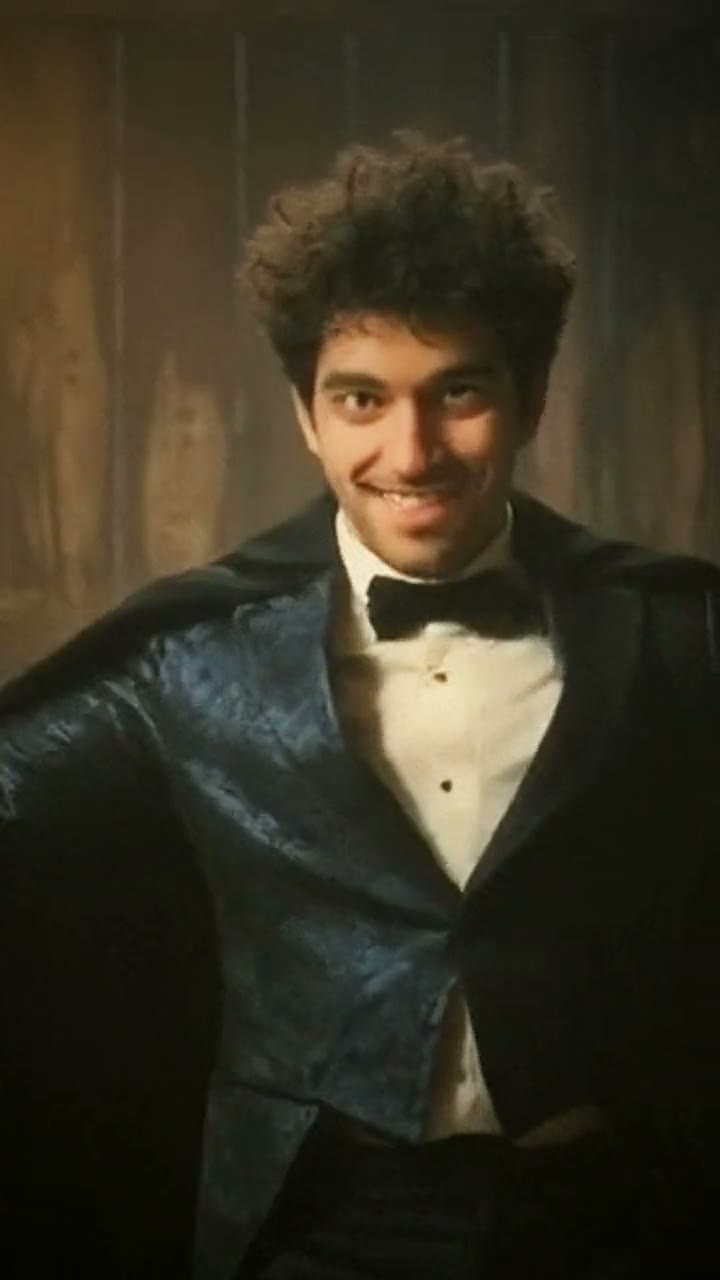
Rumpelstiltskin Tiptoe AI Video Generator
1 photo, 9-second vertical video, free preview before you pay. Your first video is $4.99, then $5.99 each.
What is the Rumpelstiltskin Tiptoe trend?
The Rumpelstiltskin tiptoe trend took off on TikTok in September 2026 and turned into a Halloween favorite in October. It uses a creepy scene from a 1980s fairy-tale movie: a small imp in a tailcoat creeps toward the camera through a hay barn on the tips of his toes, spreads his arms wide and grins, while the edit keeps cutting to close-ups of his pointy shoes tiptoeing through the straw. The clip is set to a rap song, and the hashtag most people use is #tiptoeinginmyjordans.
At first people simply reposted the movie scene with a joke caption on top. Then they started doing the tiptoe themselves, and by early October AI versions appeared that put a real person's face and body into the barn in place of the imp. That last version is what most people mean by the Rumpelstiltskin tiptoe AI trend.
What happens in the video, second by second
The most-liked repost is about 21 seconds long and opens with the imp shushing a frightened girl. The part everyone recreates is the tiptoe dance in the middle, which runs for about nine and a half seconds:
- 0 to 2 seconds: a full-length shot. The imp, hunched with his knees slightly bent, tiptoes toward the camera one step at a time and slowly spreads his arms.
- 2 to 3.4 seconds: cut to waist-up. His arms are stretched all the way out, his head tilts, and he grins and sways from side to side.
- 3.4 to 5 seconds: cut to his feet. Black shoes with curled pointy toes tiptoe through the straw while the hem of his cape swings.
- 5 to 9.5 seconds: the edit keeps alternating between the grin and the shoes, each shot about a second or a second and a half long, and a little faster toward the end.
That rhythm of full body, grin, feet, grin, feet is the whole joke. A version without the close-ups doesn't feel like the trend.
Three ways to make the Rumpelstiltskin Tiptoe AI video
1. Film it yourself and edit in CapCut
This is a movement trend, so the classic way is to do the tiptoe yourself. Plenty of people post their own attempts under #tiptoechallenge. Search "tiptoe" or "rumpelstiltskin" in CapCut's Templates tab too: if someone has published a template with the cuts already timed, you can use it with your own clips.
- Find a dim spot with warm light. A garage, a shed or a hallway works if you don't have a barn.
- Film yourself tiptoeing toward the camera, knees bent, arms slowly spreading, with your biggest creepy grin.
- Film a few seconds of the grin from the waist up and a few seconds of just your feet tiptoeing.
- In CapCut, cut between the three shots following the rhythm above, add a warm filter and the sound.
Good: free, it's really you, and a slightly clumsy tiptoe is funny in its own right.
Not so good: you need a costume, a location, someone to film and a few takes. Matching the timing of the cuts by hand is fiddly.
Best for: people who like performing and have a friend to hold the phone.
2. A general AI video tool like Kling or Runway
General AI video tools can turn a photo into a short clip. You describe the scene in a text prompt: the barn, the costume, the tiptoe and the grin.
- Make a starting image of you in an imp costume in a hay barn, or use a photo of yourself and describe the costume.
- Generate the movement from a text prompt. Some tools also offer motion control, which copies movement from a reference clip you upload and have the right to use.
- Generate or crop the close-ups separately and cut them together in an editor.
Good: you can change the costume, the setting and the length, and the same tools work for other trends.
Not so good: text prompts rarely reproduce an exact dance, and the feet-only close-ups can confuse motion control because there's no full body in the frame. Every retry uses credits. These tools usually give you a few free credits, then sell monthly plans or credit packs, and you still edit the cuts yourself.
Best for: people who already use an AI video tool and want a custom version.
3. A one-photo generator (Try a Trend)
Try a Trend has the barn, the costume and the moves already set up. The moves are matched to the viral clip and driven by our own reference video of the dance, performed by a fictional AI actor, so no movie footage is used and your video follows the same steps and rhythm.
- 1Upload one clear, front-facing photo of you.
- 2Confirm you are 18+ and the photo is of you (or someone who agreed).
- 3Check your free preview. If you like it, get the full video.
- 4Download in a few minutes and add the trending sound on TikTok.
You get a 9-second vertical video in 720p. You tiptoe toward the camera through a dim hay barn at night, dressed as the imp in a dark tailcoat with a bow tie, a short cape and pointy curled shoes, then the edit cuts to your grin with your arms spread wide and to your shoes tiptoeing through the straw, back and forth like the original. Your face stays yours. Your first video is $4.99, then $5.99 each.
Good: the exact moves and the close-up cuts with no costume, no barn and no editing, and a free preview so you can check the look before paying.
Not so good: one costume and one barn, no shushing intro and no second character. The video is silent, so you add the sound yourself, and it's an AI recreation rather than you really dancing.
Best for: anyone who wants the full tiptoe with the close-ups without filming a single take.
Tips for a photo that works
- Use one clear, front-facing photo from about the shoulders up. Your face is what carries through to the grin close-ups.
- Pick good, even light, like daylight or a window. Avoid harsh sun, strong flash and dark rooms.
- Skip beauty filters and extreme close-ups, and keep one person in the photo.
- Use the original photo rather than a screenshot. A natural expression is fine: the video adds the grin.
- Only upload a photo of yourself, or of someone who agreed to it. Everyone pictured must be 18 or older.
What to post it with
- Sound: the trending sound under #tiptoeinginmyjordans, added inside TikTok where it is licensed. The cuts in your video already follow the dance rhythm.
- Caption idea: "me tiptoeing in the barn at 3am".
- Hashtags: #tiptoeinginmyjordans, #rumpelstiltskin and #tiptoe.
- It works as a Halloween post too. Pair it with other spooky trends on our Halloween page.
FAQ
Is this the official Rumpelstiltskin video?
No. Try a Trend is an independent AI tool that recreates the moves of the trend with your own photo. We're not affiliated with the movie, its studio or cast, TikTok or any shoe brand, and we don't use any footage from the movie.
Will I really do the same tiptoe moves?
Yes. Your video follows the same moves, rhythm and camera cuts as the viral clip: tiptoeing toward the camera, waist-up shots of your grin with your arms spread, and close-ups of your shoes in the straw.
Do I have to dress up?
No. The AI dresses you as the fairy-tale imp, so any everyday photo of you works.
Make yours
Upload one photo, check the free preview and get your tiptoe in a few minutes. Make your Rumpelstiltskin tiptoe video here.