How to Make the Burning Bridges AI Video (Chandelier Party Trend)
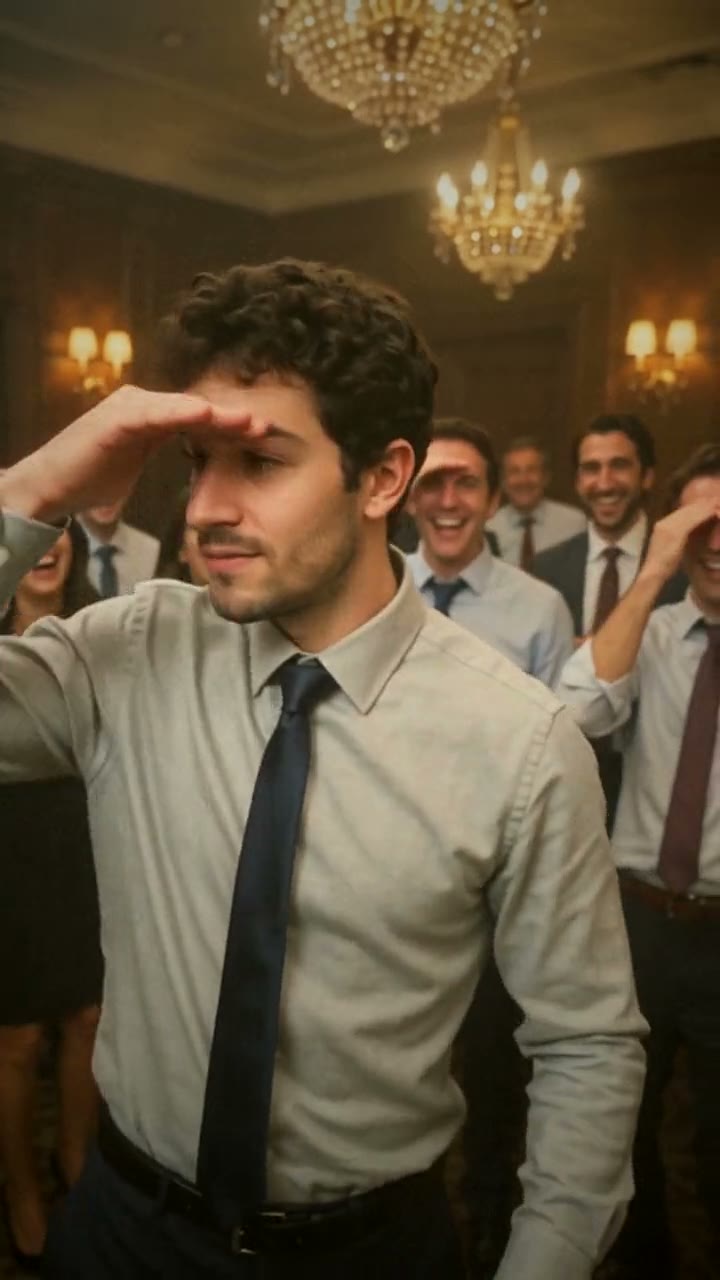
The fastest way to make the Burning Bridges AI video is to upload one photo of yourself to Try a Trend: you get a 10-second vertical video of you front and center at a packed, chandelier-lit office party, cup raised, pointing at the lens and scanning the room while everyone loses it behind you, with a free preview before you pay.
Burning Bridges AI Video Generator
1 photo, 10-second vertical video, free preview before you pay. Your first video is $4.99, then $5.99 each.
What is the Burning Bridges trend?
The Burning Bridges AI trend took off on TikTok in October 2026. It comes from the party scene in the music video for the song Burning Bridges, released earlier in the year: a crowded private room with gold crystal chandeliers, dark wood walls and a bunch of guys in shirts who hype up whoever is at the front. In early October people started using AI to put themselves, or anyone they liked, into that scene, and within days "how to do the Burning Bridges trend" was showing up in Google's search suggestions.
The appeal is the energy. Whoever is in front owns the room: they hold up a silver cup, get right in the camera's face, point at the crowd, and the crowd goes wild. The signature move is a hand held flat over the eyes, scanning the room as if looking for someone, while the people behind copy it and crack up.
What happens in the video, second by second
The most-liked AI version we studied runs about 28 seconds as one continuous handheld shot, filmed close by someone in the crowd:
- 0 to 3 seconds: the lead bounces into the frame in front of the crowd, holding a silver cup, then leans right into the lens with a straight face.
- 5 to 8 seconds: the cup goes up to the camera, then both hands point down at the lens, and the people behind point too.
- About 10 seconds: a tug at the tie and the collar, pure swagger.
- 12 to 15 seconds: a turn to point at the crowd, and the crowd points right back, everyone hyping each other up.
- 17 to 20 seconds: the signature move: hand on the brow, looking left and right across the room, with a few people around doing the same and laughing.
- 22 to 27 seconds: back to the camera, another point, then walking up close and waving a hand across the lens.
Try a Trend's version squeezes those beats into 10 seconds in the same order: cup up and walking in, leaning in and pointing, the tie tug, the turn to the crowd, the hand-on-brow scan, and the close-up wave at the end.
Three ways to make the Burning Bridges AI video
1. Film it yourself and edit in CapCut
CapCut is the free video editor from the company behind TikTok. Search "burning bridges" in its Templates tab first: if someone has published a template for this trend, you can use it. Otherwise, the real-life version needs a party.
- Get a group of friends in a room with warm light, ideally with something that sparkles overhead.
- Have one friend film you close up on a wide lens while you run through the moves: cup up, point at the lens, tie tug, turn to the crowd, hand-on-brow scan, wave.
- Make sure the crowd behind you reacts to every move. Trim it in CapCut and add the sound.
Good: a real moment with your real friends, and it costs nothing if you're already at a party.
Not so good: you need a crowd that's willing to commit, a room that looks the part, and several takes to get the timing. Hard to pull off on a Tuesday afternoon.
Best for: people with an office party, a birthday or a group night out coming up.
2. A general AI video tool like Kling or Runway
General AI video tools can animate a photo of you from a text prompt. For this trend you describe the room, the crowd, the camera and every move in order.
- Upload your photo as the reference image.
- Write a prompt with the room, the handheld camera, the crowd and each beat with timings.
- Generate, check your face and the crowd's energy, and adjust.
Good: you choose everything: the room, the outfits, the crowd, even a completely different setting.
Not so good: you write and tune the prompt yourself. A generated crowd can end up standing still and smiling politely instead of going wild, and the hand-on-brow move can get lost. Each try uses credits: these tools usually give you a few free credits, then sell monthly plans or credit packs.
Best for: people who already use an AI video tool and want a custom version.
3. A one-photo generator (Try a Trend)
Try a Trend has the Burning Bridges party already set up: the chandeliers, the warm, slightly hazy TV look, the handheld camera and a crowd of coworkers in shirts and ties who jump, point and shout behind you. You upload one photo and the AI puts you at the front.
- 1Upload one clear, front-facing photo of you.
- 2Confirm you are 18+ and the photo is of you (or someone who agreed).
- 3Check your free preview. If you like it, get the full video.
- 4Download in a few minutes and add the trending sound on TikTok.
You get a 10-second vertical video in 720p with all the key beats, including the hand-on-brow scan. The video dresses you in a shirt and tie like everyone around you. Your first video is $4.99, then $5.99 each.
Good: no party, no crowd and no prompt. You see a free preview of yourself in the room before paying, and the video is ready in a few minutes.
Not so good: the room and outfit are fixed, and it's 10 seconds rather than the full 28-second performance. The video is silent, so you add the sound in TikTok. It's AI, so the crowd is made of generated strangers, not your friends. The full video is paid.
Best for: anyone who wants to be the main character at the party today.
Tips for a photo that works
- Use a clear, well-lit photo of just you, facing the camera. Waist-up helps the scene look natural, but a selfie works too.
- Choose good light: daylight or a window, without harsh sun or a strong flash.
- Skip beauty filters and extreme close-ups, and upload the original photo rather than a screenshot.
- Wear whatever you like in the photo: the video swaps your outfit for a shirt and tie, and your face and hair come from your photo.
- One person per photo. Only upload a photo of yourself or of someone who agreed to it, and everyone pictured must be 18 or older.
What to post it with
- Sound: search "Burning Bridges" in TikTok's sounds and pick the version the trend uses. Adding it inside TikTok keeps it licensed.
- Caption: something like "main character at the office party, no notes".
- Hashtags: #burningbridges, #burningbridgesai and #officeparty.
- The video is AI-generated, so turn on TikTok's AI-generated content label when you post.
FAQ
Who are the people in the crowd?
Everyone around you is generated by AI. Only your face comes from your photo.
Is this the official Burning Bridges video?
No. Try a Trend is an independent AI tool that recreates the look of the trend with your own photo. We're not affiliated with the song, the artist, the music video or the creators of the original clips.
Do I need to wear a shirt and tie in my photo?
No. The video dresses you for the office party in a shirt and tie, like everyone around you, whatever you're wearing in your photo.
Make yours
Want to run the room without throwing a party? Upload one photo and check the free preview. Make your Burning Bridges video here.