How to Make the Zombie Love Story AI Video (Zombie Hug Trend)
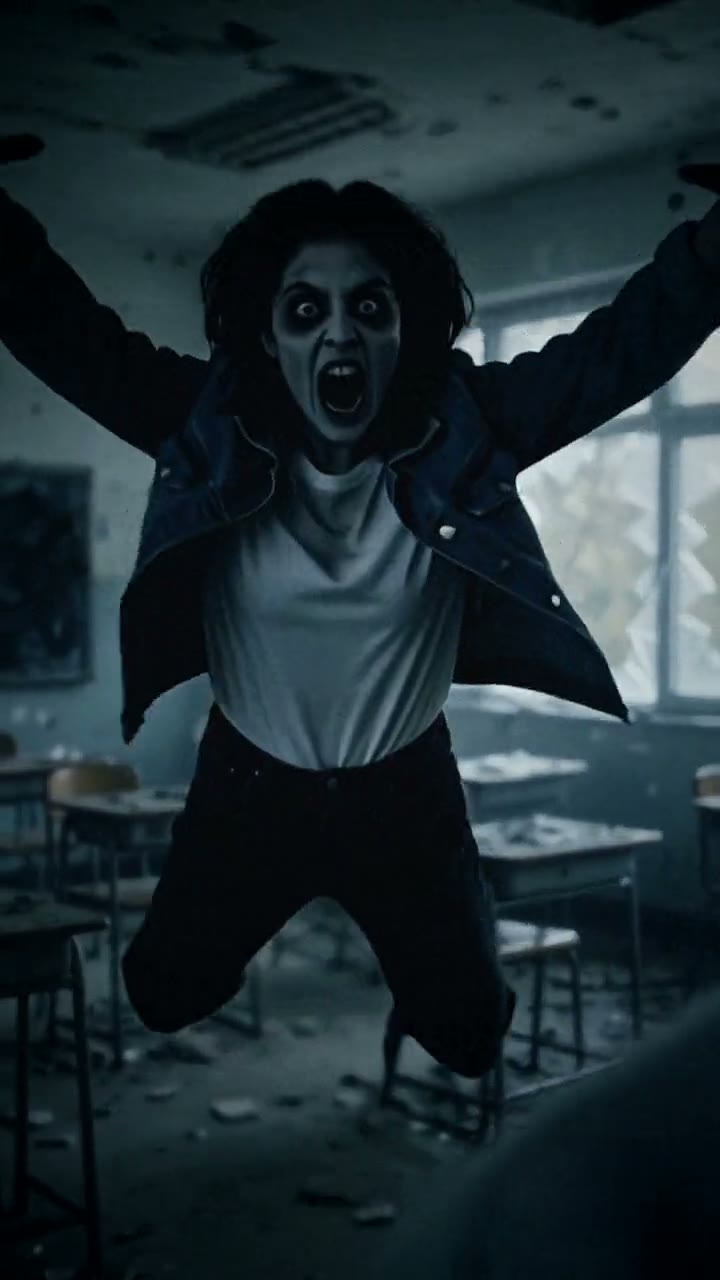
The fastest way to make the Zombie Love Story AI video is to upload two photos, one of each person, to Try a Trend: one of you turns into a zombie in an abandoned classroom and lunges, a hard cut turns the lunge into a hug in a golden-hour field, and you get a 10-second vertical video in a few minutes, with a free preview before you pay.
Zombie Love Story AI Video Generator
2 photos, 10-second vertical video, free preview before you pay. Your first video is $4.99, then $5.99 each.
What is the Zombie Love Story trend?
The zombie love story is a couples trend that took off on TikTok in early October 2026, just ahead of Halloween. People also call it the zombie hug, the AI zombie trend or the zombie couple trend. The story is always the same: the world has ended, one partner has turned, and the other, in tears, can't bring themselves to fight back. The zombie charges, and right on the lunge the video cuts to the two of them running into each other's arms in warm sunset light.
The trick that makes it work is the match cut. The same movement, arms open and rushing at the camera, is scary in the cold first half and sweet in the golden second half. The original clips use the couple's own faces, and the most-liked one we studied ends with the couple's real photos and videos together, so the horror story turns into a love letter.
What happens in the video, second by second
The most-liked clip we studied is a horizontal video about 40 seconds long. The AI part is the first 18 seconds or so:
- 0 to 3 seconds: a close-up of a man with tears on his face. Behind him, across an abandoned classroom lit in cold blue-grey, a long-haired woman stands motionless by the blackboard.
- 3 to 5 seconds: a close-up of her face shows grey skin and bared teeth. She has turned, and she screams at him.
- 5 to 7 seconds: he lowers his hands, crying, and reaches out instead of defending himself.
- 7 to 9 seconds: she charges at him with her arms wide open.
- About 9.5 seconds: the match cut. The same lunge lands in a golden field at sunset, and she jumps into his arms.
- 10 to 16 seconds: they fall into the tall grass laughing, then a short memory montage: silhouettes on a beach, running through the field, lying in the grass.
- From about 18 seconds: the couple's real photos and phone videos.
Three ways to make the Zombie Love Story AI video
1. CapCut (template or your own edit)
CapCut is the free video editor from the company behind TikTok. Search "zombie love story" or "zombie trend" in its Templates tab: if someone has published a template, it can handle the timing, the cut and the music slot for you. Keep in mind that unless a template has an AI effect built in, it only arranges footage you already have: it won't turn your partner into a zombie on its own.
Without a ready-made zombie clip, you can film it yourself:
- Do simple zombie makeup on one person: pale face, dark shadows around the eyes, messy hair.
- Film the scary half somewhere dark and empty, with cool light. The zombie runs at the camera with arms open.
- Film the sweet half outside near sunset, starting from the same arms-open pose, and running into a hug.
- In CapCut, cut from one clip to the other on the lunge, add a cold filter to the first half and a warm one to the second, then add the sound.
Good: free, and it's really the two of you. A homemade version can be very funny on its own.
Not so good: makeup, two locations, good light at golden hour and several takes to line up the lunge. The match cut is fiddly to get right.
Best for: couples who enjoy filming and have an evening to spare.
2. A general AI video tool like Kling or Runway
The original clips are AI-generated from the couple's own faces, and this is the do-it-yourself way to get there. You give an image-to-video tool a starting picture of the two of you and describe the scene in a text prompt.
- Make or find a starting image: the human partner in the foreground, the zombie partner across a dark classroom.
- Generate the scary half: tears, the turn, the lunge. Then generate the golden-hour half separately from a picture of the two of you hugging in a field.
- Join the clips in an editor with a hard cut on the lunge, and add your real photos at the end if you like.
Good: full control. You can make it longer, add the memory montage, and change the setting completely.
Not so good: you write and rewrite the prompts yourself, and two faces have to stay recognisable through a zombie look and a cut, which usually takes several tries. Every try uses credits. These tools usually give you a few free credits, then sell monthly plans or credit packs, and you still edit the clips together yourself.
Best for: people who already use an AI video tool and want a long, custom version.
3. A one-photo-each generator (Try a Trend)
Try a Trend has the scene already set up. You upload two photos: the first person stays human, the second becomes the zombie.
- 1Upload a clear, front-facing photo of each person.
- 2Confirm everyone pictured is 18+ and agreed to be in the video.
- 3Check your free preview. If you like it, get the full video.
- 4Download in a few minutes and add the trending sound on TikTok.
You get a 10-second vertical video in 720p. It opens close on the first person in a cold, grey classroom with a tear running down their face, the focus shifts to the second person across the room with pale grey skin and cloudy eyes, and they lunge. About four seconds in, the cut lands you both in a golden-hour field: you run into each other's arms and fall into the grass laughing. There is no weapon, no blood and no biting. Your first video is $4.99, then $5.99 each.
Good: no makeup, no locations and no prompt to write. Both faces carry through from scary to sweet, and you see a free preview before paying.
Not so good: it's the 10-second lunge-and-hug moment, not the full 40-second film with the montage. The scene is fixed, the video is silent, and it's AI-generated rather than really filmed.
Best for: couples who want the moment in a few minutes and plan to add their real photos after it.
Tips for photos that work
- Upload one photo per person, each a clear, front-facing shot from about the shoulders up.
- Order matters: the first photo stays human, the second photo becomes the zombie. Swap them to swap roles.
- Pick good, even light. Daylight or a window works best. Skip beauty filters and extreme close-ups.
- Use the original photos, not screenshots, and keep one person in each photo.
- Both people must be adults (18+) who agreed to be in the video. Photos of children are rejected.
What to post it with
- Sound: the trending sound under #zombietrend, added inside TikTok where it is licensed.
- Your real photos: the original trend ends with the couple's real pictures. Add a few of yours after the 10-second clip in the TikTok editor and you have the full version.
- Caption idea: "zombie apocalypse and you're still my favorite person".
- Hashtags: #zombietrend, #zombielovestory and #couplegoals.
- If you post on TikTok, turn on the AI-generated content label.
FAQ
Is this the official zombie love story video?
No. Try a Trend is an independent AI tool that recreates the look of the trend with your own photos. We're not affiliated with TikTok, CapCut, the creators of the original videos or any film or game.
Is it gory?
No. It's spooky, not gory: pale grey skin, cloudy eyes and a lunge, with no blood, wounds, biting or weapons.
Can we use a photo of the two of us together?
Use two separate photos, one of each person. A clear solo photo of each face gives the best match in both halves of the video.
Make yours
Pick who turns, upload two photos and check the free preview. Make your zombie love story video here.