How to Make the Ozil Goal AI Video (Ozil AI Goal Trend)
The fastest way to make the Ozil goal AI video is to upload one photo of yourself to Try a Trend: it puts you in a navy and neon-yellow kit and has you score the famous goal, with the keeper and both defenders sliding exactly like the original, then gives you a 15-second vertical video in 10 to 12 minutes, with a free preview before you pay.
Ozil Goal AI Video Generator
1 photo, 15-second vertical video, free preview before you pay. Your first video is $4.99, then $5.99 each.
What is the Ozil goal trend?
The Ozil goal trend is built on one of the most replayed Champions League goals of the last decade. On a cold November night in 2016, in a group game in Bulgaria, the scorer ran onto a long ball, chipped the goalkeeper as he came sliding out, and then, with the goal wide open, refused to just shoot. He dragged the ball back past one sliding defender, waited, beat a second sliding defender the same way, and only then rolled it into the empty net. It looks almost lazy, which is exactly why people love it.
The clip has been reposted for years, but in October 2026 it turned into an AI trend on TikTok. People started swapping themselves, their friends, their grandparents and cartoon characters into the goal while everything else stays the same: the floodlights, the keeper's dive, both slides and the camera moves. Tutorials for a CapCut template took off at the same time, which is why so many versions look alike.
What happens in the video, second by second
The version everyone recreates is a 15-second clip from the TV broadcast, filmed from the side by one camera that follows the play:
- 0 to 1.5 seconds: the scorer runs onto the ball from a medium shot. The keeper sprints out from the left and throws himself into a sliding tackle.
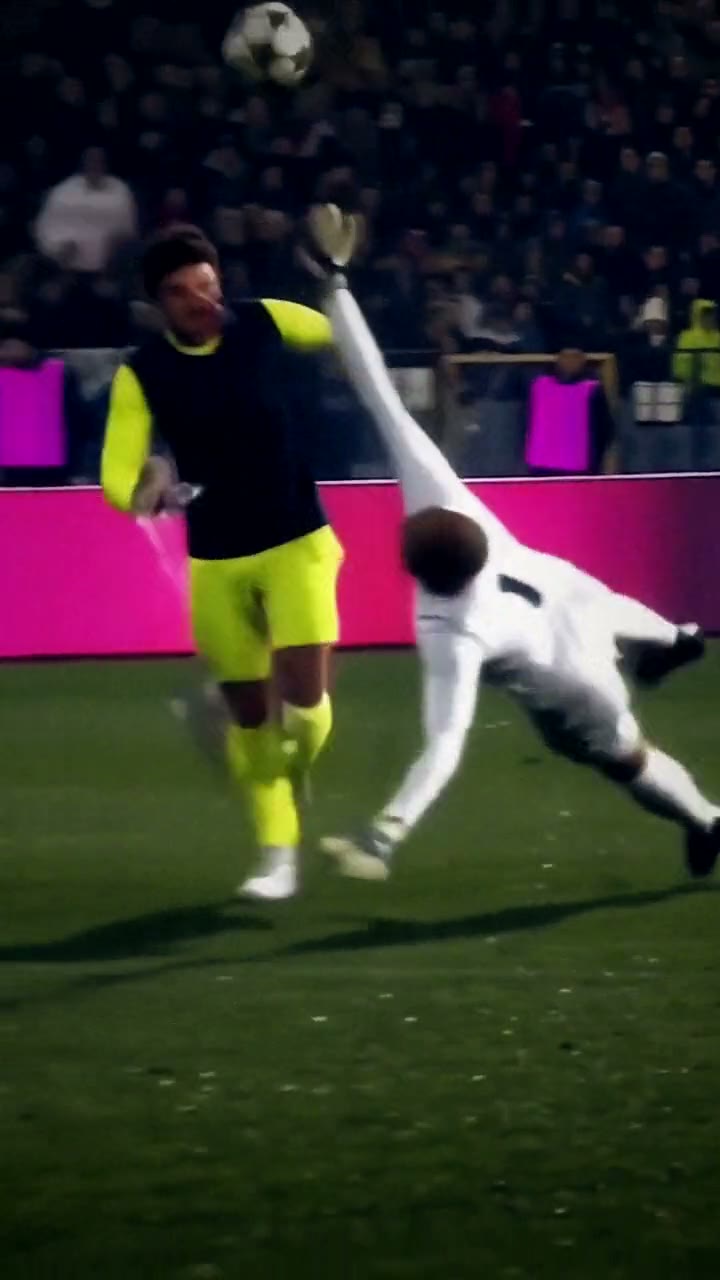
- 1.5 to 3 seconds: the scorer scoops the ball over him. The keeper dives, one arm up, and crashes onto the grass while the ball floats over his head.
- 3 to 5 seconds: the scorer jogs on, eyes on the ball dropping out of the night sky, and brings it down on his chest.
- 5 to 8 seconds: the camera pulls back. A defender in green slides in from the right, the scorer drags the ball back and the defender slides straight past.
- 8 to 10.5 seconds: the keeper is back on his feet and a second defender slides in. Same move, same result: both are left behind.
- 10.5 to 14 seconds: the scorer carries the ball toward the empty goal and rolls it in with his left foot.
- 14 to 15 seconds: cut to the camera behind the goal, with one defender still sitting on the grass.
The keeper's dive and the two slides are what make the clip recognizable. A version where only the scorer moves doesn't feel like the trend.
Three ways to make the Ozil goal AI video
1. A CapCut template
Most of the tutorials going around point to a CapCut template. You open the template from the creator's video, tap the button to use it in CapCut, pick a photo of yourself and let the app render the clip.
Good: free to try, it runs on your phone, and the template already has the music timing.
Not so good: you depend on whichever template is going around that week. If it gets changed or taken down you have to find another one, and you have little control over how your face comes out in the fast parts.
Best for: people who already use CapCut and don't mind a retry or two.
2. A general AI video tool like Kling or Runway
General AI video tools can edit a video or animate a photo. For this trend you would need a copy of the goal clip that you have the right to use, then ask the tool to replace the scorer with you, or upload your photo as a character reference.
Good: you control the kit, the setting and the length, and the same tools work for other trends.
Not so good: replacing one person in a busy football clip is hard. In our own tests some tools kept the original player's face, and others made the keeper and defenders freeze or vanish. Every retry uses credits, and these tools usually give you a few free credits, then sell monthly plans or credit packs.
Best for: people who already pay for an AI video tool and want a custom version.
3. A one-photo generator (Try a Trend)
Try a Trend has the stadium, the kit and the whole goal already set up. The moves come from our own reference video of the goal, performed by fictional AI players in a stadium without real sponsors, so no match footage is used, and the scorer in your video is you.
- 1Upload one clear, front-facing photo of you. A full-body photo works even better.
- 2Confirm you are 18+ and the photo is of you (or someone who agreed).
- 3Check your free preview. If you like it, get the full video.
- 4Download in 10 to 12 minutes and add the trending sound on TikTok.
You get a 15-second vertical video in 720p. You run onto the ball under the floodlights in a navy shirt with neon-yellow sleeves, chip the keeper as he slides out, bring the ball down on your chest, drag it past two sliding defenders and roll it into the empty net, with the same camera moves and the same cut behind the goal. Your face stays yours. Your first video is $4.99, then $5.99 each.
Good: the keeper and both defenders move exactly like the original, there's no app branding, and the free preview lets you check how you look in the kit before paying.
Not so good: one kit and one stadium, and the camera is far away for most of the clip, so your face is small in the wide shots. The video is silent, so you add the sound yourself, and it's an AI recreation rather than you really playing.
Best for: anyone who wants the full goal, with the dives and slides, from a single photo.
Tips for a photo that works
- A clear, front-facing photo of your face is enough. A full-body photo works even better, because your build and hair come out closer to real life.
- Pick good, even light, like daylight or a window. Avoid harsh sun, strong flash and dark rooms.
- Skip beauty filters and sunglasses, and keep one person in the photo.
- Use the original photo rather than a screenshot or a photo of a screen.
- Only upload a photo of yourself, or of someone who agreed to it. Everyone pictured must be 18 or older.
What to post it with
- Sound: most posts use the trending sound from the Ozil goal videos, added inside TikTok where it is licensed. Line the start up with the moment the keeper slides.
- Caption idea: "scored the ozil goal before breakfast".
- Hashtags: #ozilgoal, #ozilai and #footballtrend.
- It's even funnier with someone who has never kicked a ball: put your dad or your best friend in the goal (with their OK).
FAQ
Is this the official Ozil goal video?
No. Try a Trend is an independent AI tool that recreates the moves of the trend with your own photo. We're not affiliated with Mesut Ozil, Arsenal, Ludogorets, UEFA, TikTok or CapCut, and your video doesn't use any footage from the match.
Will the keeper and defenders really move?
Yes. The keeper rushes out, slides and dives, and two defenders slide in and miss, with the same timing and camera moves as the famous goal. Only the scorer changes: that's you.
Make yours
Upload one photo, check the free preview and score your goal in 10 to 12 minutes. Make your Ozil goal video here.