How to Make the SaWaDiKa Dance AI Video (SaWaDiKa Challenge)
The fastest way to make the SaWaDiKa Dance AI video is to upload one photo of your face to Try a Trend: you get a 10-second vertical video of you doing the first part of the viral SaWaDiKa routine, move for move, on a night train platform, with a free preview before you pay.
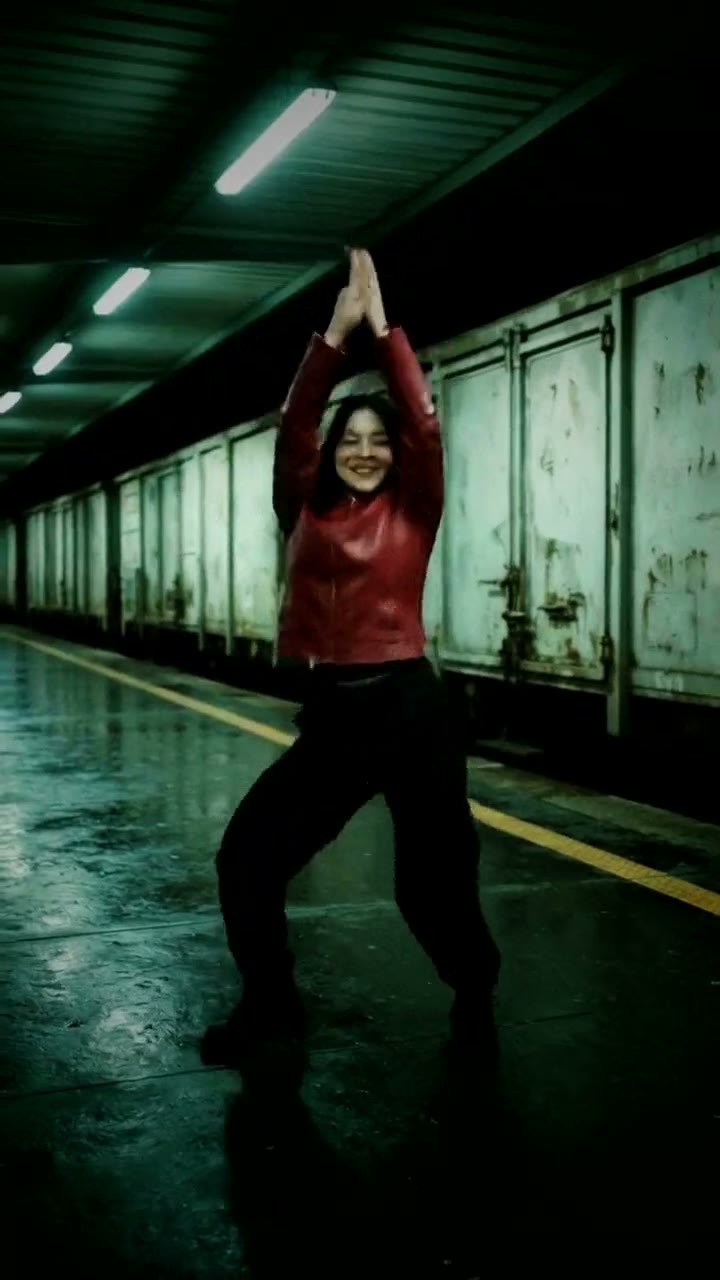
SaWaDiKa Dance AI Video Generator
1 photo, 10-second vertical video, free preview before you pay. Your first video is $4.99, then $5.99 each.
What is the SaWaDiKa Dance trend?
The SaWaDiKa dance is a TikTok dance challenge to the K-pop song SaWaDiKa, named after the Thai greeting (that's why the routine opens with a hello). It took off in September 2026 when the artist posted a full-body dance video that cuts back and forth between a sunny rooftop and a train platform at night. Fans have been copying the routine ever since, and the official SaWaDiKa sound on TikTok has been used in a huge number of videos.
In October the trend went viral a second time, this time with AI. Most of the AI versions you'll see swap someone into the group scenes of the music video. The challenge itself is simpler and more personal: one dancer, full body, a fixed camera, and the signature moves of the chorus.
What happens in the video, second by second
The original dance video holds the same full-body framing the whole time and hard-cuts between the rooftop and the platform almost every second. These are the moves in the first ten seconds:
- 0 to 0.6 seconds: feet apart, knees soft, elbows up at shoulder height with open palms, like a hello, then the hands come in to the chest.
- 0.6 to 1.5 seconds: both arms shoot straight up overhead, palms together, then one hand stays high while the other goes to the hip and the hip pops.
- 1.5 to 2.3 seconds: the arms cross overhead and sweep down while the feet switch.
- 2.3 to 3.2 seconds: the arms swing out wide, a turn, and a knee comes up at about three seconds.
- 3.2 to 6.3 seconds: hands to the chest and hip, hip sways from side to side on the beat, then one hand goes behind the head for a twist and a hair flip.
- 7 to 10 seconds: a high knee, a hand brushing the hair and covering the face, arms swinging, and it ends with the arms crossed in front of the chest, right on the beat.
Try a Trend's version uses those same moves on the same beats, but in one continuous shot on the night train platform rather than switching between two places.
Three ways to make the SaWaDiKa Dance AI video
1. Film it yourself and edit in CapCut
This is a dance challenge, so the classic way is to learn it and film it. CapCut, the free video editor from the company behind TikTok, helps you tidy it up.
- Learn the routine from a slowed-down tutorial. The first ten seconds are the part everyone recognises.
- Prop your phone at waist height so your whole body is in the frame, and film a few takes with the sound playing.
- In CapCut, pick the best take, trim it to the beat and add the SaWaDiKa sound when you post.
If you search "sawadika" in CapCut's Templates tab you may find templates too, but most of them rearrange clips you've already filmed; they don't do the dance for you.
Good: it's really you dancing, and it's free. Nailing a dance challenge yourself still gets the most love in the comments.
Not so good: learning the moves takes practice, and fast arm swings and hair flips need a lot of takes to look clean. You also need space and decent light.
Best for: people who enjoy dancing and have an evening to practise.
2. A general AI video tool like Kling or Runway
General AI video tools can animate a photo of you from a text prompt. A prompt alone won't reproduce a specific routine, though: you'll get "someone dancing", not the SaWaDiKa moves. Some of these tools also offer a motion-transfer or driving-video feature, where you upload a dance clip and a photo and the AI copies the moves onto you.
- Upload your photo as the reference.
- For motion transfer, add a clip of the routine. Only use footage you have the right to use, such as a video of you or a friend doing the dance.
- Generate, check the face during the fast moves, and retry until it looks right.
Good: flexible. You can choose the setting and the outfit, and use the same tool for other dances.
Not so good: you need a clean full-body dance clip to copy from, and faces can drift during quick turns and hair flips. You write the prompt and tune the settings yourself. These tools usually give you a few free credits, then sell monthly plans or credit packs.
Best for: people who already use an AI video tool and have their own reference clip.
3. A one-photo generator (Try a Trend)
Try a Trend has the SaWaDiKa routine already set up: the moves are matched to the viral dance video beat for beat, the setting is the night train platform, and the outfit is a red jacket, black cargo pants and black boots. You only need a photo of your face.
- 1Upload one clear, front-facing photo of you.
- 2Confirm you are 18+ and the photo is of you (or someone who agreed).
- 3Check your free preview. If you like it, get the full video.
- 4Download in a few minutes, add the SaWaDiKa sound on TikTok and start it at 0:27 so every move lands on the beat.
You get a 10-second vertical video in 720p, full body in one continuous shot, ready in a few minutes. Your first video is $4.99, then $5.99 each.
Good: the exact moves without learning them, no reference clip and no prompt. You see a free preview of yourself on the platform before paying, and it works just as well with a photo of a guy.
Not so good: there is one setting and one outfit, and it's the first ten seconds of the routine, not the whole dance. The video is silent, so you add the song in TikTok and line it up yourself. It's AI, not real dancing: during fast turns and the hair flip the face can drift slightly. The full video is paid.
Best for: anyone who wants in on the challenge today, whether or not they can dance.
Tips for a photo that works
- A clear, front-facing photo of your face is enough. You don't need a full-body shot: the AI builds the body and the outfit.
- Use good light, like daylight or a window, without harsh sun or a strong flash.
- Skip beauty filters and extreme close-ups, and upload the original photo rather than a screenshot.
- Your face and hair stay yours, so a photo with your hair the way you like it pays off during the hair flip.
- One person per photo. Only upload a photo of yourself or of someone who agreed to it, and everyone pictured must be 18 or older.
What to post it with
- Sound: add the official SaWaDiKa sound in TikTok and drag the start to 0:27, about 27.7 seconds into the sound. Your arms should shoot up overhead on the first big beat; if they're a little early or late, nudge the start until they match.
- Caption: something like "learned the SaWaDiKa dance without leaving my bed".
- Hashtags: #sawadika, #sawadikadance and #sawadikachallenge.
FAQ
Will I really do the exact same moves?
Yes. The video follows the first ten seconds of the viral dance video move for move: the arms shooting up overhead, the hip pops, the wide arm swing, the turn, the hair flip and the high knees.
Is this the official SaWaDiKa video?
No. Try a Trend is an independent AI tool that recreates the dance with your own photo. We're not affiliated with the song, its artist or label, or TikTok, and your video doesn't use any footage from the original dance video or the music video.
Does it work for guys too?
Yes. The outfit works for anyone and the moves are the same, so it's just as fun with a photo of a boyfriend, a dad or a best friend, with their OK.
Make yours
Want to do the SaWaDiKa dance move for move without a single rehearsal? Upload one photo and check the free preview. Make your SaWaDiKa Dance video here.