How to Make the Elf Dance AI Video (Office Table Elf Trend)
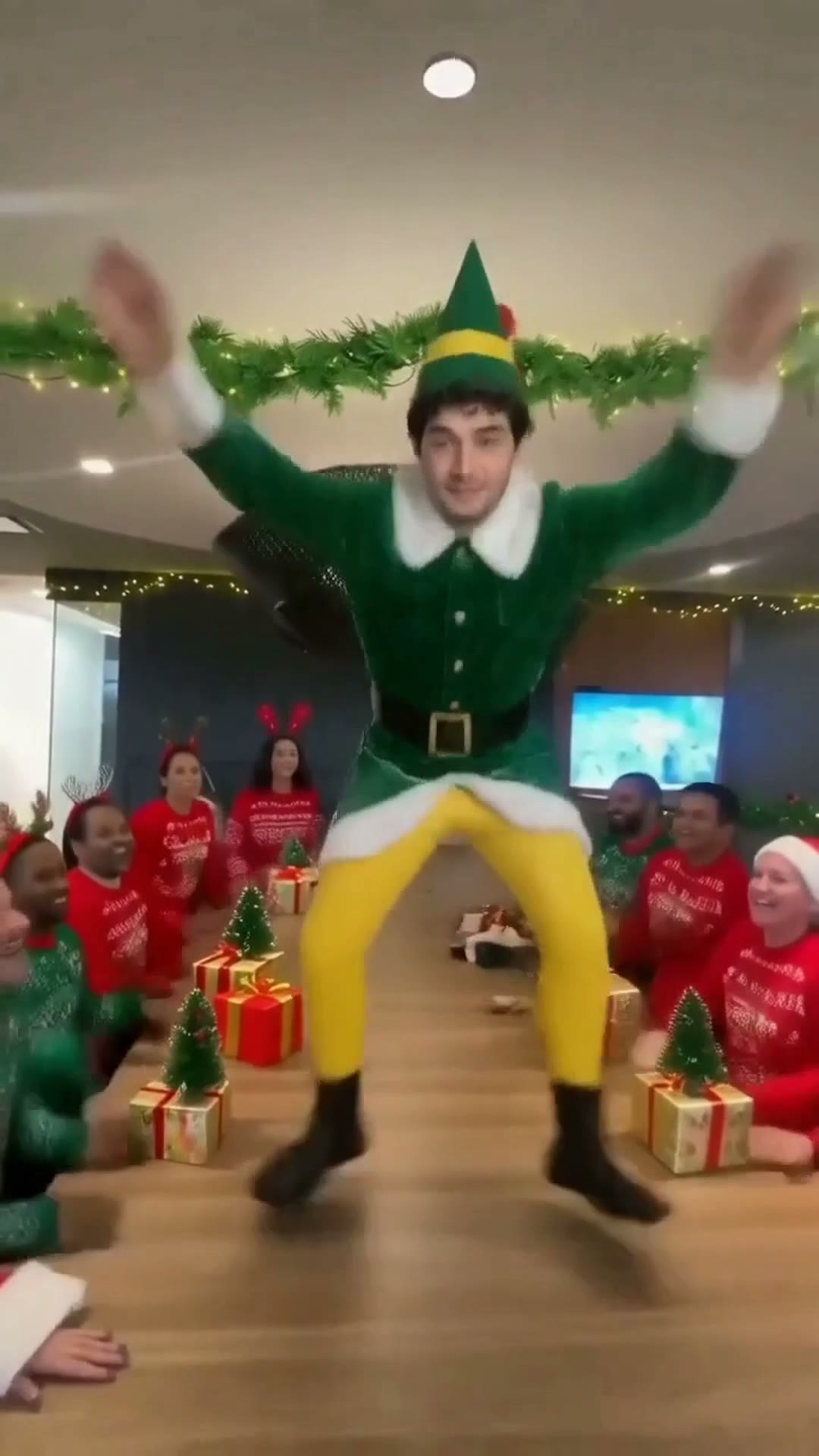
The fastest way to make the elf dance AI video is to upload one photo to Try a Trend: you become the elf in the green suit and yellow tights, dancing down an office conference table while the whole team and Santa cheer, and you get a 12-second vertical video in 1080p with the same moves and camera as the viral clip, with a free preview before you pay.
Elf Dance AI Video Generator
1 photo, 12-second vertical video, free preview before you pay. Each video is $7.99.
What is the elf dance trend?
The elf dance, sometimes called the elf table dance, is an office tradition that shows up on TikTok every Halloween and Christmas. Someone puts on the classic elf costume, a green tunic with white fur trim, yellow tights and a pointed hat, climbs onto the long conference table and dances like nobody is watching. Everyone else sits along both sides of the table cheering, waving their arms and filming, and there is often a coworker dressed as Santa in the front row.
It works because it's a real office, real coworkers and somebody committing completely to a ridiculous costume. A late-October 2026 video of an office team brought the format back this season, and an AI version followed within days: people put their own face on the dancing elf instead of borrowing a costume and clearing the meeting room.
What happens in the video, second by second
The viral version is one continuous vertical clip of about 12 seconds, filmed on a phone from the end of the table:
- 0 to 3 seconds: the elf is at the far end of the table, small in the frame, dancing with arms out like airplane wings and one knee lifted, then swinging a hand up. Santa sits in the front row.
- 3 to 5 seconds: the camera walks up the table as the elf hops and kicks toward it, getting bigger and bigger.
- 5 to 7 seconds: the closest part: a deep squat, then a star jump with arms and legs flung wide while the coworkers raise their hands.
- 7 to 10 seconds: more kicks and jumps, with Santa waving his hat right in front of the lens.
- 10 to 12.4 seconds: the camera pulls back to show the whole table, the elf throws both hands up, leaps into a mid-air split and jumps down off the table toward the camera.
The single moving shot, the cheering on both sides and that final split are what make people recognize it. A still photo of someone in an elf costume doesn't read as this trend.
Three ways to make the elf dance AI video
1. A CapCut template
CapCut templates appear for most AI trends, and at least one already swaps a person into this office clip. You open it from the creator's video, tap the button to use it in CapCut, pick a photo and let the app render.
Good: often free to try, it runs on your phone, and the timing is usually built in.
Not so good: templates come and go, and you depend on whichever one is around that week. The one we've seen keeps your everyday clothes instead of the elf costume, and the clip it uses shows the real people from the original video.
Best for: people who already use CapCut and don't mind a looser version.
2. A general AI video tool like Kling or Runway
General AI video tools can animate a photo or replace a person in a video. For this trend you would need a copy of an elf dance clip you have the right to use, ask the tool to swap the dancer for you in the costume, and fix whatever it gets wrong.
Good: you control the outfit, the setting and the length, and the same tools work for other trends.
Not so good: this clip is hard for them. The elf starts tiny at the far end of the table with a much bigger person sitting in the foreground, so tools often swap the wrong person or lose the arm poses. Fast kicks, a star jump and a mid-air split are where faces drift and legs melt, so expect retries, and each retry uses credits. These tools usually give a few free credits, then sell monthly plans or credit packs.
Best for: people who already pay for an AI video tool and want a custom version.
3. A one-photo generator (Try a Trend)
Try a Trend has the office, the table and the whole routine already set up. The moves come from our own reference video, performed by a fictional AI elf with AI-generated coworkers and Santa, so no footage from the original clip is used. The elf is the person in your photo.
- 1Upload one clear, front-facing photo of you. No costume needed: we dress you as the elf.
- 2Confirm you are 18+ and the photo is of you (or someone who agreed).
- 3Check your free preview. If you like it, get the full video.
- 4Download in about 15 minutes and add the elf dance sound on TikTok, starting from the beginning.
You get a 12-second vertical video in 1080p, the same size as the viral clip. It opens with you dancing at the far end of the table in the green elf suit, follows you up the table through the squat and the star jump, and ends with the mid-air split and the jump down to the camera, while the coworkers in Christmas sweaters cheer and Santa waves his hat. Your face and hair stay yours. Each video is $7.99.
Good: the moves and the camera match the original beat for beat, the whole office moves around you instead of freezing, there's no app branding, and the free preview shows you as the elf before you pay.
Not so good: one office and one costume: the coworkers, Santa and the room are the same AI-generated cast in every video. It takes about 15 minutes because the AI redraws you frame by frame. The video is silent, so you add the sound yourself.
Best for: your own office Christmas card, the team group chat, or getting the elf dance done without the costume or the meeting room.
Tips for a photo that works
- Use a clear, front-facing photo of your face. A selfie is fine; you don't need a full-body shot or a costume.
- Keep your face uncovered: no sunglasses, no hat, no hand over your face. The elf hat goes on top of your own hair.
- Pick good, even light, like daylight or a window. Avoid harsh sun, strong flash and very dark rooms.
- One person per photo. If there are other people in it, crop them out.
- Only upload a photo of yourself or of someone who agreed to it. Everyone pictured must be 18 or older.
What to post it with
- Sound: most posts use the trending elf dance sound, added inside TikTok or Instagram where it is licensed. Start it from the beginning; your video opens on the same frame as the viral clip.
- Caption idea: "me at the office christmas party" or "when the meeting could have been an email".
- Hashtags: #elfdance, #officechristmasparty and #christmas.
- Post it in the team chat before the holiday party, or as your out-of-office reply on the last day before the break.
FAQ
Is this the official elf dance video?
No. Try a Trend is an independent AI tool that recreates the moves and the camera of the trend with your own photo. We're not affiliated with any movie, costume or holiday brand, the people or creators of the viral TikToks, or TikTok, and your video doesn't use any footage from the original clips.
Can I put my whole team or family in it?
Not yet. The original has one dancer, so your photo becomes the one elf on the table. The coworkers and Santa are AI-generated, fictional people and stay the same in every video.
Make yours
Upload one photo, check the free preview and get your elf dance in about 15 minutes. Make your elf dance video here.