How to Make the Witch Broom AI Video (My Ride Is Here Trend)
The fastest way to make the Witch Broom AI video, the "my ride is here" clip where someone rides a broomstick down the street and flies into a road sign, is to upload one photo of yourself to Try a Trend: you get a 6-second vertical video of you in that same single shot, with a free preview before you pay.
Witch Broom AI Video Generator
1 photo, 6-second vertical video, free preview before you pay. Your first video is $4.99, then $5.99 each.
What is the Witch Broom trend?
The Witch Broom trend took off on TikTok in October 2026, in the run-up to Halloween. People post it with captions like "My ride is here", and it spread as a template: you drop in one photo and the clip puts you on a flying broom. The joke is pure slapstick. You glide toward the camera looking extremely pleased with yourself, show off as you pass, stop watching where you're going and fly straight into a road sign.
Most popular versions skip the witch costume. People ride the broom in whatever they wore in their photo, sunglasses and everyday clothes included, which makes the crash funnier. Some creators have even put their dog on the broom.
What happens in the video, second by second
The whole thing is one continuous shot with no cuts, and it lasts about six seconds:
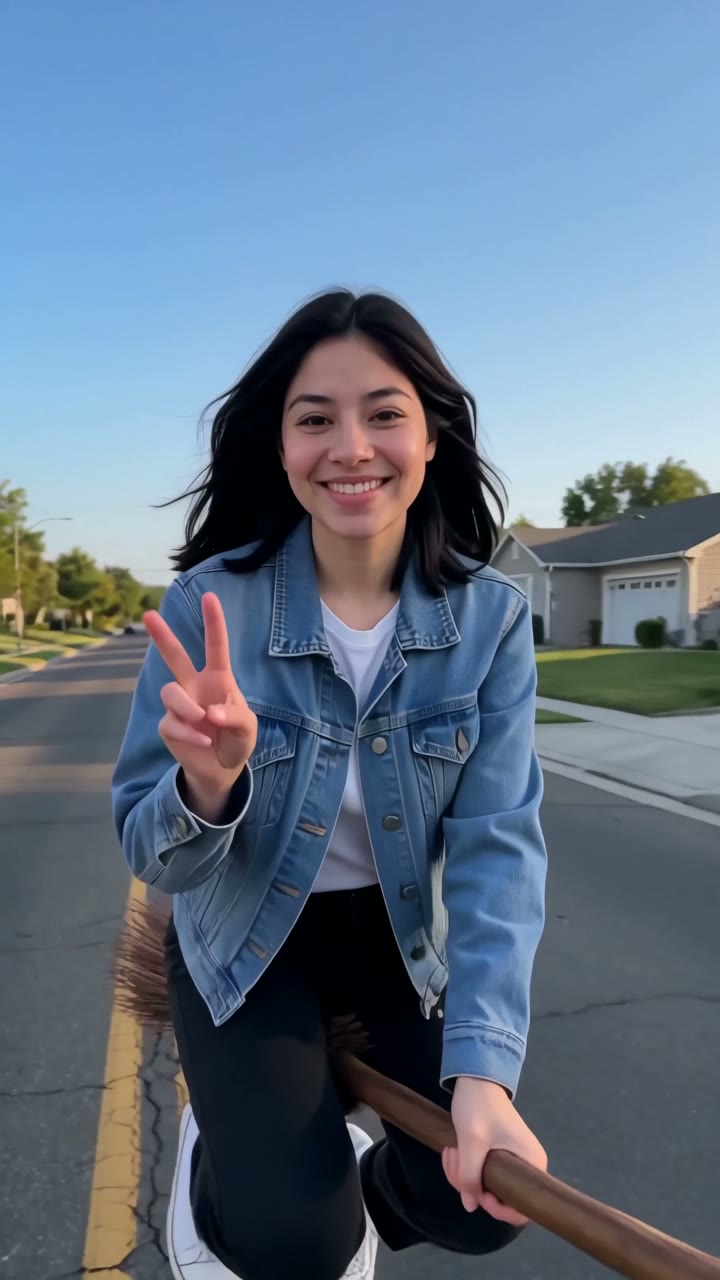
- 0 to 3 seconds: a sunny suburban street with a double yellow line, wide lawns, low houses and bare trees. The camera stands still in the middle of the road at waist height. You start as a tiny dot at the far end and glide toward the camera on a straw broom, knees bent, both hands on the handle, about a metre above the asphalt, grinning the whole way.
- 3 to 3.7 seconds: you reach the camera in a chest-up close-up, laugh and flash a peace sign.
- 3.7 to 4.4 seconds: the camera swings around to follow you as you fly past toward the sidewalk. You look back over your shoulder, still smiling and waving, not looking ahead.
- 4.4 to 4.7 seconds: you fly straight into a road sign post. A small sign gets knocked off and the broom goes spinning skyward.
- 4.7 to 6 seconds: you land flat on your back on the sidewalk with your legs in the air, and the broom tumbles out of the sky and lands next to you.
Try a Trend's version follows the same beats and camera move in one take. In our video the glide in is a little quicker than the original, so the peace sign and the crash come a bit earlier.
Three ways to make the Witch Broom AI video
1. A CapCut template
CapCut is the free video editor from the company behind TikTok, and the Witch Broom clip spread as a template. Several of the most-liked posts for this trend are tutorials showing how to use it.
- On TikTok, search "witch broom trend" or "my ride is here" and open a post that shows a CapCut template link, or search the same words in CapCut's Templates tab.
- Tap "Use template" and pick your photo.
- Let the template process, check the result, export and post with the trending sound.
Good: quick, and the camera move and timing are already set. Templates are often free to try.
Not so good: templates come and go, so the one from last week may be gone or replaced. You get whatever the template gives you, and some templates or exports need a CapCut Pro subscription.
Best for: people who already use CapCut and find a working template link.
2. A general AI video tool like Kling or Runway
General AI video tools can turn a photo into a short clip from a text prompt. For this trend you would write the whole scene yourself: the street, the broom, the camera standing still and then panning, the peace sign, the crash and the fall.
- Upload your photo as the reference image.
- Write a prompt that describes the shot beat by beat, with timings, and asks for one continuous take with no cuts.
- Generate, check the face and the timing, and tweak the prompt until the crash lands where it should.
Good: full control over the setting and style. You could set it on your own street, at night, or in a costume.
Not so good: you write and tune the prompt yourself, and slapstick timing is hard to get right. If the camera cuts away or your face drifts when you come close to the lens, that means another try. These tools usually give you a few free credits, then sell monthly plans or credit packs, so every retry counts.
Best for: people who already pay for an AI video tool and enjoy experimenting with prompts.
3. A one-photo generator (Try a Trend)
Try a Trend has the Witch Broom scene already set up, so there is no prompt to write. You upload one photo and the AI seats you on the broom, keeps your face and the outfit from your photo, and runs the whole slapstick shot.
- 1Upload one clear, front-facing photo of you.
- 2Confirm you are 18+ and the photo is of you (or someone who agreed).
- 3Check your free preview. If you like it, get the full video.
- 4Download in a few minutes and add the trending sound on TikTok.
You get a 6-second vertical video in one continuous shot: the glide in, the peace sign close-up, the look back, the crash and the broom falling next to you. Your first video is $4.99, then $5.99 each.
Good: no template hunting and no prompt. You see a free preview of yourself on the broom before paying, and the video is ready in a few minutes.
Not so good: the scene is fixed: the same sunny suburban street every time. The video is silent, so you add the trending sound in TikTok, and the full video is paid. It's AI, so small details like the shape of the road sign won't match the original exactly.
Best for: anyone who wants the clip with their own face today, without editing.
Tips for a photo that works
- Use one clear, front-facing photo of you with your face and shoulders in the shot. It doesn't have to be full body: the AI puts you on the broom.
- Good light matters. Daylight or a spot near a window works best, without harsh sun or a strong flash.
- Skip beauty filters and extreme close-ups, and use the original photo rather than a screenshot.
- The outfit in your photo is the outfit you fly in. If you want a witch look, upload a photo of you in your costume. Everyday clothes work too, just like the viral clips.
- One person per photo. Only upload a photo of yourself, or of someone who agreed to it, and everyone pictured must be 18 or older.
What to post it with
- Caption: "My ride is here" is the classic. Something like "my ride is here (the sign came out of nowhere)" adds the punchline.
- Sound: open a Witch Broom post you like on TikTok and use its sound, so you add it where it's licensed. The video itself is silent.
- Hashtags: #witchbroom, #witchbroomtrend, #myrideishere and #halloween.
- The crash comes at about four seconds, so keep any text near the top or bottom of the screen and out of the way of the close-up.
FAQ
Is this the same as the "My ride is here" broom trend?
Yes. It's the same clip people post with "My ride is here" captions: a broom ride down the street that ends in a road sign. You add your own caption in TikTok when you post.
Is this the official Witch Broom video?
No. Try a Trend is an independent AI tool that recreates the look of the trend with your own photo. We're not affiliated with TikTok, CapCut or the creators of the viral clips, and the video doesn't use any of their footage.
Do I really crash into the sign?
Yes, that's the whole joke. After the peace sign you look back at the camera, fly into a road sign, land on the sidewalk, and the broom falls down next to you. It's cartoon slapstick, nothing gory.
Make yours
Want to fly in, wave and wipe out without a template or a prompt? Upload one photo and check the free preview. Make your Witch Broom video here.