How to Make the Bicep Heart AI Video (No Gym Needed)
The fastest way to make the bicep heart AI video, the clip where someone flexes one arm and lays the other across it to make a heart, is to upload one photo of yourself to Try a Trend: you see a free preview, then get a 7-second vertical video of you doing the whole move, big bicep included, even if you have never lifted a weight.
Bicep Heart AI Video Generator
1 photo, 7-second vertical video, free preview before you pay. Your first video is $4.99, then $5.99 each.
What is the bicep heart trend?
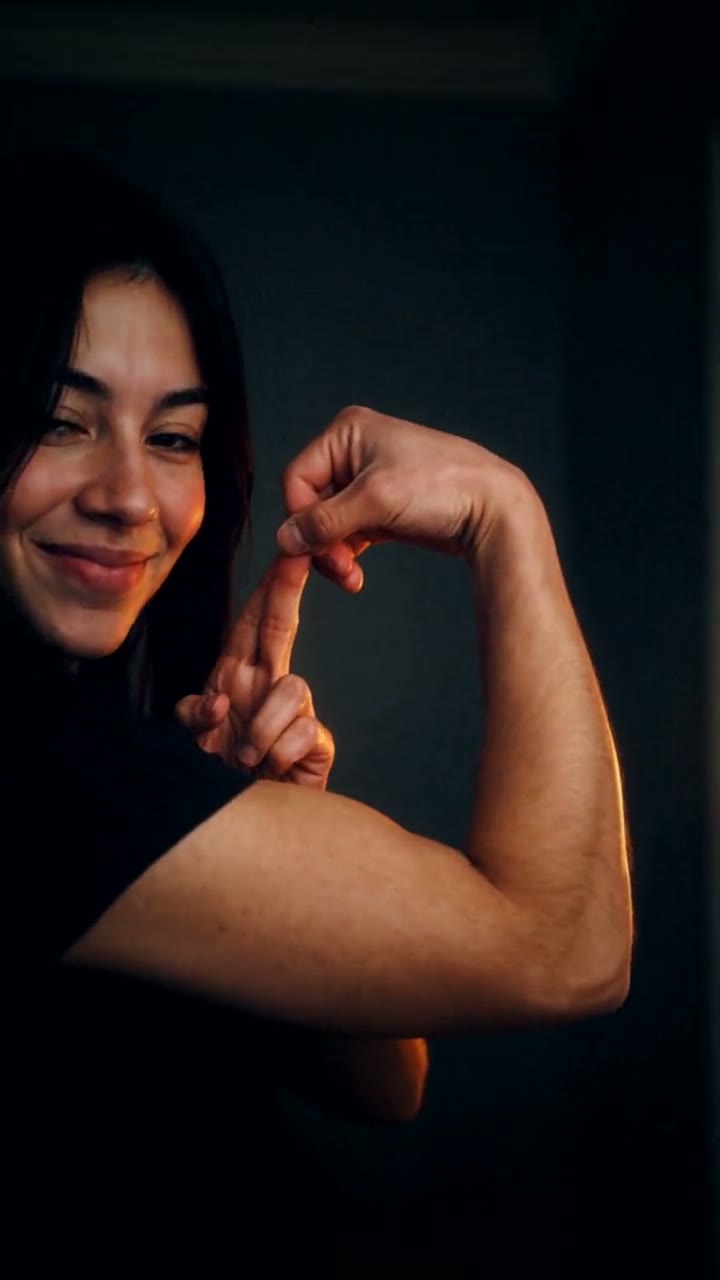
The bicep heart took off on TikTok at the start of November 2026. The idea is simple and a little cheesy: instead of making a heart with your hands, you make one with your arm. You flex, then rest the other forearm across so the curve of the bicep and the straight forearm form the two halves of a heart. People post it with captions like "have you ever heard of a bicep heart?" or "bicep hearts cure broken hearts".
It started with gym creators showing off, and that is exactly why it spread. The move only reads as a heart if the bicep actually bulges, so a lot of people who tried it at home ended up with a flat arm and a funny comment instead. Women, couples and people who have never been near a squat rack joined in, often joking that they will start going to the gym tomorrow. Making it with AI from one photo is the shortcut: you get the pose and the muscle without the months of training.
There is a sweet side too. A bicep heart is a way of saying "I've got you", so plenty of people send it to a friend or partner who is having a bad day.
What happens in the video, second by second
The most-liked version is one continuous shot from a camera that never moves, and it lasts about seven seconds:
- 0 to 1.8 seconds: a dim room at night with dark blue-gray walls, lit only by a warm lamp off to one side. You stand facing the camera from the waist up in a black T-shirt and give it a knowing little smirk.
- 1.8 to 3.4 seconds: you reach across and push one short sleeve up onto your shoulder, still looking at the lens as if to say "watch this".
- 3.4 to 4.3 seconds: you raise the bare arm and flex. The bicep pops up into a round peak while you lean in toward the camera, so the arm fills the middle of the frame.
- 4.3 to 7 seconds: you lay your other forearm flat across your chest and touch your fingertips to your fist. The arms now make a heart, and you hold it up close to the lens with a proud grin and a little head tilt.
The lean toward the camera is the original's small trick. It makes the bicep look even bigger, and Try a Trend's version keeps it. In our video the flex comes about half a second earlier, and your other hand reaches up from under the arm to touch your fist, so the heart sits slightly tilted.
Three ways to make the bicep heart AI video
1. Film it yourself
The bicep heart is a real-life trend, so the original way is to film yourself. Some people then try a body-reshaping effect in an editing app to make the arm look bigger.
- Prop your phone at chest height in a room with one warm lamp to the side.
- Film the move: smirk, push up your sleeve, flex, lean in, lay the other arm across and hold.
- Trim it, add the sound and post.
Good: it's your real footage, and it costs nothing if your arms already do the job.
Not so good: without much muscle the heart shape doesn't really show, which is the whole problem. Reshaping effects can bend the background around your arm, and they stretch what is there rather than adding a defined peak.
Best for: people who already have the arms and only want the trending format.
2. A general AI video tool like Kling or Runway
General AI video tools can turn a photo into a short clip from a written description. For this trend you would describe the whole thing yourself: the room and the lamp, the fixed camera, the sleeve, the flex, the lean and the heart.
- Upload your photo as the reference image.
- Write a prompt that walks through the move beat by beat, with timings, and asks for a single shot with a camera that stays still.
- Generate, then check the face, the arms and the heart shape, and adjust the prompt.
Good: full control over the setting, the outfit and the style.
Not so good: hands and arms are where AI video still slips. Fingers can merge, the wrong arm can flex, or the heart can come out as two arms crossing. Getting a big bicep that still looks like your own body takes trial and error, and these tools usually give you a few free credits, then sell monthly plans or credit packs, so every retry counts.
Best for: people who already pay for an AI video tool and enjoy tuning prompts.
3. A one-photo generator (Try a Trend)
Try a Trend has the bicep heart scene already set up, so there is no prompt to write and nothing to film. You upload one photo, and the AI keeps your face and hair, puts you in the moody lamp-lit room in a fitted black T-shirt, and runs the whole move with a bicep that pops.
- 1Upload one clear, front-facing photo of you.
- 2Confirm you are 18+ and the photo is of you (or someone who agreed).
- 3Check your free preview. If you like it, get the full video.
- 4Download in a few minutes and add the trending sound on TikTok.
You get a 7-second vertical video in one continuous shot: the smirk, the sleeve, the flex, the lean and the heart. Your first video is $4.99, then $5.99 each.
Good: no muscles, tripod or editing needed, and you see a free preview of your bicep heart before paying. The video is ready in a few minutes.
Not so good: the scene is fixed: the same dim room and lamp, and the same black T-shirt every time, so the outfit from your photo isn't used. The video is silent, so you add the sound in TikTok, and the full video is paid. It's AI, so the arm is a flattering take on yours rather than a photo of your real arm.
Best for: anyone who wants to join the trend today, or send someone a bicep heart, without a gym streak.
Tips for a photo that works
- Use one clear, front-facing photo of you. A selfie from the chest up is enough; your arms don't need to be in the shot.
- Good, even light helps the AI keep your face. Daylight or a spot near a window works best.
- Skip heavy beauty filters, sunglasses and extreme close-ups, and use the original photo rather than a screenshot.
- Whatever you wear in the photo, the video puts you in a black short-sleeve T-shirt, so the sleeve can roll up like in the viral clips.
- One person per photo. Only upload a photo of yourself, or of someone who agreed to it, and everyone pictured must be 18 or older.
What to post it with
- Caption: "have you ever heard of a bicep heart…" is the classic opener. "bicep hearts cure broken hearts" works if you are sending it to someone.
- Sound: open a bicep heart post you like on TikTok and use its sound, so you add it where it's licensed. The video itself is silent.
- Hashtags: #bicepheart, #bicephearttrend and #biceps.
- The heart fills the middle of the screen from about four seconds in, so keep any text near the top.
FAQ
Do I need big arms to make it?
No. That is the point of the AI version. The bicep comes out clearly flexed, a bit bigger than real life, while your face and body stay recognisably yours.
Can I send a bicep heart to someone?
Yes. Download the video and send it straight to them. If you would rather they made their own, the trend page has a "Send this trend as a gift" link.
Is this the official bicep heart video?
No. Try a Trend is an independent AI tool that recreates the look of the trend with your own photo. We're not affiliated with TikTok or the creators of the viral clips, and the video doesn't use any of their footage.
Make yours
Want a bicep heart without the gym? Upload one photo and check the free preview. Make your bicep heart video here.