How to Make the Chipmunks Dance AI Video (Red, Blue, Green Trio Trend)
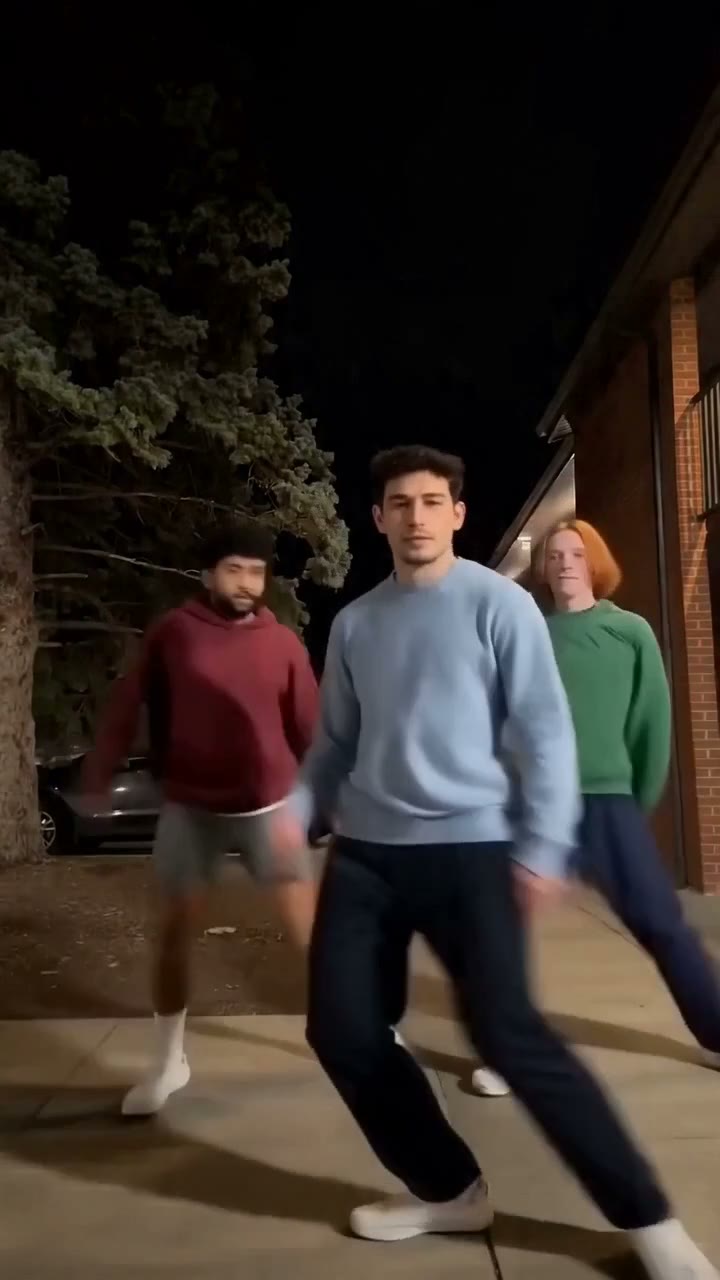
The fastest way to make the Chipmunks dance AI video is to upload one photo to Try a Trend: you become the lead dancer in the blue sweatshirt, walking up to the camera and then leading the routine on a night sidewalk while two backup dancers in red and green follow every step, and you get a 13-second vertical video of the lead's half of the dance with the same steps and camera as the viral clip, with a free preview before you pay.
Chipmunks Dance AI Video Generator
1 photo, 13-second vertical video, free preview before you pay. Your first video is $4.99, then $5.99 each.
What is the Chipmunks dance trend?
The Chipmunks dance is a three-person TikTok routine that took off in October 2026. Three people line up side by side and dance a set routine of about 25 seconds to a sped-up, chipmunk-voiced version of a party song: they hold a pose, take turns stepping out front, dance in sync, and finish by crowding into the camera together. Many groups dress in red, blue and green, the colors of the cartoon trio the sound comes from.
What made it spread is who films it. The most-viewed versions are siblings, cousins and whole families dancing in the driveway, on the deck or on the sidewalk after dinner, and captions like "dancing runs in the family" are everywhere. That makes it an easy one for family get-togethers, Thanksgiving included. An AI version followed within days: people put their own face on one of the dancers instead of rounding up two partners and learning the steps.
What happens in the video, second by second
The routine is one continuous vertical clip, usually filmed on a phone held low:
- 0 to 2.5 seconds: all three stand in a row, striking a pose.
- 2.5 to 9 seconds: they swap places and one dancer takes the middle for a big solo with wide steps and arm swings while the other two keep dancing at the sides.
- 9 to 12.5 seconds: the three dance in sync in a row and point to the sky together.
- 12.5 to 14 seconds: one dancer walks right up to the camera.
- 14 to 15.5 seconds: the other two rush past the lens in a blur.
- 15.5 to 23.5 seconds: that dancer leads the routine in the middle with the other two behind.
- 23.5 to 25.5 seconds: all three crowd into the camera, faces filling the frame.
The matching colors, the turn-taking and the big group finish at the camera are what people recognize. A photo of three people in colored sweatshirts doesn't read as this trend.
Three ways to make the Chipmunks dance AI video
1. A CapCut template
There are already CapCut templates for this trend that take one to three photos and put the faces onto a dancing trio. You open the template from a creator's video, tap the button to use it in CapCut, pick your photos and let the app render.
Good: free to try, it runs on your phone, it can use up to three photos, and the clip lines up with the sound.
Not so good: templates come and go, and you depend on whichever one is around that week. The ones we've seen paste faces onto the dancers from someone else's clip, so the bodies, clothes and hair stay theirs, and faces can slip during fast moves.
Best for: a quick version with friends' faces when you don't mind a rough look.
2. A general AI video tool like Kling or Runway
General AI video tools can animate a photo or replace a person in a video. For this trend you would need a copy of a Chipmunks dance clip you have the right to use, ask the tool to swap one of the dancers for you, and fix whatever it gets wrong.
Good: you control the outfit, the setting and the length, and the same tools work for other trends.
Not so good: three people moving fast and swapping places is hard for them. Tools often put your face on the wrong dancer when the others pass in front of the camera, and kicks, spins and the blur when someone runs past the lens are where faces drift and legs melt. Expect retries, and each retry uses credits. These tools usually give a few free credits, then sell monthly plans or credit packs.
Best for: people who already pay for an AI video tool and want a custom version.
3. A one-photo generator (Try a Trend)
Try a Trend has the night street and the routine already set up. The steps come from our own reference video, danced by three fictional AI dancers, so no footage from the original clips is used. The lead dancer in the blue sweatshirt is the person in your photo; the two backup dancers in red and green are AI-generated.
- 1Upload one clear, front-facing photo of you. No outfit needed: we put you in the blue sweatshirt.
- 2Confirm you are 18+ and the photo is of you (or someone who agreed).
- 3Check your free preview. If you like it, get the full video.
- 4Download in about 13 minutes, add the Chipmunks dance sound on TikTok and start it at 0:13 so every step lands on the beat.
You get a 13-second vertical video of the second half of the routine, the part where one dancer is out front the whole time. It opens with you walking right up to the camera, your two backup dancers rush past the lens, then you lead the steps in the middle of the sidewalk and all three of you crowd into the camera for the finish. Your face and hair stay yours. Your first video is $4.99, then $5.99 each.
Good: the steps and the camera match the original beat for beat, your backup dancers move with you instead of freezing, there's no app branding, and the free preview shows you out front before you pay.
Not so good: one person, one street: your photo replaces the lead and the two backup dancers are the same AI-generated pair in every video. It covers the lead's half of the dance, not the whole 25 seconds, and it takes about 13 minutes because the AI redraws you frame by frame. The video is silent, so you add the sound yourself.
Best for: the family group chat before Thanksgiving, sending your sibling proof that you'd lead it, or doing the trend without two partners and a rehearsal.
Tips for a photo that works
- Use a clear, front-facing photo of your face. A selfie is fine; you don't need a full-body shot or a blue sweatshirt.
- Keep your face uncovered: no sunglasses, no hat, no hand over your face.
- Pick good, even light, like daylight or a window. Avoid harsh sun, strong flash and very dark rooms.
- One person per photo. If there are other people in it, crop them out.
- Only upload a photo of yourself or of someone who agreed to it. Everyone pictured must be 18 or older.
What to post it with
- Sound: use the trending Chipmunks dance sound, added inside TikTok or Instagram where it is licensed. Your video is the second half of the routine, so move the sound's start to 0:13 and the steps land on the beat.
- Caption idea: "leading the family dance this year" or "my siblings said I couldn't lead it".
- Hashtags: #chipmunksdance, #chipmunksdanceai and #familydance.
- Post it in the family chat before everyone gets together, and dare your siblings to film the real thing.
FAQ
Is this the official Chipmunks dance video?
No. Try a Trend is an independent AI tool that recreates the steps and the camera of the trend with your own photo. We're not affiliated with the Alvin and the Chipmunks films or their studio, the song or its label, the people or creators of the viral TikToks, TikTok or CapCut, and your video doesn't use any footage from the original clips.
Can I put my whole family in it?
Not yet. This version swaps one person: your photo becomes the lead dancer, and the two backup dancers are AI-generated, fictional people who stay the same in every video. Want everyone in? Make one for each person and see who leads it best.
Make yours
Upload one photo, check the free preview and get your Chipmunks dance in about 13 minutes. Make your Chipmunks dance video here.