How to Make the Schooling Seniors AI Video (Car Park Freestyle)
The fastest way to make the Schooling Seniors AI video is to upload one photo to Try a Trend: you become the MC who walks up to the phone and raps straight down the lens in the late-night car park, you can add a second photo to put a friend in the opening, and you get a 10-second horizontal video with a free preview before you pay.
Schooling Seniors AI Video Generator
1 photo, 10-second horizontal video, free preview before you pay. Each video is $7.99.
What is the Schooling Seniors trend?
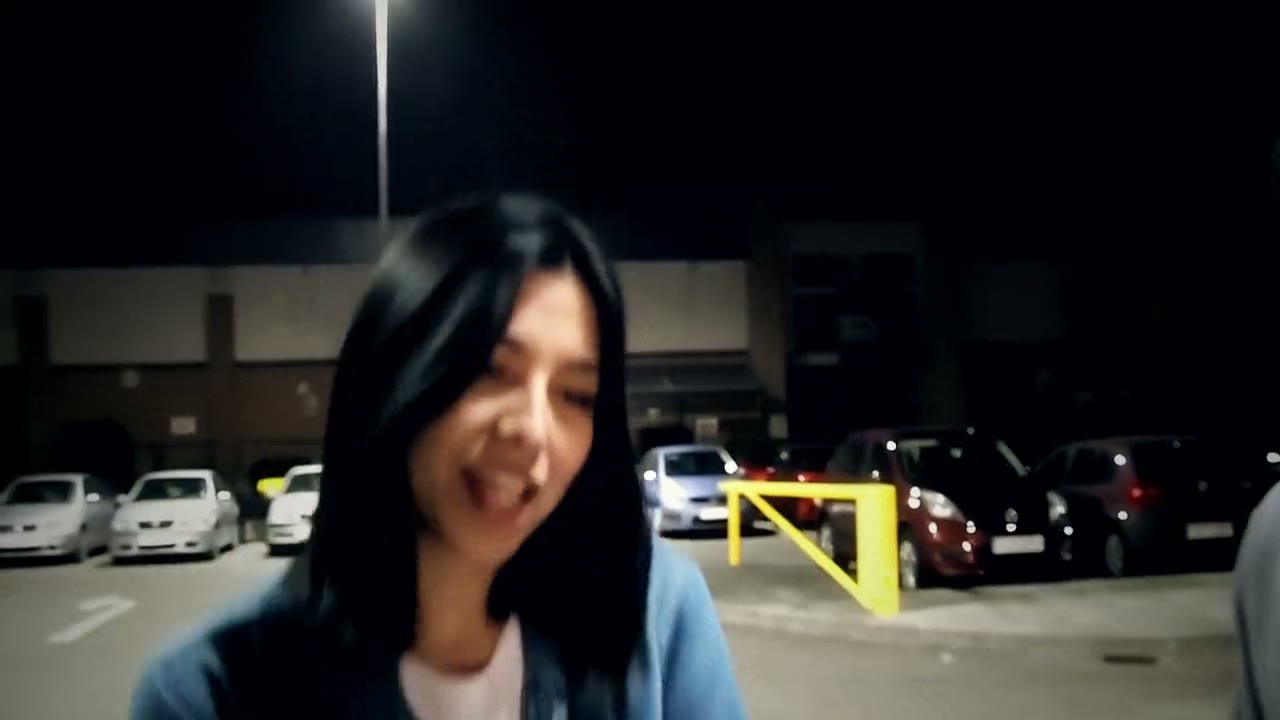
Schooling Seniors is an old grime freestyle filmed on a phone in an empty car park at night. There is no stage and no editing: one MC finishes his bars and steps aside, the next one walks right up to the camera, and the whole thing is a single shaky handheld shot under a white street lamp, with rows of parked cars and yellow bollards behind them.
In July 2026 a repost of the clip went viral on TikTok, and the track became the go-to soundtrack for football edits, the kind where a player gets "schooled" by someone younger. By early November people had started using AI to swap themselves, their mates or famous footballers in as the rapper, and "how to make the Schooling Seniors trend" tutorials started appearing every day.
What happens in the video, second by second
The AI versions follow the original take, about ten seconds of one continuous shot:
- 0 to 1.5 seconds: a friend on the left of the frame is finishing their verse, with the rapper waiting at the right edge.
- 1.5 to 2.5 seconds: the friend walks off to the left and the rapper steps up to the phone, grinning.
- 2.5 to 5.5 seconds: the rapper takes over in a close shot, nodding to the beat, while the friend hangs around and peeks in behind them.
- 5.5 to 10 seconds: just the rapper, straight down the lens, eyebrows up, hands moving, the camera swaying with them.
The handover in the opening and the in-your-face close shot are what make it read as this trend. A still photo with the song on top doesn't.
Three ways to make the Schooling Seniors AI video
1. A CapCut template
Most of the tutorial posts point to a CapCut template. You open it from the creator's video, tap the button to use it in CapCut, pick your photo and let the app render it.
Good: often free to try, it runs on your phone, and the music is usually built in.
Not so good: templates come and go, and you depend on whichever one is around that week. Many of them turn one photo into a short talking clip in a generic setting, so the car park, the friend walking off and the handheld camera may not be there. Results usually come out square or with bars.
Best for: people who already use CapCut and don't mind a looser version.
2. A general AI video tool like Kling or Runway
General AI video tools can replace a person in a video or animate a photo with a prompt. For this trend you would need a clip you have the right to use, then ask the tool to swap in your face, check the mouth and hands, and fix the framing yourself.
Good: you control the outfit, the setting and the length, and the same tools work for other trends.
Not so good: a close-up of someone rapping into the lens is where faces drift and mouths smear, so expect retries, and each retry uses credits. Putting a second person into the same shot is another round of work. These tools usually give a few free credits, then sell monthly plans or credit packs.
Best for: people who already pay for an AI video tool and want a custom version.
3. A one-photo generator (Try a Trend)
Try a Trend has the car park, the handover and the handheld camera already set up. The moves come from our own reference clip, performed by fictional AI actors, so no footage of the original freestyle is used. You are the rapper, and the friend in the opening is either an AI extra or the person in your second photo.
- 1Upload a clear, front-facing photo of you. Want a friend in the opening? Add their photo too, or leave it empty and an AI extra plays the part.
- 2Confirm everyone pictured is 18+ and agreed to be in the video.
- 3Check your free preview. If you like it, get the full video.
- 4Download your video and add the Schooling Seniors sound on TikTok.
You get a 10-second horizontal video in 720p. It opens on the friend finishing their verse and walking off, then you step up to the camera and rap straight into it while the friend peeks in behind you. Faces stay yours, and each person wears the clothes from their photo. Each video is $7.99. The price is the same with or without the second photo.
Good: the walk-up, the head nods and the hand moves follow the original take, it's one continuous shot like the real thing, there's no app branding, and the free preview shows you in the car park before you pay.
Not so good: one car park and one take; you always play the rapper and the friend always opens. The video is silent, so you add the sound yourself, and the mouth moves to the reference performance, not to your own voice.
Best for: turning yourself or your group chat into the next MC in a couple of minutes.
Tips for photos that work
- Use a clear, front-facing photo of your face and shoulders: most of the video is a close shot from the chest up.
- Photo 1 is the rapper. If you add a friend, their photo goes in the second slot.
- Wear what you'd want to be seen in. The clothes in each photo are the clothes in the video.
- Pick good, even light, like daylight or a window. Avoid harsh sun, strong flash and very dark rooms.
- Skip sunglasses and keep one person per photo.
- Only upload photos of people who agreed to it. Everyone pictured must be 18 or older.
What to post it with
- Sound: most posts use the Schooling Seniors sound, added inside TikTok or Instagram where it is licensed. Start it on the walk-up so the first bar lands as you reach the camera.
- Caption idea: "schooling seniors but it's me on the mic" or tag the friend who opened for you.
- Hashtags: #schoolingseniors and #grime.
- The football crowd loves this one: post it after a big result with the player you think got schooled.
FAQ
Is this the official Schooling Seniors video?
No. Try a Trend is an independent AI tool that recreates the shot and timing of the trend with your own photos. We're not affiliated with Skepta, his record label, the creators of the viral TikToks, TikTok or CapCut. Your video doesn't include the song or any footage of the original freestyle.
Do I need a friend's photo?
No. One photo is enough: an AI-generated extra plays the friend who opens the clip. Add a second photo if you want your friend in the opening too.
Make yours
Upload your photo, check the free preview and get your freestyle in a few minutes. Make your Schooling Seniors video here.