How to Make the Ice Ice Baby Dance AI Video (90s Dance Trend)
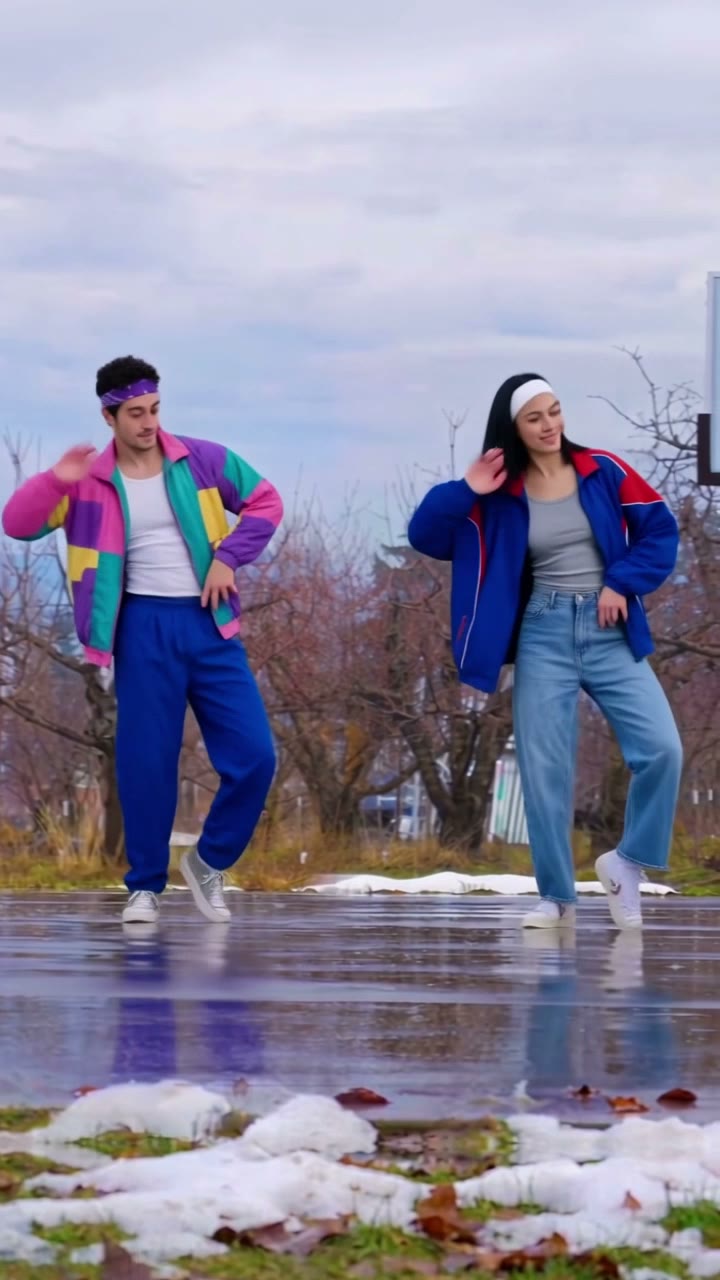
The fastest way to make the Ice Ice Baby dance AI video is to upload a photo of you to Try a Trend, plus a friend's photo if you like: the two of you dance the whole routine side by side on a wet winter basketball court in loud 90s windbreakers, step for step, and you get an 11-second vertical video with a free preview before you pay.
Ice Ice Baby Dance AI Video Generator
1 photo, 11-second vertical video, free preview before you pay. Each video is $7.99.
What is the Ice Ice Baby dance trend?
The Ice Ice Baby dance started as a home video: a father and his son doing a goofy retro routine to Ice Ice Baby in their living room, with the son leaning into the camera before the two of them launch into it together. It reached millions of views, and the routine stuck.
In November 2026 it came back as an AI trend. A CapCut template put two people in loud 90s windbreakers, headbands and sunglasses on a wet outdoor basketball court in winter, with bare trees behind them, a hoop on one side and melting snow in the puddles, doing the same routine side by side. The same template also turned out a beach version and a sitcom version, but the winter court is the look most posts use, and it's the one people mean when they say the Ice Ice Baby dance AI trend.
It works because it's pure nostalgia with zero shame. The moves are a little dorky, the outfits are louder than anything you own, and doing it in perfect sync with someone is the whole joke.
What happens in the video, second by second
Our version follows the AI court version. The camera sits on a tripod, both dancers are in full view from head to sneakers, and there are no cuts or zooms:
- 0 to 1.5 seconds: the two of you stand side by side facing the camera, nodding to the beat.
- 1.5 to 5 seconds: the routine kicks in, in sync: one hand up by the head, little shuffles and slides, knee lifts and swinging arms.
- 5 to 9 seconds: crossing steps and low bounces on bent knees, hands up by the ears, mirroring each other the whole time.
- 9 to 11 seconds: quick shuffles to finish, then a relaxed stand facing the camera.
The sync is the point. One person doing these moves looks like a warm-up; two people doing them at the same moment looks like the trend.
Three ways to make the Ice Ice Baby dance AI video
1. The CapCut template
The AI court version spread through a CapCut template, so you can go to the source. Search CapCut's Templates tab for "ice ice baby dance" and add your photos. Or do what the father and son did and learn the routine, prop up a phone and film it for real.
Good: the template is quick and cheap or free to try, and filming it yourself costs nothing and is a fun thing to do together.
Not so good: in the template's preview, the dancers keep the clothes from their photos, so you don't get the windbreakers and headbands. Templates come and go, and some add the app's ending card or need a paid plan to remove it. Filming it yourself takes practice: the steps are quick, and staying in sync with another person takes a few takes.
Best for: people who want a quick version and don't mind the outfits, or two people who actually want to learn the dance.
2. A general AI video tool like Kling or Runway
General AI video tools have motion-control features: you give them your photos and a dance clip, and they make the people in the photos copy the moves. You'd need a clip of the routine you're allowed to use as the reference, then describe the court, the outfits and the camera.
Good: you pick the setting, the outfits and the length, and the same tool works for other dances.
Not so good: two dancers in one frame is where these tools struggle. Faces can drift or swap between the two people, hands blur on the fast shuffles, and if your reference dancers wear sunglasses, you might end up wearing them too. Each retry uses credits, and these tools usually give a few free ones, then sell monthly plans or credit packs.
Best for: people who already pay for an AI video tool and want a custom version.
3. A one- or two-photo generator (Try a Trend)
Try a Trend has the court, the outfits and the routine already set up. The moves come from our own reference video, a recreation of the AI court version with two fictional dancers, so you do every step on the same beats. You're the dancer on the left. Add a friend's photo to put them on the right, or leave it empty and an AI-generated dancer, not a real person, dances next to you.
- 1Upload a clear, front-facing photo of you. Want a friend next to you? Add their photo too, or leave it empty and an AI dancer takes the spot.
- 2Confirm everyone pictured is 18+ and agreed to be in the video.
- 3Check your free preview. If you like it, get the full video.
- 4Download your video and add the Ice Ice Baby sound on TikTok.
You get an 11-second vertical video. You both wear a loud 90s windbreaker, a headband, track pants or jeans and white sneakers, but no sunglasses, so your faces show. Your face and hair stay yours. The price is the same with one photo or two. Each video is $7.99.
Good: the same steps on the same beats as the trend, no outfit or practice needed, and the second photo is optional. The free preview shows you on the court before you pay, and the video is ready in about five minutes.
Not so good: one court and one set of outfits for everyone, and the camera never moves, like the trend. At a couple of moments the dancer on the right looks down and turns, so their hair covers their face for a beat, just as in the trend. It's the AI court version, not the original living-room routine. The video is silent, so you add the song yourself, and the full video is paid.
Best for: best friends, couples, or getting your dad to finally do the dance with you.
Tips for a photo that works
- Use a clear, front-facing photo of your face. A selfie is fine; you don't need a full-body shot or anything 90s.
- Take off sunglasses and keep the face uncovered: no hat pulled low, no hand in front of your face.
- Pick good, even light, like daylight from a window. Avoid harsh sun, strong flash and very dark rooms.
- One person per photo. If there are other people in it, crop them out.
- Your photo goes on the left, your friend's on the right. Swap them if you'd rather be on the other side.
- Only upload photos of yourself and of people who agreed to it. Everyone pictured needs to be 18 or older.
What to post it with
- Sound: add the Ice Ice Baby sound inside TikTok or Instagram, where it is licensed. Start it from the beginning of the clip, and nudge it if the first step feels early or late.
- Caption idea: "had to do the ice ice baby dance" or "me and my dad, 90s edition".
- Hashtags: #iceicebaby, #iceicebabydance and #90s.
- Turn on the platform's AI-generated content label when you post. It's an AI video, and saying so keeps it honest.
- Tag the friend in the video. Half the fun is them seeing themselves in that windbreaker.
FAQ
Is this the official Ice Ice Baby dance video?
No. Try a Trend is an independent AI tool that recreates the dance and the look of the trend with your own photos. We're not affiliated with the song, its artist or record label, the creators of the viral TikToks, TikTok or CapCut.
Do I need a second photo?
No. One photo is enough: you dance on the left and an AI-generated dancer dances the routine next to you. Add a second photo if you want your friend, partner or parent there instead.
Does the video come with the song?
No. The video is silent so you can add the Ice Ice Baby sound inside TikTok or Instagram, where it's licensed.
Make yours
Upload your photo, add a friend's if you want, check the free preview, and get the Ice Ice Baby dance in about five minutes. Make your Ice Ice Baby dance video here.