How to Make the Wassup in a Minute AI Video (the Lakeside Dance)
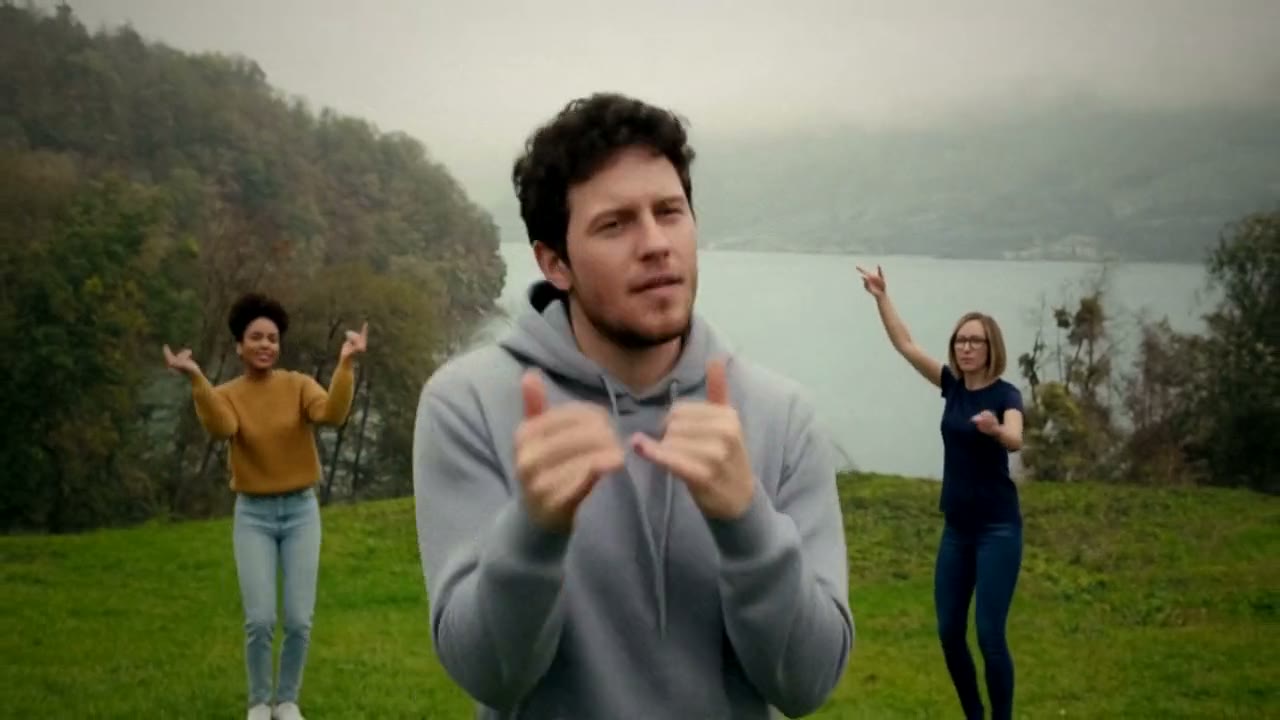
The fastest way to make the Wassup in a Minute AI video, the clip where three friends dance on a green hillside above a misty lake and one of them dances right up to the camera, is to upload one photo of yourself to Try a Trend: you see a free preview, then get a 9-second widescreen video that follows the viral clip shot for shot, with you in the middle spot. Add a second photo and a friend dances with you.
Wassup in a Minute AI Video Generator
1 photo, 9-second horizontal video, free preview before you pay. Your first video is $4.99, then $5.99 each.
What is the Wassup in a Minute trend?
Wassup in a Minute is a TikTok dance trend from autumn 2026. People also search for it as "wassup been a minute", "in a minute wassup" or simply the "wassup dance". The original is a short widescreen clip filmed on a trip to Switzerland: three friends dance on a grassy slope above a lake, with grey mountains and low cloud behind them, to a bouncy jersey club style sound. It looks like a travel video that suddenly turns into a music video, and that contrast is a big part of the charm.
In November the clip turned into an AI trend. Instead of flying to a Swiss lake, people swap themselves, their friends or their favourite characters into the same three spots, keeping the scenery, the cuts and every move. Group chats picked it up quickly because it is made for three: you, your best friend and whoever else you want to drag in.
What happens in the video, second by second
The part everyone copies is the opening, and it has three shots. Try a Trend's video keeps every beat:
- 0 to 2 seconds: the three of you stand close to the camera on the grass, bouncing through a few quick steps, the lake and mountains behind you.
- 2 to 4 seconds: hands go up on your heads on the beat, a mock "oh no" moment.
- 4 to 7 seconds: cut. You, in the middle spot, dance right up to the camera for a close-up with a cheeky grin and playful hand moves, while the other two cheer and wave behind you.
- 7 to 9 seconds: cut to a wide shot. All three of you come forward across the slope in a line.
The original keeps going for a few more seconds of looser dancing on the hill; we stop after the line walks forward, which is the part people recognise.
Three ways to make the Wassup in a Minute AI video
1. A CapCut template
The AI version of this trend spread mostly through CapCut templates. You open the template from a TikTok post, pick photos and CapCut swaps faces into the clip.
- Find a Wassup in a Minute template post on TikTok and tap the CapCut link.
- Choose your photos, one per dancer.
- Export and post.
Good: it's quick, and the basic version is free.
Not so good: templates swap faces into someone else's clip, so the bodies, clothes and hair often stay as they were and the face can drift in the close-up. Results vary a lot between templates, and many lean on cartoon or character versions rather than a realistic take on you. Watermarks and export limits depend on the app and your plan.
Best for: people who already use CapCut and want something fast and free.
2. A general AI video tool like Kling or Runway
General AI video tools can make a dance clip from a photo and a written prompt, and some can edit an existing video.
- Upload your photo and, if the tool allows it, a reference video of the dance.
- Describe the hillside, the three dancers, the two cuts and the moves with timings.
- Generate, check the faces and hands, and adjust.
Good: full control over the setting, the clothes and the style.
Not so good: three people dancing in sync is hard to get from text alone. Models tend to invent their own dance, merge the cuts into one shot or mix up who is who. Getting a friend in as well means more references and more retries, and these tools usually sell credits or plans, so every attempt counts.
Best for: people who already pay for an AI video tool and enjoy tuning prompts.
3. A one-photo generator (Try a Trend)
Try a Trend has the Wassup in a Minute dance already set up, so there is nothing to film and no prompt to write. It starts from our own reference video, a recreation of the viral clip with three fictional people, and swaps you into the middle spot: your face, hair and glasses, and the top from your photo with dark jeans, with the same hillside, cuts and moves on the same beats. Add an optional second photo and your friend takes the spot on the right; the third dancer stays a fictional AI person.
- 1Upload one clear, front-facing photo of you, ideally from the waist up. Want a friend in it too? Add their photo, or leave it empty and an AI extra dances in their spot.
- 2Confirm everyone pictured is 18+ and agreed to be in the video.
- 3Check your free preview. If you like it, get the full video.
- 4Download in a few minutes: one with the original sound, one silent for adding the sound on TikTok.
You get a 9-second widescreen video ready to post, with the original sound and a silent copy. Your first video is $4.99, then $5.99 each.
Good: no trip, no tripod and no friends who need to learn the moves. The close-up and both cuts land on the same beats as the clip it follows, and you see a free preview photo before paying. The video is ready in a few minutes.
Not so good: the scene is fixed: the same lake, the same three spots and the same moves every time. Only you and one friend can be swapped in, so the third dancer is always fictional. You wear the top from your photo with dark jeans rather than a full outfit of your choice. The full video is paid, and it's AI, so it's a take on you rather than real footage of you.
Best for: anyone who wants the clip today, alone or with one friend.
Tips for a photo that works
- Use one clear photo of you facing the camera, ideally from the waist up so your top shows. A selfie works too.
- Good, even light keeps your face and skin tone true. Daylight near a window is ideal.
- Skip sunglasses, heavy beauty filters and photos where your face is partly covered. Use the original photo rather than a screenshot.
- Your top carries over to the video, so pick a photo in something you like.
- Adding a friend? Their photo follows the same rules: one person, face to the camera.
- Only upload photos of yourself or of people who agreed to it, and everyone pictured must be 18 or older.
What to post it with
- Caption: keep it short and in on the joke, like "wassup in a minute but it's us", or tag the friend you put in it.
- Sound: use the silent version and add the Wassup in a Minute sound inside TikTok or Reels, so your post shows up on that sound's page. The download with sound is there for sharing anywhere else.
- Hashtags: #wassupinaminute, #wassupdance and #inaminutewassup.
FAQ
Is this the official Wassup in a Minute video?
No. Try a Trend is an independent AI tool that recreates the look of the trend with your own photo. We're not affiliated with the creators of the original sound or the viral TikToks, TikTok or CapCut. Your video is AI-generated: it follows a TikTok clip of the trend shot for shot, with you swapped in, and the other dancers are fictional AI people.
Can all three dancers be my friends?
Not yet. You can add one friend, who takes the spot on the right. The third dancer is always a fictional AI person.
Why is it widescreen?
Because the original is. The clip was filmed in landscape, and keeping it wide keeps the lake and the mountains in the shot. TikTok and Reels show it with bars above and below, the same way the original appears.
Make yours
Want the Wassup in a Minute dance without a trip to Switzerland? Upload one photo, add a friend if you like, and check the free preview. Make your Wassup in a Minute video here.