How to Make the Sticky Bubblegum AI Video (Sticky Bubble Gum Dance)
The fastest way to make the Sticky Bubblegum AI video, the clip where a little one claps, gets their hands stuck to their tummy, pulls the "gum" apart and finishes with a tiny kick, is to upload one photo of your baby or toddler to Try a Trend: you see a free preview, then get an 8-second vertical video that follows a real TikTok clip of the trend shot for shot, with your child's face and hair, and no need to get a toddler to dance on cue.
Sticky Bubblegum AI Video Generator
1 photo, 8-second vertical video, free preview before you pay. Each video is $7.99.
What is the Sticky Bubblegum trend?
Sticky Bubblegum (people also search for it as the sticky bubble gum dance or Icky Sticky Bubble Gum) is a TikTok dance trend that took off in mid-November 2026. A DJ remixed the old preschool song Icky Sticky Bubble Gum, the one where you pretend your hands are stuck together with gum, and the remix turned the song's actions into a short dance: clap, stick your hands to your tummy, pull them apart, kick.
Grown-ups dance it too, but the version everyone shares is a baby or toddler doing it, usually standing on a bed in a onesie, wobbling through the moves with very serious concentration. Within days, CapCut templates and AI versions appeared, so parents could make the clip from a single photo instead of trying to film a toddler who has their own plans.
What happens in the video, second by second
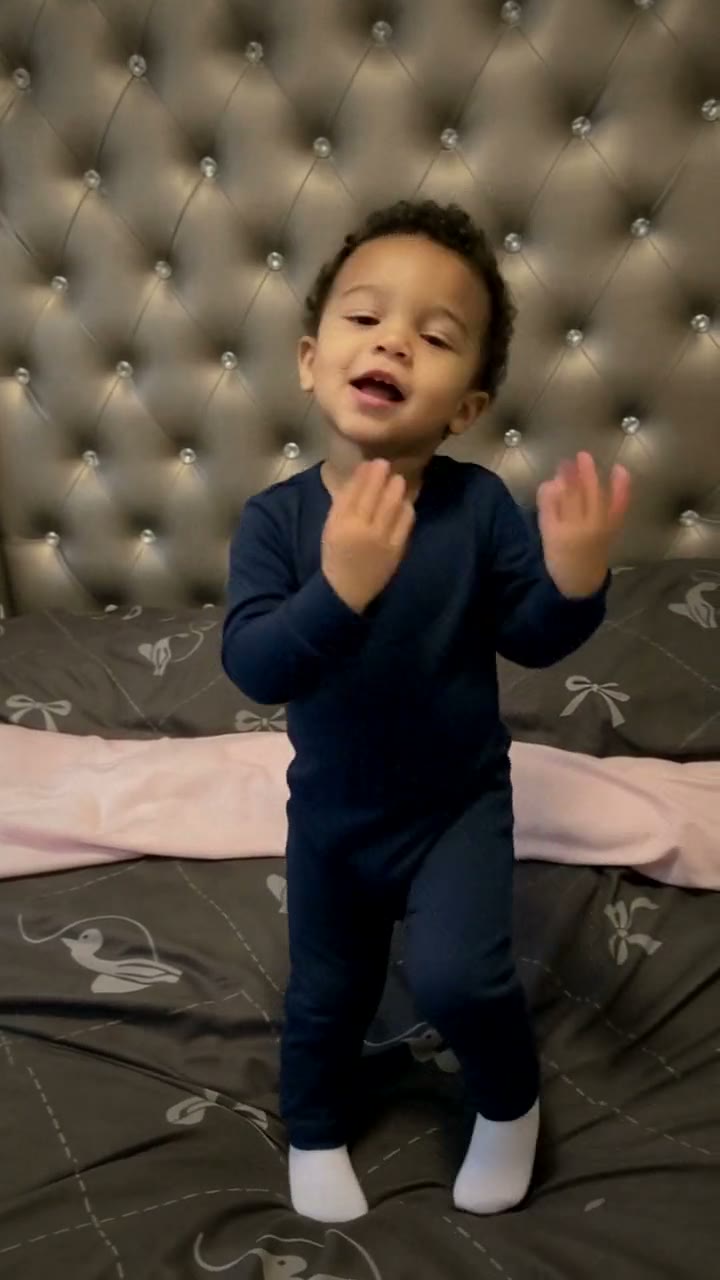
The clip we follow is about eight seconds, one phone shot of a little one standing on a big bed with a tufted headboard, a dark grey duvet and a soft pink blanket behind their legs. Try a Trend's video keeps every beat:
- 0 to 2 seconds: turned to one side, clapping along, then a turn to the camera, a little wiggle and a tiny hop.
- 2 to 4 seconds: a funny scrunched-up face and a shrug, hands flapping at their sides, little steps, arms out wide.
- 4 to 6 seconds: a bend forward with both hands stuck to the tummy, then up again with both fists stuck together in front of the chest.
- 6 to 8 seconds: the fists pull apart, a little kick to the side, and a couple of steps toward the edge of the frame as the camera moves in a touch.
It's short on purpose: that's one full round of the dance, and it loops nicely with the sound on TikTok.
Three ways to make the Sticky Bubblegum AI video
1. Film it yourself, or use a CapCut template
The trend started with real families filming, so the classic way is to do the same.
- Stand your little one somewhere soft and safe, like the middle of a bed, and prop your phone up so their whole body is in the frame.
- Play the sound and dance it with them: clap, hands on tummy, pull apart, kick. Expect a few takes.
- Trim the best one and post. CapCut also has templates for this trend where you pick a photo instead of filming.
Good: it's free, and nothing beats your actual kid doing it.
Not so good: toddlers rarely perform on cue, so getting all four moves in one take can take a while. Templates are quick, but they tend to look the same for everyone.
Best for: families with a little one who already loves dancing to it.
2. A general AI video tool like Kling or Runway
General AI video tools can turn a photo into a short clip from a written description. For this trend you would describe the whole thing yourself: the bed, the framing, each move and when it happens.
- Upload the photo as the reference image.
- Write a prompt that walks through the claps, the sticky tummy, the pull and the kick with timings.
- Generate, check the face and the hands, and adjust the prompt.
Good: full control over the setting, the outfit and the style.
Not so good: a specific little routine is hard to get from text. The model may invent its own dance, change the child's face partway through or lose the hands-stuck-together moment, and every retry costs credits. Some tools are also cautious with photos of children.
Best for: people who already pay for an AI video tool and enjoy tuning prompts.
3. A one-photo generator (Try a Trend)
Try a Trend has the Sticky Bubblegum dance already set up, so there is no prompt to write and nothing to film. It starts from our own reference video, a recreation of a real TikTok clip of the trend with a fictional toddler, and swaps that toddler for your little one: their face and hair, in a soft long-sleeve romper in the colour of the top in your photo, with the same bed, camera and moves on the same beats.
- 1Upload one clear, front-facing photo of your baby or toddler in everyday clothes. A full-body photo of them standing works best.
- 2Confirm the photo is of you or someone who agreed. If they're under 18, confirm you're their parent or legal guardian.
- 3Check your free preview. If you like it, get the full video.
- 4Download in a few minutes: one with the original sound, one silent for adding the sound on TikTok.
You get an 8-second vertical video ready to post, with the original sound and a silent copy. Each video is $7.99.
Good: no filming and no wrangling a toddler, the moves land on the same beats as the clip it follows, and you see a free preview of your little one on the bed before paying. The video is ready in a few minutes.
Not so good: the scene is fixed: the same bed and the same moves every time, and your child wears a romper rather than their own outfit. It's made for babies and toddlers, so a photo of an older child or an adult still comes out as a toddler-sized dancer. The full video is paid. It's AI, so it's a sweet take on your child rather than real footage of them.
Best for: parents and grandparents who want the clip today.
Tips for a photo that works
- Use one clear photo of your little one facing the camera in good light. A photo of them standing, with their whole body in the shot, works best.
- Upload a photo where they're dressed in everyday clothes. We only accept photos where everyone is fully dressed, so skip bath, beach and nappy-only photos.
- Keep the face clear: no hands, dummies, hats or blankets covering it. Use the original photo rather than a screenshot.
- The colour of their top carries over to the romper in the video, so pick a photo in a colour you like.
- One child per photo, and only upload a photo of a child you're the parent or legal guardian of.
What to post it with
- Caption: something short like "the sticky bubble gum dance 🫧" or "they nailed it" does the job.
- Sound: use the silent version and add the Sticky Bubble Gum remix sound inside TikTok or Reels, so your post shows up on that sound's page. The download with sound is there for sharing anywhere else, like the family group chat.
- Hashtags: #stickybubblegum and #stickybubblegumdance, plus #babydance.
FAQ
Is this the official Sticky Bubblegum video?
No. Try a Trend is an independent AI tool that recreates the look of the trend with your own photo. We're not affiliated with the song Icky Sticky Bubble Gum or its owners, the remix's creator, the creators of the viral TikToks, TikTok or CapCut. Your video is AI-generated: it follows a real TikTok clip of the trend shot for shot, with the dancer swapped for your little one.
Can I use a photo of a baby who can't stand yet?
Yes. The video shows your little one standing and dancing on the bed, whatever they can do in real life. A clear photo of their face is what matters most.
Why is it only eight seconds?
That's one full round of the dance: clap, stick, pull, kick. It loops with the sound on TikTok, just like the originals.
Make yours
Want your little one in the Sticky Bubblegum dance without filming a single take? Upload one photo and check the free preview. Make your Sticky Bubblegum video here.