How to Make the Last Dance AI Video (the TikTok Hand-Hold Spin)
The fastest way to make the Last Dance AI video, the TikTok clip where two people catch one hand and spin around each other with their free arms flung wide, is to upload one photo of yourself to Try a Trend: you see a free preview, then get a 9-second vertical video that follows a viral clip of the trend move for move, with you as the lead dancer. Add a second photo and your friend becomes your partner.
Last Dance AI Video Generator
1 photo, 9-second vertical video, free preview before you pay. Each video is $7.99.
What is the Last Dance trend?
Last Dance is a TikTok dance trend that took off in autumn 2026. People search for it as "last dance trend" or "the last dance trend", and many of them are really asking which song it is: fans call the track The Last Dance, a Vocaloid song from 2014 that found a second life online this year.
The dance itself is simple and that is why it spread. Two people face each other, one bows forward and reaches out, the other reaches back, they catch one hand and then spin around each other again and again, kicking their feet and throwing their free arms wide like they are flying. It works in a hallway, a park or an empty car park. Cosplayers dressed as characters from the same show made it famous, and best friends, couples and siblings followed. Now people swap themselves and a friend into a clip of the trend with AI instead of finding a partner who will rehearse it.
What happens in the video, second by second
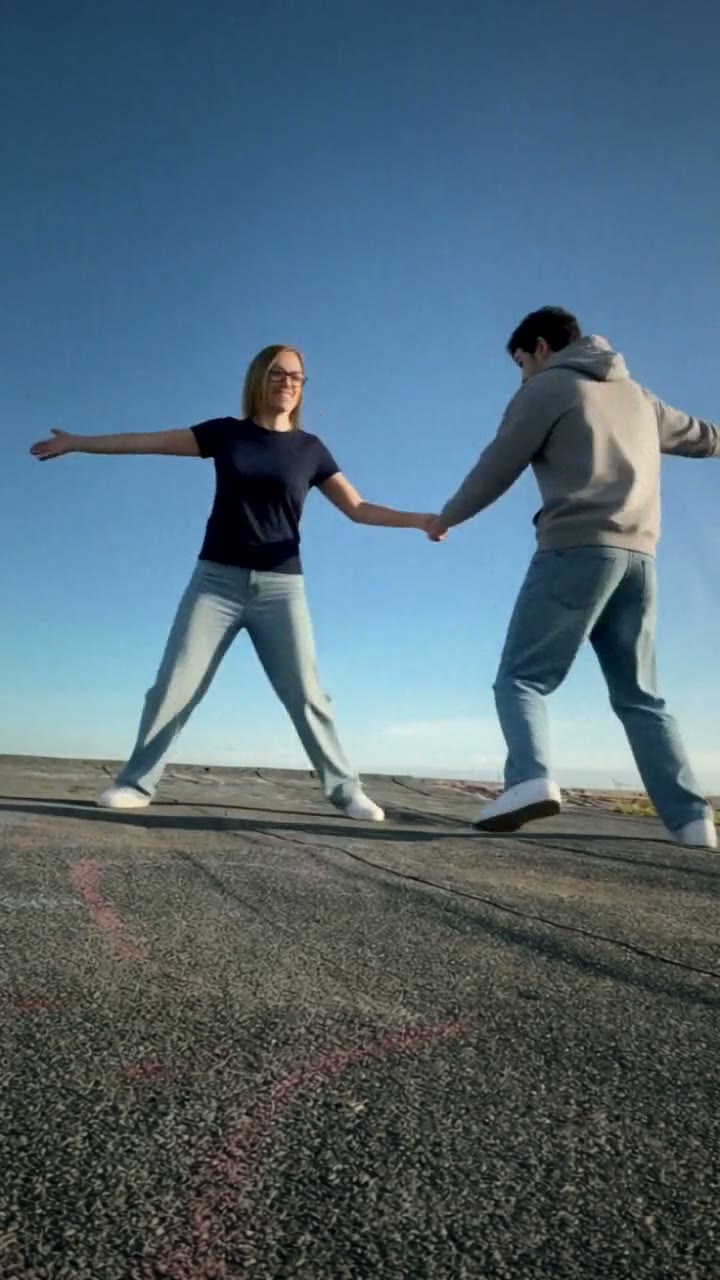
Try a Trend's version follows a single-shot TikTok clip filmed from a low camera on open asphalt under a clear blue sky. The camera never moves, so every beat reads clearly:
- 0 to 1 second: you and your partner stand a few metres apart, facing each other, the sky filling most of the frame.
- 1 to 3 seconds: you bow forward and stretch a hand out; your partner turns and reaches back.
- 3 to 4 seconds: you catch one hand, dip low and pull together.
- 4 to 9 seconds: free arms flung out, you whirl around each other, swapping sides with little jumps and kicks, faces turning to the camera on every pass.
The original clip keeps spinning for a few more seconds; we stop after the first full run of spins, which is the part people recognise.
Three ways to make the Last Dance AI video
1. A CapCut template
Many trend videos start from a CapCut template linked in a TikTok post. You pick photos and the app swaps faces into an existing clip.
- Find a Last Dance template post on TikTok and tap the CapCut link.
- Choose a photo for each dancer.
- Export and post.
Good: it's quick, and basic templates are free.
Not so good: templates usually swap only the face, so the bodies, clothes and hair stay as they were. In a dance with this much spinning, the face often slips or blurs when the dancers turn. Watermarks and export limits depend on the app and your plan.
Best for: people who already use CapCut and want something fast and free.
2. A general AI video tool like Kling or Runway
General AI video tools can make a dance clip from a photo and a prompt, and some can edit a reference video.
- Upload your photo and, if the tool allows it, a reference video of the dance.
- Describe the setting, the two dancers, the hand hold and the spins with timings.
- Generate, check faces and hands, and try again.
Good: full control over the setting, the clothes and the style.
Not so good: two people spinning while holding hands is one of the hardest things to get from text. Models tend to merge the dancers, lose the hand hold or mix up who is who after a spin. Adding a friend means more references and more retries, and these tools usually sell credits, so every attempt costs something.
Best for: people who already pay for an AI video tool and enjoy tuning prompts.
3. A one-photo generator (Try a Trend)
Try a Trend has the Last Dance already set up, so there is nothing to film and no prompt to write. It starts from our own reference video, a recreation of a TikTok clip of the trend with two fictional dancers, and swaps you into the lead: your face, hair and glasses, and the top from your photo with loose wide-leg jeans, with the same sky, the same low camera and every spin on the same beat. Add an optional second photo and your friend takes the partner's place; leave it empty and a fictional AI partner dances with you.
- 1Upload one clear, front-facing photo of you, ideally full body or from the waist up. Want a friend as your partner? Add their photo, or leave it empty and an AI partner dances with you.
- 2Confirm everyone pictured is 18+ and agreed to be in the video.
- 3Check your free preview. If you like it, get the full video.
- 4Download in a few minutes: one with the original sound, one silent for adding the sound on TikTok.
You get a 9-second vertical video ready to post, with the original sound and a silent copy. Each video is $7.99.
Good: no partner to rehearse with and no tripod. The bow, the catch and every spin land on the same beats as the clip it follows, both dancers stay themselves through the side swaps, and you see a free preview photo before paying. The video is ready in a few minutes.
Not so good: the scene is fixed: the same blue sky, the same asphalt and the same moves every time. You wear the top from your photo with wide-leg jeans rather than a costume of your choice, so it won't turn you into a character. The full video is paid, and it's AI, so it's a take on you rather than real footage of you.
Best for: anyone who wants the clip today, alone or with one friend.
Tips for a photo that works
- Use one clear photo of you facing the camera, ideally full body or from the waist up so your top shows.
- You are filmed from a few metres away and you spin a lot, so good light on your face matters more than usual. Daylight near a window is ideal.
- Skip sunglasses, heavy beauty filters and photos where your hair or a hand covers your face. Use the original photo rather than a screenshot.
- Your top carries over to the video, so pick a photo in something you like.
- Adding a friend? Their photo follows the same rules: one person, face to the camera.
- Only upload photos of yourself or of people who agreed to it, and everyone pictured must be 18 or older.
What to post it with
- Caption: keep it short and soft, like "our last dance", or tag the friend you spun with.
- Sound: use the silent version and add the Last Dance sound inside TikTok or Reels, so your post shows up on that sound's page. The download with sound is there for sharing anywhere else.
- Hashtags: #lastdance and #lastdancetrend.
FAQ
Is this the official Last Dance video?
No. Try a Trend is an independent AI tool that recreates the look of the trend with your own photo. We're not affiliated with the creators of the song, the viral TikToks, TikTok or CapCut. Your video is AI-generated: it follows a TikTok clip of the trend move for move, with you swapped in, and your partner is a fictional AI person unless you add a friend's photo.
Can I dance it with my partner or best friend?
Yes. Add their photo as the second upload and they become your partner, the dancer who starts on the right. Each of you keeps your own face and top through every spin.
Can it look like the cosplay versions?
Not yet. You wear the top from your photo, not a character costume, and the setting is always the open asphalt under a blue sky.
Make yours
Want the Last Dance without finding someone to rehearse it with? Upload one photo, add a friend if you like, and check the free preview. Make your Last Dance video here.