How to Make the Santa in Your House AI Video With Your Pet
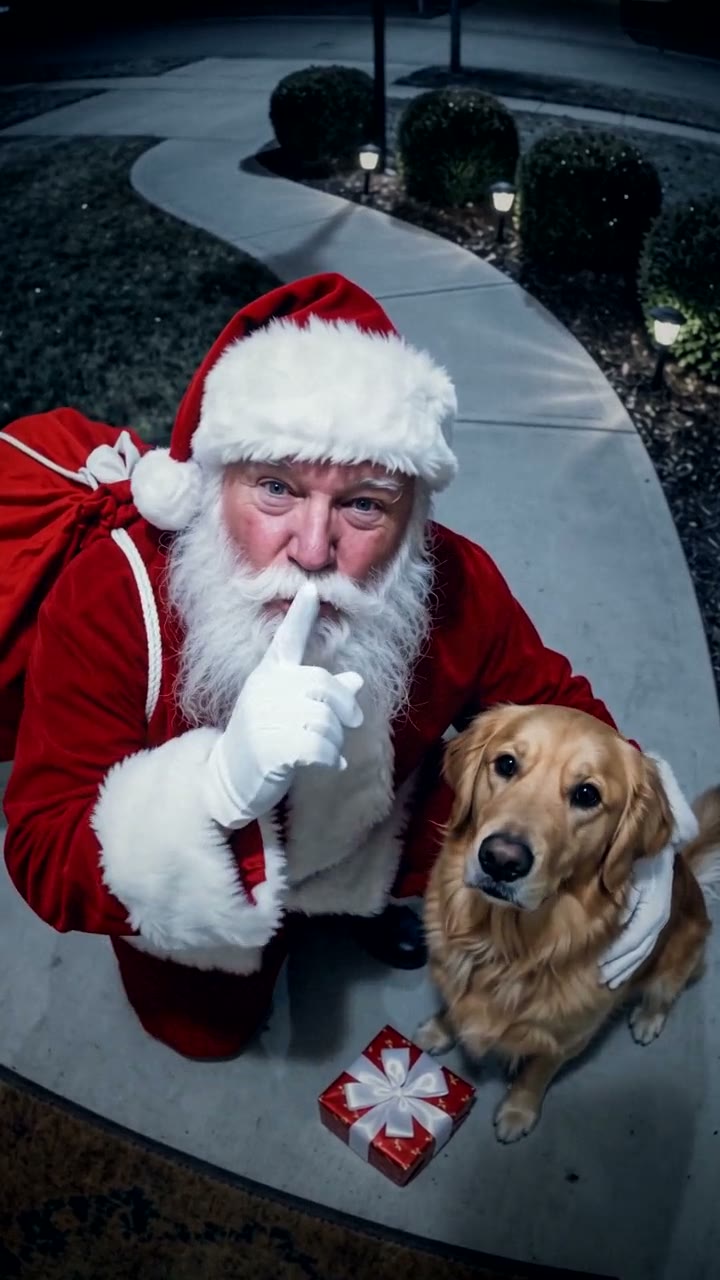
The fastest way to make the Santa in Your House AI video is to upload one photo of your dog, cat or other pet to Try a Trend: you get a 10-second vertical clip that looks like night footage from a home security camera, where Santa tiptoes up the front walk, stops to give your pet a present and winks at the camera, and you see a free preview of your pet with Santa before you pay.
Santa in Your House AI Video Generator
1 pet photo, 10-second vertical video, free preview before you pay. Each video is $7.99.
What is the Santa in Your House trend?
Santa caught on camera is a Christmas video format on TikTok and YouTube Shorts. It's grainy night footage from a doorbell or home security camera that seems to catch Santa Claus at someone's house: crossing the yard, coming up to the door, sometimes looking right into the lens. People look for it as "Santa in my house", "AI Santa video" or "Santa caught on camera", and searches peak in the week before Christmas.
The format took off with a creepy AI clip posted on Christmas Day 2024. A fixed security camera watches an empty front walk at night until Santa appears far off on the lawn and makes his way, step by step, right up to the camera. It was a horror short, and it was watched millions of times. By Christmas 2025, parents had turned the same idea around into friendly versions to show their kids on Christmas morning, and pet owners started putting their own dog or cat in the shot.
What happens in the video, second by second
The viral clip is a single shot of about 10 seconds: the camera never cuts and never moves. Our version keeps that slow build-up but makes it warm, with Santa coming for your pet instead of the camera:
- 0 to 1 second: night on a security camera mounted high on the house, wide angle, looking down the front walk to the street. The picture is cold blue-grey and grainy. Your pet sits on the walk near the camera, watching the street.
- About 1 to 3 seconds: far across the lawn on the left, Santa sneaks in low, tiptoeing over the grass with his sack. Your pet turns its head to follow him.
- About 3 to 5 seconds: under the street lamp he straightens up and walks up the path toward the house, getting bigger in the frame, until he reaches your pet.
- About 5 to 8 seconds: Santa kneels, gives your pet a scratch behind the ears and leaves a little wrapped present with a white bow at its paws.
- About 8 to 10 seconds: Santa looks straight up into the camera, smiles, winks and puts a finger to his lips, while your pet looks up at the camera too.
The moments that sell it are the empty yard at the start, the small red figure appearing in the dark, the walk toward the lens and that final look into the camera. In the original it's a scare; here it's a "shh, don't tell".
Three ways to make the Santa in Your House AI video
1. A CapCut template
CapCut is the free video editor from the company behind TikTok. Its Templates tab fills up with Christmas templates every December; search for terms like "santa caught on camera" or "security camera". Camera-style templates and effects usually add a night-vision filter, a timestamp and a REC dot over footage you supply.
Good: free to try, and quick if you already have the footage.
Not so good: a template adds the camera look, not Santa. To get Santa in the shot you need someone in a Santa suit, footage of your own yard at night and a pet that will sit still on cue. Templates also change from season to season, and some add the app's ending card or need a paid plan to remove it.
Best for: families with a Santa suit, a willing helper and a patient pet.
2. A general AI video tool like Kling or Runway
General AI video tools can animate a photo of your pet from a text description. You write the whole scene yourself.
- Upload a clear photo of your pet and describe the look: night, a fixed security camera high up, wide angle, cold and grainy.
- Write the action in order: the empty yard, Santa appearing far away, the walk up the path, the present, the wink.
- Generate, then adjust until your pet still looks like your pet and Santa looks friendly.
Good: you control everything, from the house and the snow to what's in the present.
Not so good: you write and tune the prompt yourself. A small figure far away in the dark often comes out blurry or walks oddly, the camera may start to drift, and keeping your pet's exact coat and markings takes trial and error. Each try uses credits; these tools usually give a few free credits, then sell monthly plans or credit packs.
Best for: people who enjoy fine-tuning and already pay for an AI video tool.
3. A one-photo generator (Try a Trend)
Try a Trend has the whole scene set up, so you only upload one photo of your pet.
- 1Upload one clear photo of your dog, cat or other pet, with its face visible and no people in the shot.
- 2Confirm it's your pet (or you have permission to use the photo).
- 3Check your free preview. If you like it, get the full video.
- 4Download in a few minutes, then show the kids or add a Christmas song when you post.
Your 10-second video is one steady shot from a camera high on the house at night. Your pet waits on the front walk; Santa sneaks in from the far side of the lawn, stands up tall under the street lamp and heads up the path. He kneels beside your pet, scratches its ears and sets down a little present, then looks up at you with a smile, a wink and a finger to his lips. Each video is $7.99.
Good: no Santa suit, no camera and no editing. The video keeps your pet's breed, coat colours and markings, your pet sits close to the camera so its face is easy to see, and you get a free preview of your pet with Santa before you pay. Santa is an AI-made character, and he's jolly, never scary.
Not so good: the scene is fixed: the front walk, the street lamp and the house are made by the AI, so it isn't your actual home. The video is silent, so you add the sound yourself, and it's an AI-made video, not real camera footage.
Best for: pet owners who want a finished Santa video from one photo, in time for Christmas morning.
Tips for a photo that works
- One clear photo of your pet with its face fully visible: facing the camera or a three-quarter view works best. A photo from behind or a strict side profile gives the AI too little to go on.
- One animal per photo, and no people in the shot. If your favourite photo has someone in it, crop them out first.
- A sharp photo taken while your pet was still, in good, even light such as daylight or near a window, so the coat colours and markings come through. The video is dark, so a clear photo matters even more.
- Dogs, cats, rabbits and other pets all work.
- Only use a photo of your own pet, or one you have permission to use.
What to post it with
- Sound: the video is silent, so add something soft and festive from TikTok's or Instagram's sound library, where it's licensed. Sleigh bells, a doorbell chime or a quiet Christmas piano all suit the late-night camera feel, and a Christmas song works too.
- Hashtags: #santacaughtoncamera, #christmaspets and #santa.
- A caption in your pet's voice: "Caught Santa on the porch cam and he brought me a present. I've been very good this year."
- When to post: in the week before Christmas or on Christmas Eve, then play it for the family on Christmas morning.
FAQ
Is this an official Santa video or app?
No. Try a Trend is an independent AI tool that makes its own Santa caught on camera video from your pet's photo. We're not affiliated with any Santa video app or website, any Santa brand, any doorbell or security camera company, TikTok or CapCut.
Can I put two pets in one video?
The video is made from one photo of one animal, so make one video per pet.
Is there a Spanish version of this page?
Yes. You can make the same video from the Spanish page, and for more pet videos see all pet trends.
Make yours
If your pet has been very good this year, upload one photo and check the free preview of Santa's visit. Make your pet's Santa in Your House video here.