How to Make the Day of the Dead Pet AI Video (Día de Muertos Mascotas)
The fastest way to make the Day of the Dead pet AI video is to upload one photo of your dog or cat to Try a Trend: you get a 10-second vertical 3D animated video of your pet walking a marigold path through a candlelit town and finding its own photo on an ofrenda, with a free preview before you pay and no animation software or editing.
Day of the Dead Pet AI Video Generator
1 pet photo, 10-second vertical video, free preview before you pay. Your first video is $4.99, then $5.99 each.
What is the Day of the Dead Pet trend?
In Spanish the trend is called "Es su primer Día de Muertos", which means "it's their first Day of the Dead". It took off on TikTok in October 2026, mostly in Mexico and across Latin America. People upload a photo of a pet that has passed away and get back a short animated clip of their dog or cat arriving in a glowing, candlelit Day of the Dead world, where it's welcomed because someone at home has put its photo on the altar.
The idea comes straight from the tradition. During the Day of the Dead, families build an ofrenda (an altar) with photos of loved ones, candles, food and orange cempasúchil marigolds, and scatter petals to guide the spirits home. Many families set aside October 27 for pets, the day they are said to come back first, so the trend peaks in the last days of October, just before the main celebrations on November 1 and 2.
The clips are gentle rather than spooky. The appeal is seeing a pet you miss looking happy and curious again, in warm candlelight, with your own photo of it on the altar. Plenty of people also make one for a pet that's still with them, simply because it looks beautiful.
What happens in the video, second by second
The most-liked version we studied is a CapCut template shown off in a tutorial. Its finished clip runs about 10 seconds and shows two dogs, one after the other, in a 3D animated style with big shining eyes and soft fur.
- 0 to 1 second: a wide shot at night: a city of lights, a glowing path of marigold petals and crowds of people, all in warm orange against a purple-blue sky.
- About 1 to 2 seconds: a low close-up of a small white terrier trotting toward the camera over scattered petals, looking up, a little unsure.
- About 2 to 4 seconds: the dog reaches a gateway where an official checks a screen. A close-up shows the dog's own photo in a frame on an ofrenda, surrounded by marigolds and candles.
- About 4 to 6 seconds: the dog is welcomed in and trots ahead into the glowing world.
- About 6 to 10 seconds: the same story again with a second dog: a medium shot on the petal path, the photo on the altar, then the dog walking on.
The shots that make it work are the wide opening, the low close-up of the pet walking toward you, and the insert of its photo on the ofrenda. That photo is the emotional moment: it means the pet is remembered.
Three ways to make the Day of the Dead Pet AI video
1. A CapCut template
CapCut is the free video editor from the company behind TikTok, and this trend spread through its templates. Tap "Use template" (or the CapCut link) under a video you like, or search "dia de muertos mascota" in CapCut's Templates tab, then pick your pet's photo and export.
Good: quick and free to try, and the look is exactly what you've seen on TikTok.
Not so good: templates come and go, and many of them borrow scenes and characters from a well-known animated film. You have little control over the shots, and some templates add the app's ending card or need a paid plan to remove it. Results vary a lot with the photo you pick.
Best for: people who already use CapCut and want the exact template look.
2. A general AI video tool like Kling or Runway
General AI video tools can animate a photo of your pet from a text description. You describe the town, the candles, the papel picado, the altar and each shot yourself.
- Upload a clear photo of your pet and describe the style (3D animated, warm candlelight, night).
- Write the shots in order: the wide opening, the close-up of your pet walking toward the camera, the photo on the ofrenda, your pet reaching the altar.
- Generate, then adjust until your pet still looks like your pet.
Good: you control every detail, from the colours of the papel picado to what's on the altar.
Not so good: you write and tune the prompt yourself, and keeping your pet's exact coat and markings across several shots takes trial and error. Each try uses credits; these tools usually give a few free credits, then sell monthly plans or credit packs.
Best for: people who enjoy fine-tuning and already pay for an AI video tool.
3. A one-photo generator (Try a Trend)
Try a Trend has the whole scene set up, so you only upload one photo of your pet.
- 1Upload one clear photo of your pet, with its face visible and no people in the shot.
- 2Confirm it's your pet (or you have permission to use the photo).
- 3Check your free preview. If you like it, get the full video.
- 4Download in a few minutes and add a soft song or the trending sound on TikTok.
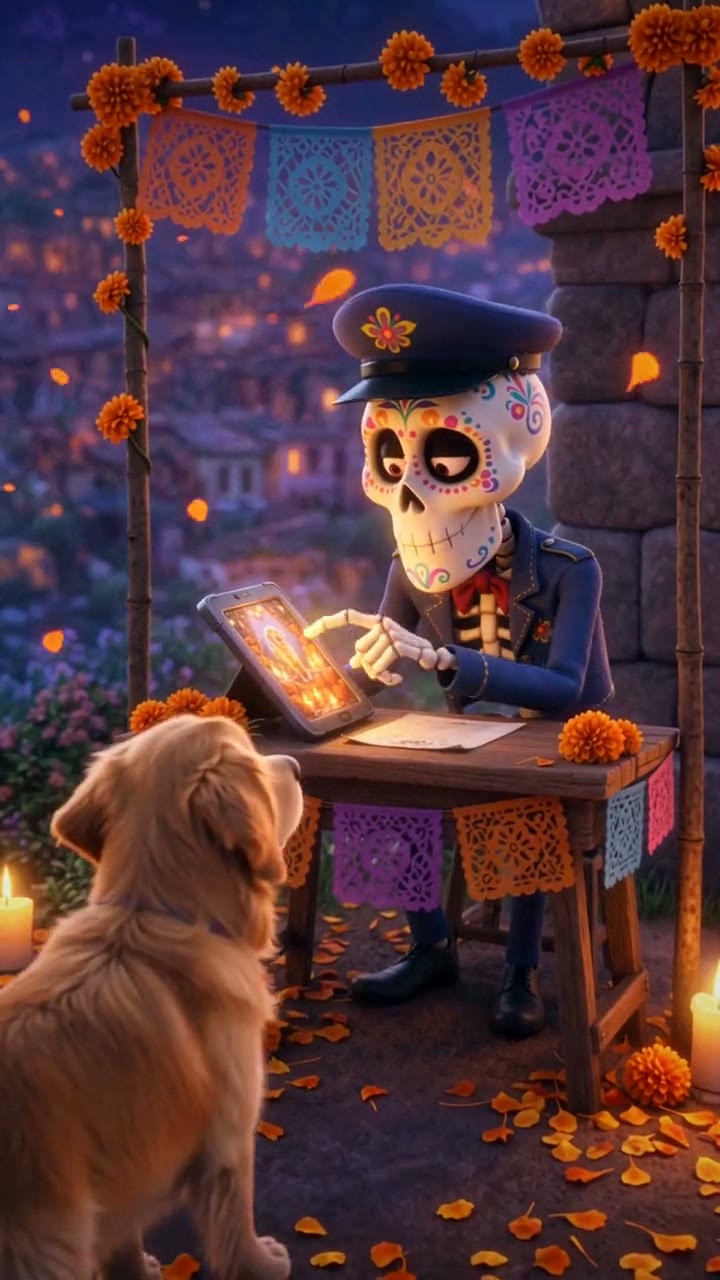
Your 10-second video follows the same shots as the viral clip, with our own characters and set. It opens wide on a glowing town on the hills, a candlelit stone archway and a bridge of marigold petals. Then a low close-up as your pet walks toward you over the petals. At the gate, a friendly skeleton officer with a flower-painted face and a dark-blue cap looks your pet up on a glowing screen, and the screen fills the frame: there is your pet's picture, framed and set on the family altar between marigolds and candles. The officer grins, brings down a little rubber stamp and waves your pet through, and it races across the marigold bridge toward the lights. Your first video is $4.99, then $5.99 each.
Good: no templates, no animation software and no editing. The video keeps your pet's breed, coat colour and markings, and you see a free preview of your pet at the gate before you pay. The officer and the whole set are our own designs, not characters or scenes from any film.
Not so good: the scene is fixed, the video is silent so you add the music yourself, and it is an AI animation, not real footage of your pet.
Best for: anyone who wants a gentle, finished tribute from a single photo, today.
Tips for a photo that works
- One clear photo of your pet with its face fully visible, ideally looking toward the camera. Dogs, cats and other pets all work.
- One animal per photo, and no people in the shot. If your favourite photo has you in it, crop yourself out first.
- A sharp photo taken while your pet was still. An older photo is fine if it isn't blurry; a scan of a printed photo works too.
- Good, even light such as daylight or near a window, so the coat colour and markings come through.
- Only use a photo of your own pet, or one you have permission to use.
What to post it with
- Sound: a soft instrumental or the trending sound for "es su primer Día de Muertos" from TikTok's sound library, where it is licensed.
- Hashtags: #diademuertos, #diademuertosmascotas, #27deoctubre and #dayofthedead.
- A caption in your own words, or in your pet's voice: "I followed the marigolds all the way home." In Spanish, "Te esperamos en casa" (we're waiting for you at home) is a common one.
- Post it around October 27 or on November 1 and 2, when people are looking for it.
FAQ
Is this the official "Es su primer Día de Muertos" template?
No. Try a Trend is an independent AI tool that makes its own Day of the Dead pet video from your photo. We're not affiliated with CapCut, TikTok, any film studio or any movie.
Is there a Spanish version of this page?
Yes. You can make the same video from the Spanish page, and for more pet videos see all pet trends.
Make yours
If there's a pet you'd like to welcome home this Day of the Dead, upload one photo and check the free preview. Make your pet's Day of the Dead video here.