How to Make the Rainbow Bridge AI Video (Pet Memorial Tribute)
The fastest way to make the Rainbow Bridge AI video is to upload one photo of your dog or cat to Try a Trend: you choose what your pet does, where it happens and how it should feel, see a free preview, and get a 10-second vertical tribute of your pet walking up to you above golden clouds and then on into the light, with no editing.
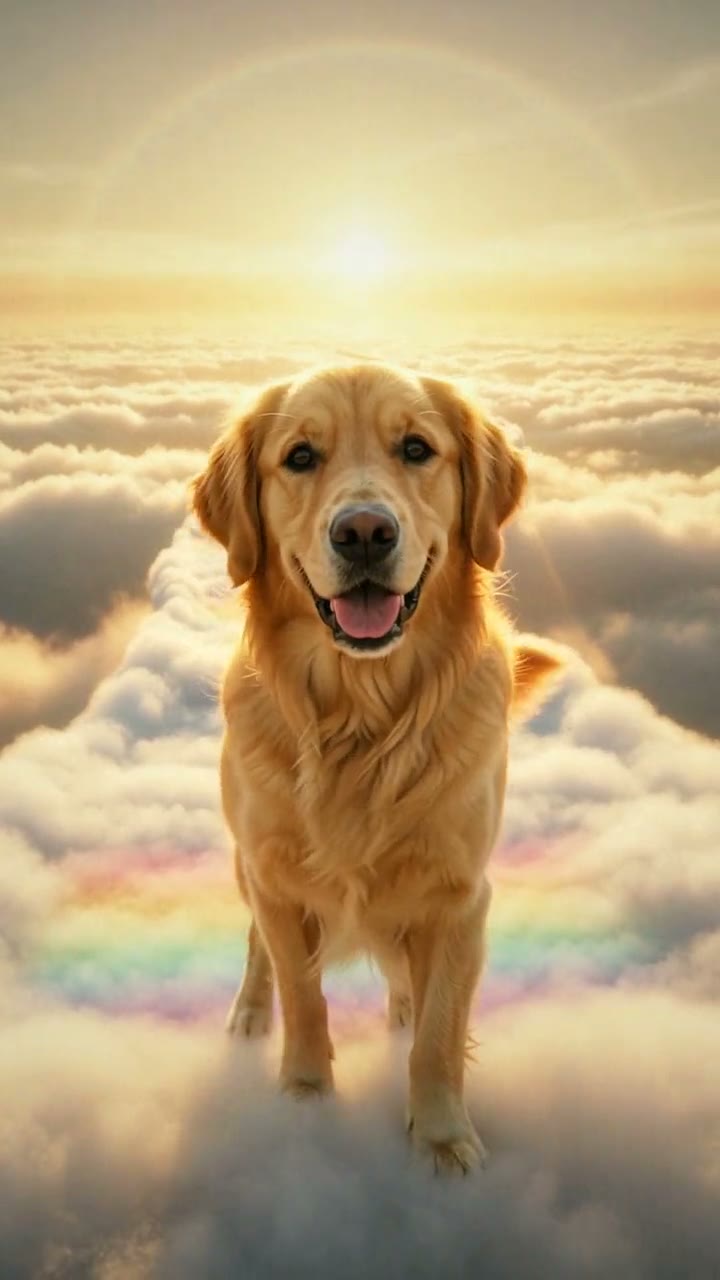
Rainbow Bridge AI Video Generator
1 pet photo, 10-second vertical video, free preview before you pay. Each video is $7.99.
What is the Rainbow Bridge trend?
The Rainbow Bridge comes from a short piece of writing that pet owners have passed around for decades. It describes a green meadow just this side of heaven where pets who have died are young and healthy again, play together in the sun and wait for the person who loved them, and a bridge the two of them cross together when they finally meet again. "Crossed the Rainbow Bridge" has become a gentle way to say a pet has died, and many vets and shelters use it too.
On TikTok, the idea has turned into a format of its own: short, realistic AI tribute clips made from a single photo of a pet. The pet appears on a glowing path above the clouds, walks up to the camera, looks at you for a moment, then turns and trots on toward the sun. People post them in the days after losing a pet, on its birthday, on the anniversary of its passing or on Rainbow Bridge Remembrance Day, August 28. The comments are usually full of other owners sharing their own pets' names.
The appeal is simple. If your last memories of a pet are of it being old or unwell, seeing it calm, healthy and free again is a comfort, even when you know it's an AI image.
What happens in the video, second by second
The most-liked version we studied is a 10-second clip filmed as one unbroken shot, with no cuts, in a realistic style.
- 0 to 1.5 seconds: a wide view of a white path winding across a sea of soft clouds toward a low golden sun. The dog is a small figure far down the path, coming your way.
- About 1.5 to 3 seconds: it trots closer and closer, ears bouncing, the path shimmering with faint rainbow colours under its paws.
- About 3 to 4 seconds: it stops right in front of the camera and lifts one front paw, like a little wave.
- About 4 to 5.5 seconds: it looks straight into the camera with soft eyes for a long moment.
- About 5.5 to 6.5 seconds: it turns away as the sun starts to send out rays of light.
- About 6.5 to 10 seconds: it walks back up the path toward the sun, getting smaller and smaller until it disappears into the glow.
Many versions also put a line of text on screen written as if the pet were talking. The moments that carry the feeling are the walk toward you, the little wave, the long look and the walk into the light, which says goodbye without a single word.
Three ways to make the Rainbow Bridge AI video
1. A CapCut template
CapCut is the free video editor from the company behind TikTok. Search "rainbow bridge" or "pet memorial" in its Templates tab, or tap "Use template" under a video you like, then add your pet's photos and export.
Good: free to try, quick, and many templates come with music and text already timed.
Not so good: depending on the template, your photo may only be framed, zoomed or decorated with clouds and rainbows rather than turned into your pet actually walking and moving. Templates come and go, you have little say over what happens, and some add the app's ending card or need a paid plan to remove it.
Best for: a quick slideshow of several favourite photos set to a song.
2. A general AI video tool like Kling or Runway
General AI video tools can animate a photo of your pet from a written description. You describe the clouds, the path, the light and each moment yourself.
- Upload a clear photo of your pet and describe the look: realistic, warm sunset light above the clouds.
- Write what happens in order: your pet walking toward the camera, stopping, looking at you, turning and walking into the light.
- Generate, then adjust and try again until your pet still looks like your pet.
Good: full control over every detail, and you can make several versions.
Not so good: you write and tune the description yourself, and keeping your pet's exact coat, markings and face shape takes trial and error. Each try uses credits; these tools usually give a few free credits, then sell monthly plans or credit packs.
Best for: people who enjoy fine-tuning and already pay for an AI video tool.
3. A one-photo generator (Try a Trend)
Try a Trend has the scene ready, so you answer three quick questions and upload one photo of your pet.
- 1Pick a moment, a place and a feeling, then upload one clear photo of your pet, with its face visible and no people in the shot.
- 2Confirm it's your pet (or you have permission to use the photo).
- 3Check your free preview. If you like it, get the full video.
- 4Download in a few minutes and add a soft song when you post it.
With the default picks, your 10-second video keeps the viral clip's single unbroken shot. A cloud path tinted with soft rainbow colours winds across a golden sky, a faint rainbow overhead, and your pet comes trotting toward you from far away. It stops in front of the camera, lifts a paw, and gives you that happy, open-mouthed dog smile for a few seconds, tail wagging. Then it turns, heads back up the path toward the low sun and slowly disappears into the warm glow. Choose another moment, place or feeling and the scene changes with it. Each video is $7.99.
Good: no editing, no prompts and no animation software. The video keeps your pet's breed, coat colour and markings from your photo, you see a free preview before you pay, and the three questions let you shape it: walking into the light, running to you, playing or resting; the Rainbow Bridge, a flower meadow, the beach or their spot at home; warm and comforting, happy the way you remember them, or a quiet goodbye.
Not so good: it's one 10-second scene, not a slideshow of many photos. The video is silent, so you add the music yourself, it has no words on screen, and it's an AI video, not real footage of your pet.
Best for: anyone who wants a gentle, finished tribute from a single photo, today.
Tips for a photo that works
- One clear photo of your pet with its face fully visible. Dogs, cats and other pets all work.
- One animal per photo and no people in the shot. If your favourite photo has you in it, crop yourself out first.
- A photo that shows most of its body helps the walk look natural, but a good face photo works too.
- A sharp photo is more important than a recent one. An older photo, or a phone photo of a printed picture, is fine if it isn't blurry. If your pet was unwell in its last photos, an earlier one shows them the way you remember them.
- Even, soft light such as daylight or near a window, so the coat colour and markings come through.
- Only use a photo of your own pet, or one you have permission to use.
What to post it with
- Sound: a soft piano piece or a gentle song from TikTok's or Instagram's sound library, where it is licensed.
- Caption: in your own words. Their name and years are enough, or a line like "Until we meet again at the Rainbow Bridge" or "Run free, sweet girl."
- Hashtags: #rainbowbridge, #petmemorial, #pettribute and #petloss, plus your pet's breed.
- When: whenever you're ready. Many people post on their pet's birthday, on the anniversary of its passing or on Rainbow Bridge Remembrance Day (August 28). It's also something you can simply send to the family members who loved them too.
FAQ
Is this the official Rainbow Bridge video?
No. Try a Trend is an independent AI tool that makes its own Rainbow Bridge video from your photo. We're not affiliated with TikTok, CapCut, any pet memorial service or the writers of the Rainbow Bridge poem.
Is there a Spanish version of this page?
Yes. You can make the same video from the Spanish page, and for more pet videos see all pet trends.
Make yours
If there's a pet you'd love to see happy and free one more time, take your time choosing a photo, then check the free preview. Make your pet's Rainbow Bridge video here.