How to Make the AI Dancing Dog Video (Dog Dance Trend With Your Pet)
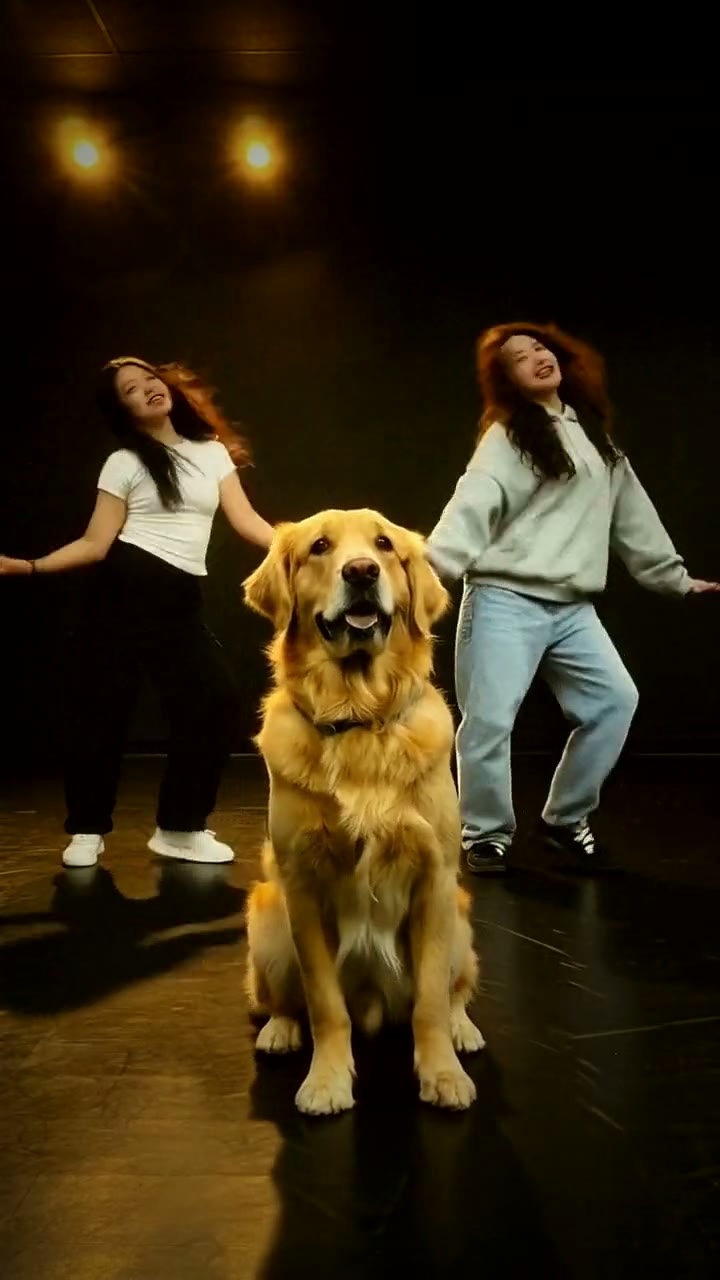
The fastest way to make the AI dog dance video is to upload one photo of your dog or cat to Try a Trend: you get an 18-second vertical video of your pet sitting front and center in a dark dance studio and hitting every head whip with two dancers behind it, with a free preview before you pay.
Dog Dance AI Video Generator
1 pet photo, 18-second vertical video, free preview before you pay. Your first video is $4.99, then $5.99 each.
What is the AI dog dance trend?
The AI dog dance took off on TikTok at the end of September 2026. The setup is always the same: a dark dance studio with a couple of warm spotlights, two dancers performing a routine to a classic pop song, and a dog sitting on the floor right in front of them, copying the routine with its head. When the dancers fold over and flip their hair, the dog drops its nose to the floor and whips it back up. When they bob, it bobs.
Most of the videos are made with AI: people take a dance studio clip and put their own dog in the front spot. The first ones were a golden retriever puppy in pink pajamas and a long-haired dachshund, and within a few days the format was everywhere, with huskies, poodles, shiba inus and cats taking the front spot. In October it spread to Japan, where people call it inu dance AI and search for how to make their dog dance with AI.
What makes it funny is how seriously the dog takes it. It never stands up or does anything a dog couldn't do: it just sits there and nails every head move, on the beat, like the third member of the crew.
What happens in the video, second by second
The viral clip is one continuous shot from a phone placed almost on the floor, so the dog looks big and the dancers stand a few metres behind it. These are the beats:
- 0 to 0.5 seconds: everyone folds down at once. The dancers' hair hangs to the floor and the dog drops its nose almost to the ground.
- 0.6 to 0.9 seconds: the first big whip. The dancers snap upright with their hair flying, and the dog throws its head up so its ears flare out.
- 1 to 4 seconds: a groove. The dancers sway with their hands on their hips while the dog sits and bobs and tilts its head.
- 4 to 7.5 seconds: a quick head toss, then pointing and shoulder moves from the dancers while the dog keeps bobbing.
- 8 to 9.5 seconds: the biggest move. The dancers roll their hair all the way around and the dog throws its head back until its nose points at the ceiling, then swings it back down.
- 10 to 16.5 seconds: arms up around the head, kicks and more hair flips, with the dog whipping and shaking its ears along.
- 17 to 18 seconds: the dancers throw their arms up in a V and the dog finishes sitting tall, looking straight at the camera.
Try a Trend's version keeps those moves on the same beats in one continuous shot.
Three ways to make the AI dog dance video
1. A CapCut template
Most of the tutorials going around TikTok use a CapCut pet dance template. You open a dog dance video that has a template link, tap it to open the template in CapCut, swap in a photo of your pet and export.
- On TikTok, find a dog dance video that shows a CapCut template link, or search CapCut's Templates tab for pet dance.
- Open the template and upload one photo of your pet.
- Export, then post with the sound.
Good: it's quick, and you may be able to do it for free on your phone.
Not so good: templates come and go, so the one you find may be gone next week, and many tutorial posts are really ads for other apps. You can't choose the scene, and you only see how your pet turned out after it renders.
Best for: people who already use CapCut and find a working template today.
2. A general AI video tool like Kling or Runway
General AI video tools can animate a photo of your pet, and some offer motion transfer, where you add a video clip and the AI copies the movement onto your photo. A text prompt alone won't reproduce this routine, though: you'll get "a dog nodding in a studio", not the beat-for-beat head whips.
- Upload your pet's photo as the reference.
- For motion transfer, add a clip of the moves. Only use footage you have the right to use.
- Generate, check that your pet still looks like your pet, and retry until the timing is right.
Good: flexible. You can pick the setting and the length, and reuse the tool for other trends.
Not so good: you need your own reference clip, the dancers behind your pet usually freeze or melt unless the tool handles several characters at once, and fur colour and markings can drift. You write the prompt and tune the settings yourself. These tools usually give a few free credits, then sell monthly plans or credit packs.
Best for: people who already use an AI video tool and have their own reference clip.
3. A one-photo generator (Try a Trend)
Try a Trend has the dog dance already set up: the head drop, the whips and the bobs are matched to the viral clip beat for beat, the scene is a dark dance studio with warm spotlights, and two AI dancers perform the routine behind your pet. You only need one photo of your dog or cat.
- 1Upload one clear photo of your pet, with its face visible and no people in the shot.
- 2Confirm it's your pet (or you have permission to use the photo).
- 3Check your free preview. If you like it, get the full video.
- 4Download in a few minutes, add the trending sound on TikTok and start it from the beginning.
You get an 18-second vertical video in 720p in one continuous shot, ready in a few minutes. Your first video is $4.99, then $5.99 each.
Good: the exact routine without a reference clip or a prompt, and the dancers move with your pet. You see a free preview of your pet in the studio before paying, and it works for cats too.
Not so good: there is one studio and one routine, and the dancers are AI-generated, so they look a little different in every video. The video is silent, so you add the sound in TikTok yourself. It's AI, so very fluffy ears can blur during the fastest whips. The full video is paid.
Best for: anyone who wants their pet in on the trend today, with no editing at all.
Tips for a photo that works
- One clear photo of one pet, with its face visible. A sitting pose is ideal because your pet sits through the whole routine, but any clear photo works.
- Shoot at your pet's eye level in daylight or near a window; avoid flash, which makes eyes glow.
- Skip heavy filters, stickers and costumes that cover the face, and upload the original photo rather than a screenshot.
- Only upload a photo of your own pet, or one you have permission to use, with no people in it.
What to post it with
- Sound: in TikTok, open one of the viral dog dance videos where a dog sits in front of two dancers (they show up under #dogdance), tap its sound and use it, leaving it at the beginning. The first head whip should land on the same beat as in the original; if it feels a little early or late, nudge the start.
- Caption: write it in your pet's voice, something like "they finally let me in the dance crew".
- Hashtags: #dogdance, #aidogdance and #petdance, plus #犬ダンス if your audience is in Japan.
FAQ
Is this the official dog dance video?
No. Try a Trend is an independent AI tool that recreates the dance with a photo of your pet. We're not affiliated with the song or its artist, the people who posted the viral clips, or TikTok, and your video doesn't use any footage from them.
Can I make it in Japanese?
Yes. The trend page has a Japanese version with the same video and the same price: switch the language at the top of the page to 日本語.
Does it work with cats?
Yes. Any pet that can sit up works, dogs and cats alike. Your pet takes the front spot and copies the routine with the dancers.
Make yours
Want your pet front and center with the crew, without a single dance lesson? Upload one photo and check the free preview. Make your dog dance video here.