How to Make the Christmas Dog AI Video (Your Pet as Santa's Elf)
The fastest way to make the Christmas dog AI video is to upload one photo of your dog, cat or other pet to Try a Trend: you get a 10-second vertical clip where your pet, in a little elf hat, works a shift in Santa's toy workshop and then flies home with Santa in his sleigh, and you see a free preview of your pet as an elf before you pay.
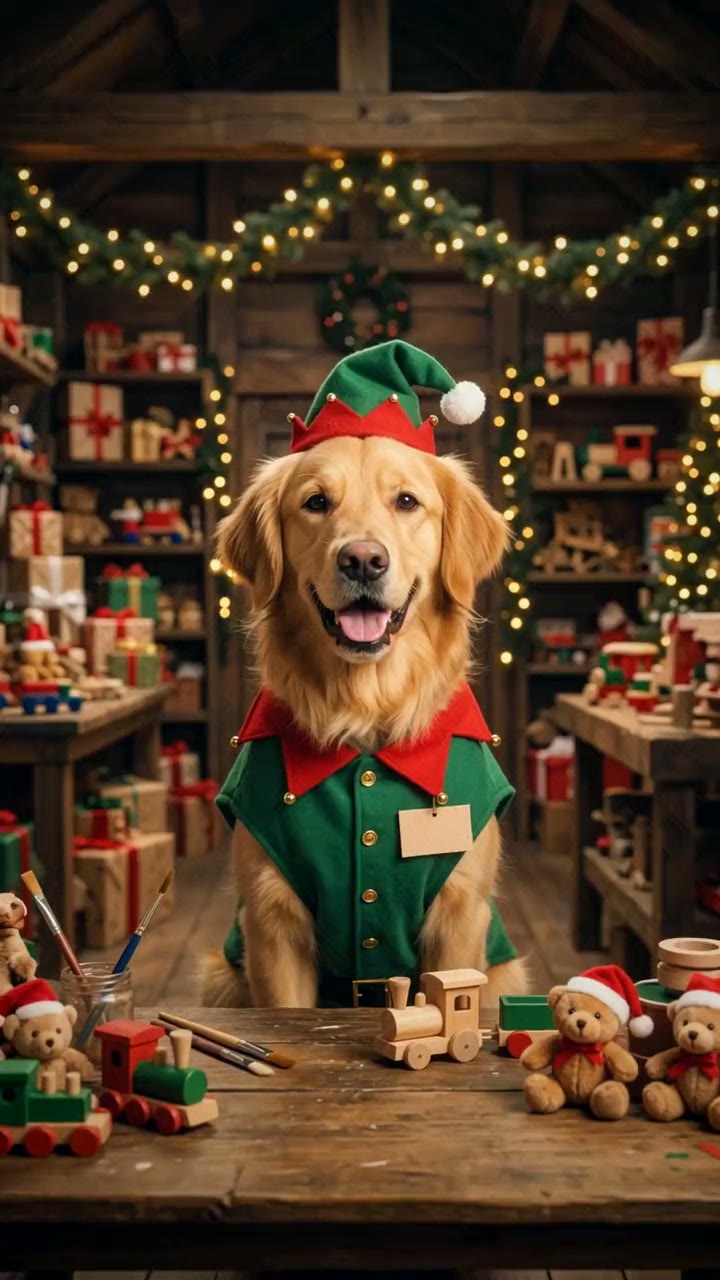
Christmas Dog AI Video Generator
1 pet photo, 10-second vertical video, free preview before you pay. Each video is $7.99.
What is the Christmas dog trend?
The Christmas dog AI video is a pet video format that spread on TikTok in late November 2025. A pet account posted an AI clip of its fluffy white Pomeranian "working for Santa": dressed as one of Santa's elves, it spent the day in a North Pole workshop glowing with fairy lights, testing toys, chasing a runaway line of teddy bears, writing its own name all over Santa's list and getting caught on the cookie belt, until Santa picked it to fly home with him. People loved it because it's the kind of Christmas story you'd tell about your own pet, and other owners started making versions with their dogs and cats.
People search for it as "Christmas dog AI", "Christmas pet AI" or "my dog as Santa's elf", and searches climb through December, peaking in the week before Christmas.
What happens in the video, second by second
The original runs close to a minute with a dozen short scenes and a caption on each one. Our 10-second version keeps the scenes people remember, cut the same way, with hard cuts between them:
- 0 to 2 seconds: a close-up of your pet at a wooden workbench in Santa's workshop, wearing a green elf hat and tunic with a name tag, teddy bears and toys all around. It smiles at the camera and tilts its head.
- About 2 to 3.5 seconds: side view of the conveyor belt. Teddy bear after teddy bear speeds toward your pet, and it scrambles to keep up.
- About 3.5 to 5 seconds: close-up of the Nice List. Your pet's paw scribbles across the page, leaving little paw prints everywhere.
- About 5 to 7 seconds: cookie quality control. Your pet sniffs a gingerbread star, takes a big bite and looks up with crumbs on its whiskers and a guilty little smile.
- About 7 to 9 seconds: night, a huge full moon. Your pet sits next to Santa in his golden sleigh, and Santa smiles and pats its head.
- About 9 to 10 seconds: the silhouette of the sleigh and reindeer flies across the moon, with green northern lights over snowy hills.
The moments that make it work are the elf outfit, the fairy-lit workshop, the "oops" with the cookies and the ride home with Santa at the end.
Three ways to make the Christmas dog AI video
1. A CapCut template
CapCut is the free video editor from the company behind TikTok. Every December its Templates tab fills up with Christmas pet templates; search for terms like "christmas pet" or "christmas dog".
Good: free to try and quick. Many templates take one photo of your pet.
Not so good: most Christmas pet templates turn your photo into a Christmas portrait, such as your dog in a Santa outfit in front of a tree, or add stickers and filters over it. They don't build a little story with scenes in a workshop and a sleigh ride. Templates also change from season to season, and some add the app's ending card or need a paid plan to remove it.
Best for: a quick festive photo of your pet.
2. A general AI video tool like Kling or Runway
General AI video tools can animate a photo of your pet from a text description. You plan and write every scene yourself.
- Make a still of your pet in an elf hat and tunic in Santa's workshop, either with an AI image tool or by asking the video tool to add the outfit.
- Describe each scene in order: the workbench, the conveyor belt, the Nice List, the cookies, the sleigh, the moon.
- Generate each scene, keep the best takes and cut them together in an editor.
Good: you control everything: which toys, which cookies, even what your pet writes on the list.
Not so good: it's a lot of writing and editing, and each scene is a separate try. Keeping your pet's coat, markings and outfit the same from scene to scene takes trial and error, and each try uses credits; these tools usually give a few free credits, then sell monthly plans or credit packs.
Best for: people who enjoy editing and already pay for an AI video tool.
3. A one-photo generator (Try a Trend)
Try a Trend has the whole story set up, so you only upload one photo of your pet.
- 1Upload one clear photo of your dog, cat or other pet, with its face visible and no people in the shot.
- 2Confirm it's your pet (or you have permission to use the photo).
- 3Check your free preview. If you like it, get the full video.
- 4Download in a few minutes and add a Christmas song or the trending sound when you post.
Your 10-second video opens on your pet at the workbench in its elf hat and tunic, smiling at you. Then the teddy bears rush down the belt, its paw covers the Nice List in paw prints, it gets caught taking a bite out of a gingerbread star, and it rides beside Santa in the golden sleigh before the sleigh flies across the full moon. Each video is $7.99.
Good: no costume, no Christmas set and no editing. The video keeps your pet's breed, coat colours and markings and only adds the elf hat and tunic, the first shot is a close-up so you can check it looks like your pet, and you see that shot as a free preview before you pay. Santa is an AI-made character.
Not so good: the scenes are fixed, so you can't choose your own toys or change the order. The video is silent and has no captions, so you add the sound and text yourself, and it's an AI-made video, so a detail like your pet's collar may come out a little different.
Best for: pet owners who want a finished Christmas video from one photo, ready to send to the family.
Tips for a photo that works
- One clear photo of your pet with its face fully visible: facing the camera or a three-quarter view works best. A photo from behind or a strict side profile gives the AI too little to go on.
- One animal per photo, and no people in the shot. If your favourite photo has someone in it, crop them out first.
- A sharp photo in good, even light, such as daylight or near a window, so the coat colours and markings come through.
- Dogs, cats, rabbits and other pets all work, and an older photo of a pet who has passed away is fine as long as it's sharp.
- Only use a photo of your own pet, or one you have permission to use.
What to post it with
- Sound: the video is silent, so add something with sleigh bells or a cheerful Christmas song from TikTok's or Instagram's sound library, where it's licensed.
- Captions: the original has a short line in the pet's voice on every scene. Type a few of your own, like "I'm working for Santa! Wish me luck", "it's moving so fast", "cookie quality control" and "oopsie".
- Hashtags: #christmasdog, #christmaspets and #santaselves.
- When to post: any time in December. It also makes a fun Christmas card to send to family on the morning of the 25th.
FAQ
Is this an official Christmas app or template?
No. Try a Trend is an independent AI tool that makes its own Christmas elf video from your pet's photo. We're not affiliated with TikTok, CapCut, the pet creator who made the original, or any Christmas brand or film.
Can I put two pets in one video?
The video is made from one photo of one animal, so make one video per pet.
Is there a Spanish version of this page?
Yes. You can make the same video from the Spanish page, and for more pet videos see all pet trends.
Make yours
If your pet has earned a spot on the Nice List this year, upload one photo and check the free preview of your new elf. Make your pet's Christmas dog video here.