How to Make the Hit the Road Dude Pet AI Video (Private Property)
The fastest way to make the Hit the Road Dude pet AI video is to upload one photo of your cat or dog to Try a Trend: you get a 10-second vertical video of your pet leaning out of an old pickup truck window, glaring at the camera and waving you off its property, with a free preview before you pay and no truck, training or editing.
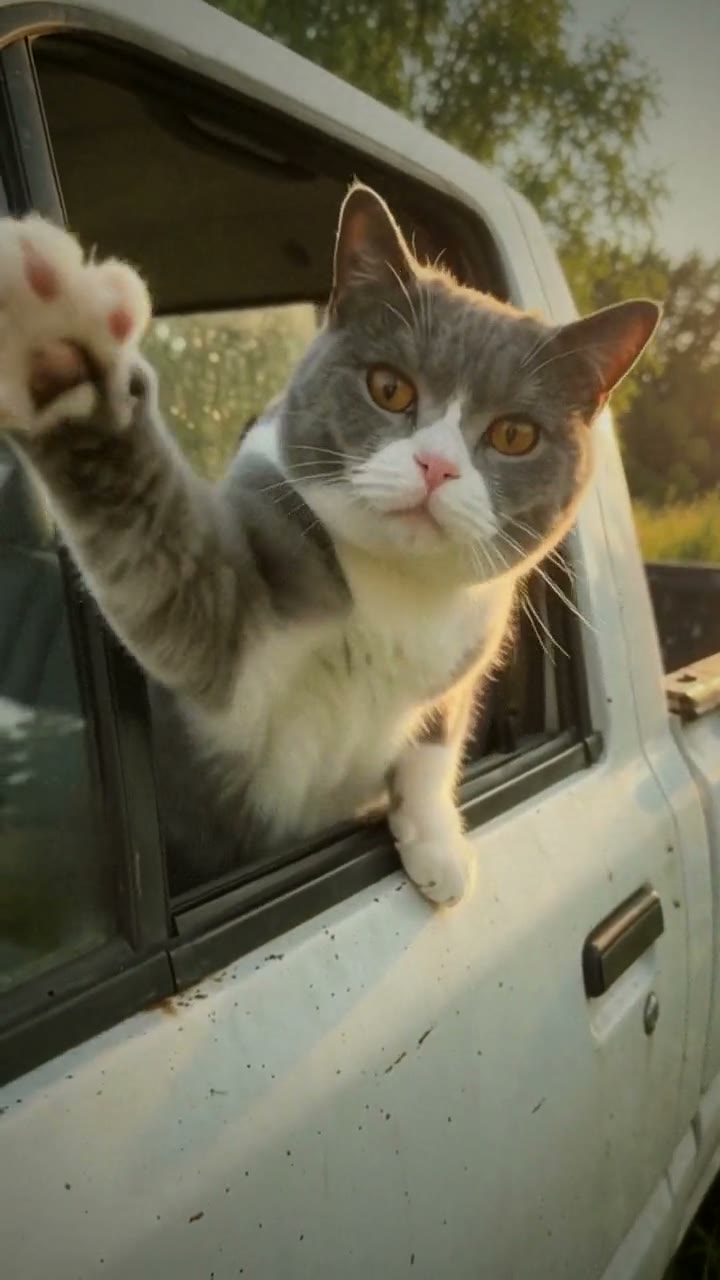
Hit the Road Dude AI Video Generator
1 pet photo, 10-second vertical video, free preview before you pay. Your first video is $4.99, then $5.99 each.
What is the Hit the Road Dude trend?
The hit the road dude trend, also called the private property trend, comes from a viral clip of someone sitting in an old pickup truck, leaning out of the driver's window and sternly telling the person filming to get off their land. People reuse that original audio and act it out. In early October 2026 the pet version took off on TikTok: a cat or dog sits in the driver's seat with its paws on the window frame, stares down the camera like an offended landlord, and seems to deliver the lecture itself.
The comedy is in how serious it all looks. There are no big stunts, just a pet with a very stern face, an open truck window and perfectly timed glares. The most-liked pet version we studied stars a cat, and the most-liked tutorial opens with that same cat before showing how to swap in your own pet.
What happens in the video, second by second
The clip we studied runs about 28 seconds, filmed handheld outdoors in warm late-afternoon light, with green trees and grass behind the truck.
- 0 to about 2 seconds: an old white pickup parked on the grass, seen from the front corner. You can't make out the cat yet.
- About 2.5 seconds: the camera walks along the driver's side, the wing mirror in the foreground. The window is down and a cat is already leaning on the frame.
- About 4.5 seconds: a steady mid-shot of the driver's window, shot from slightly below. A grey-and-white cat rests both front paws on the door, half out of the window, orange eyes wide and fixed on the lens.
- About 6 to 8 seconds: its mouth opens as if it is talking, then one paw reaches out of the window and flicks outward: the universal "go away".
- About 9.5 to 23.5 seconds: the camera barely moves. The cat glares, occasionally opens its mouth on the pauses in the audio, tilts its head and shifts a little, like a landlord who has had enough.
- About 25 to 27 seconds: a sheet of paper is held up to the window, and the cat side-eyes it, then swats it away.
Three ways to make the Hit the Road Dude AI video
1. CapCut (a template or a real pet)
CapCut is the free video editor from the company behind TikTok. The most-liked tutorial for this trend shows the cat version first, then demonstrates swapping in your own photo in CapCut. Search "hit the road dude" in the Templates tab and see what is available for you.
If you would rather film your real pet:
- Park a truck or car somewhere with grass and trees, window down, and sit your pet in the driver's seat.
- Film handheld from outside, slightly below the window, walking up from the front of the vehicle.
- Trim the take in CapCut, add the original sound and line up the pauses.
Good: templates are quick, and a real pet with a genuinely grumpy face is the gold standard.
Not so good: getting a real cat or dog to sit in a driver's seat, lean on the window frame, stare into the lens and lift a paw on cue is mostly luck. You also need a truck, a quiet spot and plenty of takes. Templates come and go, and you have less say over the look.
Best for: people with a calm, camera-happy pet and access to a pickup.
2. A general AI video tool like Kling or Runway
General AI video tools can animate a photo of your pet from a text prompt. You describe the truck, the light, the camera move and each bit of acting.
- Upload a clear photo of your pet and describe the scene: an old pickup on grass, window down, your pet in the driver's seat.
- Write the beats: the walk-up, the stare, the shooing paw, the "talking" mouth, the turn away.
- Generate and adjust until the face looks stern and the pet still looks like yours.
Good: you control everything, from the vehicle to the time of day.
Not so good: you write and tune the prompt yourself. The pet can end up looking friendly instead of grumpy: panting, tongue out, a soft face. Truck badges and stray lettering on the glass can also appear and need another try. Each try uses credits; these tools usually give you a few free credits, then sell monthly plans or credit packs.
Best for: people who already use an AI video tool and like fine-tuning a performance.
3. A one-photo generator (Try a Trend)
Try a Trend has the scene set up: a plain, unbranded old pickup on the grass, warm late-afternoon backlight, a low handheld camera and a pet with an attitude. You upload a single photo of your pet.
- 1Upload one clear photo of your pet, with its face visible and no people in the shot.
- 2Confirm it's your pet (or you have permission to use the photo).
- 3Check your free preview. If you like it, get the full video.
- 4Download in a few minutes and add the original 'hit the road' sound on TikTok.
Your 10-second video squeezes the original into its best moments. The camera walks up to the driver's window where your pet is already leaning out, stops below the window, and your pet glares, swings a whole front leg out of the window to shoo you away, lectures you in short, sharp bursts of mouth movement, glares without moving a whisker, then bats at the lens with one paw and looks away, unimpressed, as the camera jerks back. The light is warm, like a sunny evening. Your first video is $4.99, then $5.99 each.
Good: no truck, no training and no editing. The video keeps your pet's breed, fur colour and markings, and you see a free preview of your pet in the window before you pay.
Not so good: the truck and scene are fixed, and the video is silent. Your pet's mouth moves as if it is talking, but it isn't lip-synced to the audio, so it only roughly matches once you add the sound. It is AI-generated, not real footage of your pet.
Best for: anyone whose pet has the attitude but would never sit still in a truck.
Tips for a photo that works
- One clear photo of your pet with its face fully visible, ideally looking toward the camera. Cats and dogs both work.
- One animal per photo, and no people in the shot.
- A sharp photo taken while your pet was still. Use the original, not a screenshot or a drawing.
- Good, even light such as daylight or near a window, so the fur colour and markings come through.
- Only use a photo of your own pet, or one you have permission to use.
What to post it with
- Sound: add the original "hit the road dude" audio from TikTok's sound library, where it is licensed. Nudge the start of the sound until the mouth movements roughly line up.
- Hashtags: #hittheroaddude, #privateproperty and #petsoftiktok.
- A caption in your pet's voice: "private property. hit the road, dude".
FAQ
Is this the official hit the road dude video?
No. Try a Trend is an independent AI tool that recreates the look of the trend with a photo of your pet. We're not affiliated with the creator of the original video, TikTok, CapCut or any truck maker.
Is that a real truck brand?
No. The truck is generated by AI and is meant to be a plain, unbranded pickup. If it ever looks like a real make, that's incidental.
Does it work for dogs too?
Yes. Use a clear photo of one dog with its face visible. For more pet trends, see all pet trends.
Make yours
If your pet has the look of a landlord who wants you gone, upload one photo and check the free preview. Make your pet's Hit the Road Dude video here.