How to Make the Paws at You AI Video (Your Pet Paws at the Camera)
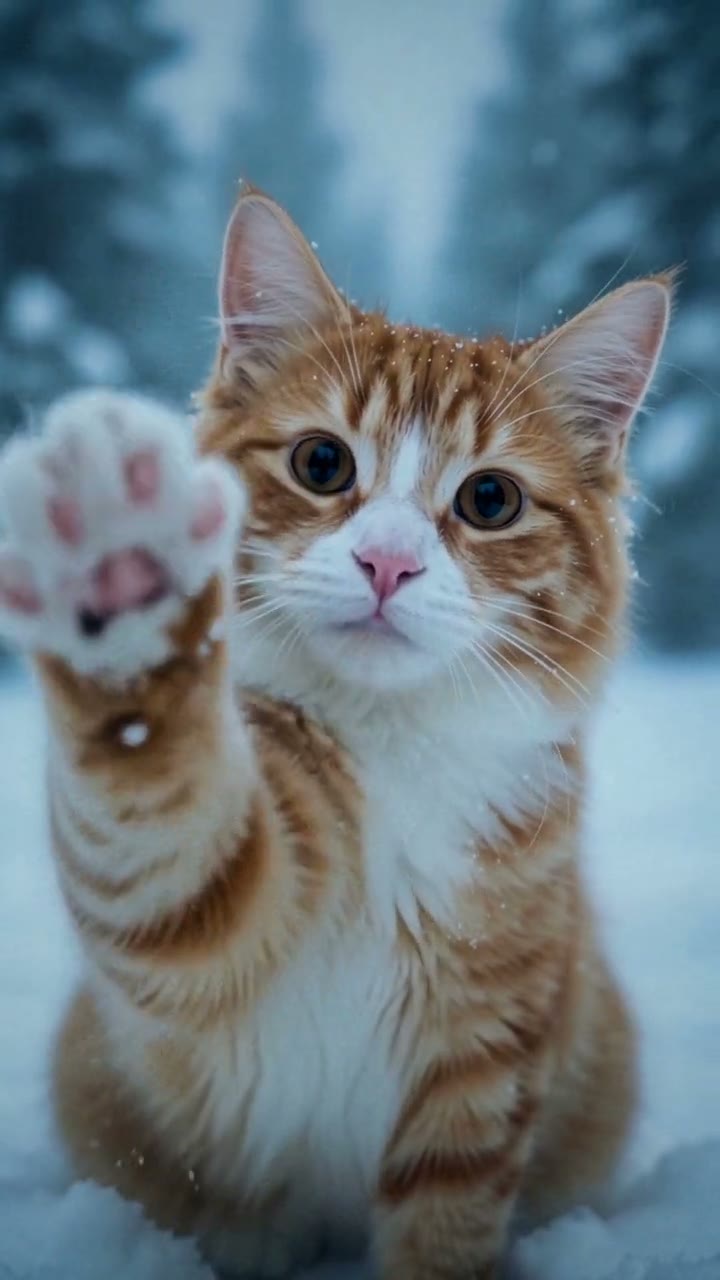
The fastest way to make the Paws at You AI video is to upload one photo of your cat, dog or other pet to Try a Trend: you get a 5-second vertical clip where your pet sits in falling snow right up close to the camera and keeps reaching out to pat the lens with its paw, and you see a free preview of your pet in the snow before you pay.
Paws at You AI Video Generator
1 pet photo, 5-second vertical video, free preview before you pay. Your first video is $4.99, then $5.99 each.
What is the Paws at You trend?
Paws at You comes from the viral Mei Mei snow leopard "paws at you" meme that spread across TikTok in late October 2026. The clips show a fluffy snow leopard with huge, round, shiny eyes sitting face to face with the viewer and reaching out again and again to tap the screen with its paw, as if it wants your attention. Fans redrew it as cartoons, made dramatic edits of it and captioned it "*paws at you*", and cat owners started joking that their own cat is a snow leopard too.
The next step was obvious: people wanted the same moment with their own pet. Search interest for the meme took off in the last week of October, and the most popular phrases are the meme's name, "paws at you" and "paws at you cat".
What happens in the video, second by second
The best-known version is a short loop of one action, filmed as one continuous close-up with a camera that never moves. Our 5-second version keeps that framing and that rhythm, with your own pet in the snow:
- 0 to 1 second: a close-up of your pet sitting in fresh snow, its face and chest filling the frame, snowflakes drifting down in soft blue winter light. It looks straight at you with big, bright eyes and tilts its head a little.
- About 1 to 2 seconds: it lifts one front paw and reaches for the camera, paw pad first, gives the lens one soft tap and pulls the paw back.
- About 2 to 3.5 seconds: a slow blink, then two more quick, gentle taps, as if it's asking you to look up from your phone.
- About 3.5 to 5 seconds: one last reach. Its paw pad presses against the lens, big and soft and a little out of focus, with its eyes still peeking over it, before it settles back and gazes at you.
Because the clip is short and starts and ends on the same calm close-up, it loops nicely when you post it.
Three ways to make the Paws at You AI video
1. A CapCut template
CapCut is the free video editor from the company behind TikTok, and many of the popular paws-at-you edits on TikTok carry a CapCut tag. Search its Templates tab for "paws at you" or "snow leopard".
Good: free to try and quick, with timing, text and effects already set up.
Not so good: a template mostly adds effects, text and timing to the photo or clip you give it. If you only have a still photo of your pet, it can't make your pet actually lift its paw and reach for the camera. Templates also come and go quickly with a meme like this, and some add the app's ending card or need a paid plan to remove it.
Best for: pet owners who already filmed their pet pawing at the phone and want the meme's captions and effects on top.
2. A general AI video tool like Kling or Runway
General AI video tools can animate a photo of your pet from a text description you write yourself.
- Pick a sharp photo of your pet facing the camera.
- Describe the scene: the snow, the close-up, the blue winter light and the paw tapping the lens several times.
- Generate a few takes, keep the best one and trim it.
Good: you control everything, so you can change the setting, the length or the number of taps.
Not so good: you write and rewrite the description yourself, and AI video often gets paws wrong: an extra toe, a paw that melts into the fur, or a pet that won't stay facing you. Each try uses credits; these tools usually give a few free credits, then sell monthly plans or credit packs.
Best for: people who enjoy experimenting and already pay for an AI video tool.
3. A one-photo generator (Try a Trend)
Try a Trend has the scene, the framing and the timing set up, so you only upload one photo of your pet.
- 1Pick a style (Realistic, or Cartoon like the original), then upload one clear photo of your cat, dog or other pet, with its face visible and no people in the shot.
- 2Confirm it's your pet (or you have permission to use the photo).
- 3Check your free preview. If you like it, get the full video.
- 4Download in a few minutes and add the trending sound on TikTok.
Your 5-second video opens on a close-up of your pet in the snow looking right at you, then it taps the lens with its paw three times, the last time pressing its paw pad right against the camera. Your first video is $4.99, then $5.99 each.
Before the preview you also pick a style. Realistic shows your pet as itself in real falling snow. Cartoon, like the original redraws it in the meme's own look, with soft pencil lines, a misty grey-blue background and huge, glossy eyes, while it keeps its own coat colours and markings, so a ginger tabby comes out as a ginger tabby cartoon rather than a snow leopard.
Good: no snow trip, no bribing your pet with treats to touch the phone, and no editing. Your pet stays itself: the video keeps its breed, coat colours and markings from your photo and doesn't turn it into a snow leopard, and you see a free preview of it in the snow before you pay.
Not so good: apart from choosing realistic or cartoon, the scene is fixed, so you can't pick another place or change the number of taps. The video is silent and has no captions, so you add the sound and the "*paws at you*" text yourself, and it's an AI-made video, so a small detail like a collar or the exact shape of a paw may come out a little different from real life.
Best for: pet owners who want their own pet in the meme from one photo, without filming anything.
Tips for a photo that works
- One clear photo of your pet with its face fully visible: facing the camera works best, because the whole video is a face-to-face close-up. A photo from behind or a strict side profile gives the AI too little to go on.
- If you can, pick a photo where its front paws are visible too, so the colour of its paws comes out right when it reaches for you.
- One animal per photo, and no people in the shot. If your favourite photo has someone in it, crop them out first.
- A sharp photo in good, even light, such as daylight or near a window, so the coat colours, markings and eye colour come through.
- Cats, dogs, rabbits and other pets all work. Only use a photo of your own pet, or one you have permission to use.
What to post it with
- Sound: the video is silent, so add the trending sound you hear on the paws-at-you posts, or any soft, cute track from TikTok's or Instagram's sound library, where it's licensed.
- Caption: the meme lives on its captions. Try "*paws at you*", "*paws at you* hi. it's me. pay attention to me" or "my cat is a snow leopard too".
- Hashtags: #pawsatyou, #snowleopard and #catsoftiktok (or #dogsoftiktok).
- Loop it: because the clip starts and ends on the same calm close-up, it plays well on repeat.
FAQ
Is this the official Mei Mei snow leopard video?
No. Try a Trend is an independent AI tool that makes its own paws-at-you video from a photo of your pet. We're not affiliated with the creators of the Mei Mei snow leopard meme, TikTok or CapCut, and we don't use any of the original pictures or clips.
Will my pet turn into a snow leopard?
No. Your pet keeps its own breed, coat and markings. It only borrows the snow leopard's moment: the close-up in the snow, the big eyes and the paw on the lens.
Can I put two pets in one video?
The video is made from one photo of one animal, so make one video per pet. For more pet videos, see all pet trends.
Make yours
If your pet already taps your phone screen every time you ignore it, it's ready for this one. Upload one photo and check the free preview first. Make your pet's Paws at You video here.