How to Make the La Mujer del Pelotero AI Video (the Viral Hand Dance)
The fastest way to make the La Mujer del Pelotero AI video, the dance where you put your hands up by your head, roll your forearms in front of your chest and sway your hips to the beat, is to upload one photo of yourself to Try a Trend: you see a free preview, then get an 11-second vertical video that follows a real TikTok clip of the trend shot for shot, with your face and hair, and no filming or rehearsing.
La Mujer del Pelotero AI Video Generator
1 photo, 11-second vertical video, free preview before you pay. Your first video is $4.99, then $5.99 each.
What is the La Mujer del Pelotero trend?
La Mujer del Pelotero is a TikTok dance trend that started in Mexico in October 2026 and took off in November. The sound is a Mexican party song of the same name, the kind that gets the whole family up at a quinceañera or a wedding. The dance is short and mostly hands: both hands up beside the head, the forearms rolling around each other in front of the chest, a sway of the hips and a few quick finger points at waist height, all on the beat.
Most versions are one fixed phone shot at home. Some people do it alone in the kitchen or the living room, and plenty do it in a row with sisters, cousins, moms and friends, which is part of the fun. It spread fast through Spanish-speaking TikTok in Mexico and the US, and within a couple of weeks AI templates appeared so people could make it from a single photo instead of learning the moves.
What happens in the video, second by second
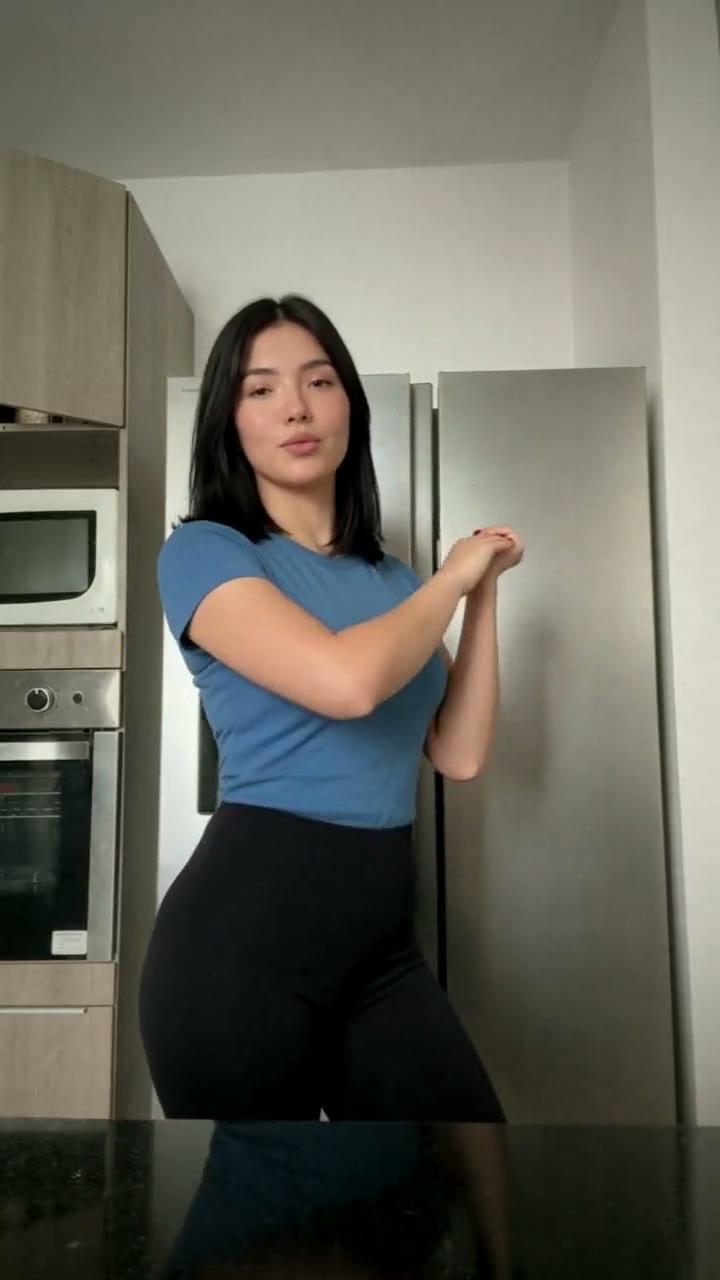
The clip we follow is 11 seconds, one fixed shot from a phone on a tripod in a bright modern kitchen: a stainless-steel fridge, built-in ovens in light wooden cabinets and a glossy black counter in the foreground that reflects the dancer. The camera never moves. Try a Trend's video keeps every beat:
- 0 to 1 second: you stand behind the counter, hands together at your hips, smiling and waiting for the beat.
- 1 to 2.5 seconds: your hands go up beside your head, then one arm swings out to the side.
- 2.5 to 5.5 seconds: the main move. Your forearms roll around each other in front of your chest while your hips sway from side to side and you sing along.
- 5.5 to 6.5 seconds: your arms cross and roll down towards your hips.
- 6.5 to 11 seconds: quick hand and finger moves at waist height, pointing to the sides on the beat, still swaying, until the end.
It is short because the trend is: the sound loops on TikTok, and the whole joke is landing the hand moves in time.
Three ways to make the La Mujer del Pelotero AI video
1. Film it yourself, or use a CapCut template
The trend is a real dance, so the classic way is to film it.
- Prop your phone on a shelf or tripod, framed from about the thighs up.
- Play the sound, learn the hand moves from a tutorial and practise until the forearm roll lands on the beat.
- Film a few takes, trim the best one and post. CapCut also has AI templates where you pick a photo instead of filming.
Good: it's free and it's genuinely you, and dancing it with your family is half the fun.
Not so good: the hand moves are quick, so getting them clean and on the beat takes practice and several takes. Templates are fast, but they often look the same for everyone, and many use a generic dance instead of these exact moves.
Best for: people who are happy to dance on camera and have a few minutes to practise.
2. A general AI video tool like Kling or Runway
General AI video tools turn a photo into a short clip from a written description. For this trend you would describe the whole thing yourself: the room, the framing, each hand move and when it happens.
- Upload your photo as the reference image.
- Write a prompt that walks through the hands by the head, the forearm roll, the hip sway and the finger points with timings, and say the camera stays still.
- Generate, check the face and the hands, and adjust the prompt.
Good: full control over the setting, the outfit and the style.
Not so good: fast, specific hand choreography is the hardest thing to get from text. The model may invent its own dance, swap the order of the moves or tangle the hands, which is where AI video still slips. These tools usually give you a few free credits, then sell plans or credit packs, so every retry counts.
Best for: people who already pay for an AI video tool and enjoy tuning prompts.
3. A one-photo generator (Try a Trend)
Try a Trend has the La Mujer del Pelotero dance already set up, so there is no prompt to write and nothing to film. It starts from our own reference video, a recreation of a real TikTok clip of the trend with a fictional dancer, and swaps that dancer for you: your face, hair and glasses, and a fitted T-shirt in the colour of your top, with the same kitchen, camera and moves on the same beats.
- 1Upload one clear photo of you, face to the camera, ideally from the waist up so your top shows.
- 2Confirm you are 18+ and the photo is of you (or someone who agreed).
- 3Check your free preview. If you like it, get the full video.
- 4Download in a few minutes: one with the original sound, one silent for adding the sound on TikTok.
You get an 11-second vertical video ready to post, with the original sound and a silent copy. Your first video is $4.99, then $5.99 each.
Good: no filming, tripod or practising, the hand moves land on the same beats as the clip it follows, and you see a free preview photo of you mid-dance before paying. The video is ready in a few minutes.
Not so good: the scene is fixed: the same kitchen and the same moves every time, and you wear a fitted T-shirt and black leggings rather than your own outfit. Each video has one dancer, so a family row means one video per person. The full video is paid. It's AI, so it's a take on you rather than real footage of you.
Best for: anyone who wants the clip today without learning the dance.
Tips for a photo that works
- Use one clear photo of you facing the camera, ideally from the waist up so the colour of your top shows. A selfie works too.
- Good, even light keeps your face and skin tone true. Daylight near a window is ideal.
- Skip sunglasses, heavy beauty filters and photos where your face is partly covered. Use the original photo rather than a screenshot.
- Your top's colour carries over to the T-shirt in the video, so pick a photo in a colour you like.
- One person per photo. Only upload a photo of yourself, or of someone who agreed to it, and everyone pictured must be 18 or older.
What to post it with
- Caption: keep it short and playful, like "had to try the pelotero dance 💃", or tag the friend you'd do it with.
- Sound: use the silent version and add the La Mujer del Pelotero sound inside TikTok or Reels, so your post shows up on that sound's page. The download with sound is there for sharing anywhere else.
- Hashtags: #lamujerdelpelotero and #lamujerdelpeloterotrend, plus #baile if you post in Spanish.
- Doing it as a family? Make one video per person and line them up side by side in CapCut, like the group versions on TikTok.
FAQ
Is this the official La Mujer del Pelotero video?
No. Try a Trend is an independent AI tool that recreates the trend with your own photo. We're not affiliated with the song, its artists or record label, the creators of the viral TikToks, TikTok or CapCut. Your video is AI-generated: it follows a real TikTok clip of the trend shot for shot, with the person swapped for you.
Does it work for guys?
Yes. Whoever is in your photo does the same moves in the same kitchen, and the hand dance is just as funny with your brother, your dad or your best friend doing it (with their permission).
Is there a Spanish version?
Yes. The trend page has a Spanish version with the same video and the same price: switch the language at the top of the page to Español.
Make yours
Want the La Mujer del Pelotero dance without learning the moves? Upload one photo and check the free preview. Make your La Mujer del Pelotero video here.