How to Make the Dame Hombro AI Video (Bulin 47 Freestyle Trend)
The fastest way to make the Dame Hombro AI video is to upload one photo of your face to Try a Trend: you get a 10-second vertical video of you freestyling at a red-lit nightclub entrance, boxed in by fans and security, with the same gestures and the same handheld shot as the viral clip, and you see a free preview before you pay.
Dame Hombro AI Video Generator
1 photo, 10-second vertical video, free preview before you pay. Your first video is $4.99, then $5.99 each.
What is the Dame Hombro trend?
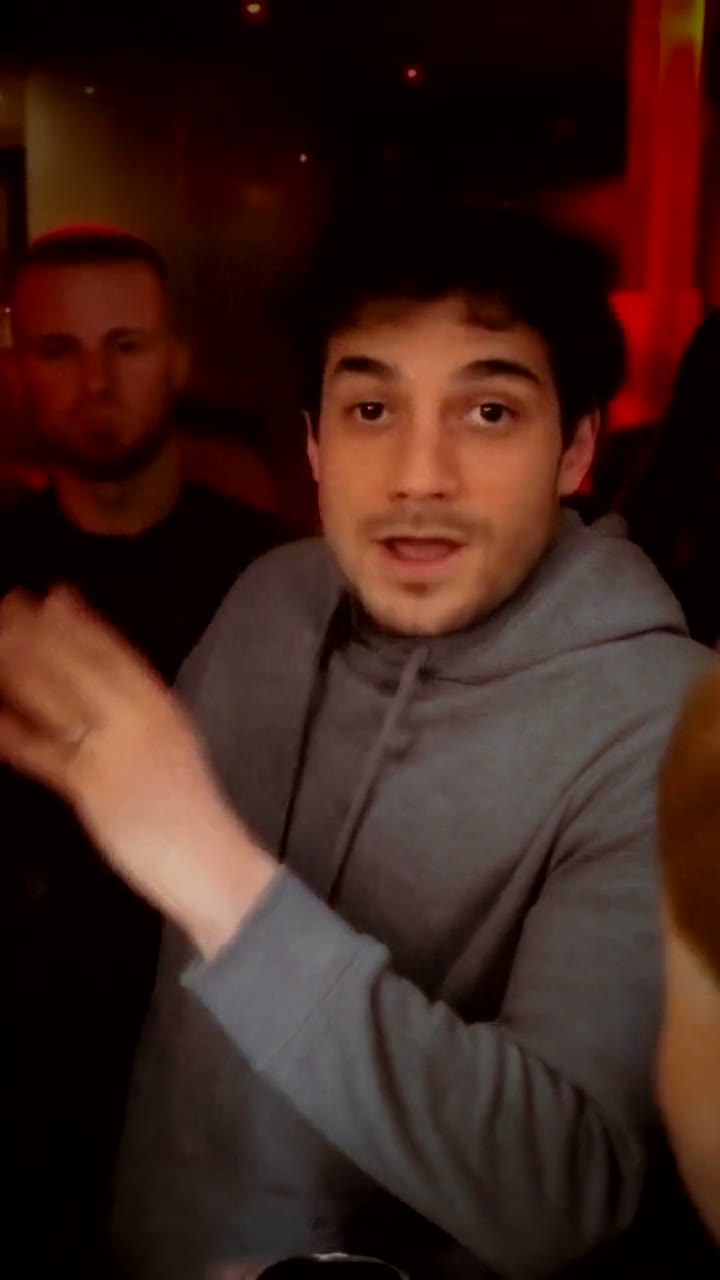
Dame Hombro started as a phone clip from a night out in Madrid. Dominican artist Bulin 47 arrives at the red-carpet entrance of a club, gets packed in by fans and security, and starts improvising: he raps straight at the camera, talks with his hands, shrugs and keeps going while a fan holds up a portable speaker and a phone right in front of him. The whole place is washed in red light, and the person filming is stuck in the crowd too, so the shot bounces and squeezes the whole time.
The freestyle spread across Spanish-speaking TikTok in October 2026, its catchphrase became a song, and people started searching for the lyrics. Then the AI versions arrived: people swapped themselves, their friends and famous faces into his spot, usually keeping the same ten seconds of the clip. On TikTok it also goes by the Bulin 47 freestyle.
What makes it work is the energy. It's not a dance and nothing dramatic happens; it's one person holding the whole crowd with pure confidence, and that's exactly why it's funny with someone else in the middle.
What happens in the video, second by second
The AI versions use one continuous ten-second stretch of the original, filmed handheld from inside the crowd:
- 0 to 1 second: he's surrounded at the club door, someone reaching across in front of him, and he starts the freestyle.
- 1 to 2.75 seconds: he steps into the middle of the frame, rapping and gesturing, as a fan lifts a phone and a speaker toward him.
- 2.75 to 6 seconds: the main moment. He's facing the camera, rapping hard, both hands going, shrugging and swaying.
- 6 to 8.5 seconds: the crowd squeezes in, a fan's head fills the bottom of the frame and someone waves an arm, while he keeps rapping with a grin.
- 8.5 to 10 seconds: he glances down and raises a hand to finish the line.
Try a Trend's version keeps those moments on the same timing, in the same single handheld shot, framed close from the waist up like the viral AI versions, with you in the middle and an AI-generated crowd around you.
Three ways to make the Dame Hombro AI video
1. A CapCut template
Most tutorials on TikTok use a CapCut template, often called the Bulin 47 freestyle template. You open a video that has a template link, tap it to open the template in CapCut, add your photo and export.
- On TikTok, find a Dame Hombro or Bulin 47 freestyle AI video that shows a CapCut template link, or search for it in CapCut's Templates tab.
- Open the template and upload one photo.
- Export, then post it.
Good: it's quick, it usually keeps the original audio, and you may be able to do it for free on your phone.
Not so good: templates come and go, so the one you find may be gone next week, and you may have to dig through tutorial posts to find a working link. You can't choose the outfit or the setting, and you only see how your face turned out after it renders.
Best for: people who already use CapCut and find a working template today.
2. A general AI video tool like Kling or Runway
General AI video tools can animate a photo of you, but a text prompt alone won't recreate this exact moment: you'll get "a person rapping at a club", not the meme with its crowd, timing and camera. Some tools offer motion transfer or character replacement, where you add a video clip and the AI puts you into it.
- Upload your photo as the reference.
- Add a clip to copy from. Only use footage you have the right to use, such as a video of you or a friend acting it out.
- Generate, check your face in the close moments, and retry until it looks right.
Good: flexible. You can pick the outfit, the setting and the length, and reuse the tool for other trends.
Not so good: you need your own clip to copy from, crowded scenes like this one confuse the AI about who to replace, and faces can drift when other people pass in front. You write the prompt and tune the settings yourself. These tools usually give a few free credits, then sell monthly plans or credit packs.
Best for: people who already use an AI video tool and have their own reference clip.
3. A one-photo generator (Try a Trend)
Try a Trend has the Dame Hombro moment already set up: the gestures, shrugs and timing match the viral clip second by second, the setting is a red-lit club entrance with a crowd of AI-generated fans and security around you, and you wear the clothes from your photo. You only need a photo of your face.
- 1Upload one clear, front-facing photo of you.
- 2Confirm you are 18+ and the photo is of you (or someone who agreed).
- 3Check your free preview. If you like it, get the full video.
- 4Download in about 12 minutes, add the Dame Hombro freestyle sound on TikTok and start it from the beginning.
You get a 10-second vertical video in 720p (720×1280), one handheld shot from inside the crowd, ready in about 12 minutes. Your first video is $4.99, then $5.99 each.
Good: the exact moment and camera without acting anything out, no reference clip and no prompt. The crowd around you moves just like in the original. You see a free preview of yourself at the club door before paying, and it works just as well with a photo of a girl as a guy.
Not so good: there is one setting, and the crowd is the same in every video. It takes about 12 minutes, longer than a template. You keep your own clothes and no sunglasses, so you won't get the pink shirt unless your photo has one. It's silent, so you add the sound in TikTok yourself. It's AI, so look closely and the phone the fan holds up at the bottom of the frame can look smudged. The full video is paid.
Best for: anyone who wants in on the trend today, with no editing at all.
Tips for a photo that works
- A clear, front-facing photo of your face is enough. You don't need a full-body shot: the AI builds the rest of you and keeps the clothes from your photo, so wear something you'd actually go out in.
- Your face is small in a crowded shot, so pick a sharp photo where your eyes are easy to see. Daylight or a window works best; avoid harsh sun and strong flash.
- Skip sunglasses, beauty filters and heavy edits, and upload the original photo rather than a screenshot. If you do want the sunglasses look, know that it makes it harder to tell it's you.
- One person per photo. Only upload a photo of yourself or of someone who agreed to it, and everyone pictured must be 18 or older.
What to post it with
- Sound: your video covers the same ten seconds the viral AI versions use, so open one of those videos on TikTok, tap the sound and use it from the beginning. If it feels a little early or late, nudge the start.
- Caption: something like "pulling up to the club like", or tag the friend who always takes over the party.
- Hashtags: #damehombro and #damehombroai, plus #tendenciaia if your audience is in Spanish.
FAQ
Is this the official Dame Hombro video?
No. Try a Trend is an independent AI tool that puts you in the moment with your own photo. We're not affiliated with the song, Bulin 47 or anyone in the original clip, TikTok or CapCut, and the people and place around you are AI-generated.
Can I make it in Spanish?
Yes. The trend page has a Spanish version with the same video and the same price: switch the language at the top of the page to Español.
Does it work with a photo of my partner or a friend?
Yes, as long as they agreed to it and they're 18 or older. One clear photo of their face is enough.
Make yours
Want to hold the whole crowd at the club door without leaving your couch? Upload one photo and check the free preview. Make your Dame Hombro video here.