How to Make the AI Pregnancy Reveal Video From Two Photos
The fastest way to make the AI pregnancy reveal video is to upload two photos to Try a Trend, one of you and one of your partner: the two of you step into the viral black-and-white bathroom clip, from the positive test held up to the camera to the long hug and the ultrasound at the end, and you get a 19-second vertical video with the clip's original sound, after a free preview.
Pregnancy Reveal AI Video Generator
2 photos, 19-second vertical video, free preview before you pay. Each video is $7.99.
What is the AI pregnancy reveal trend?
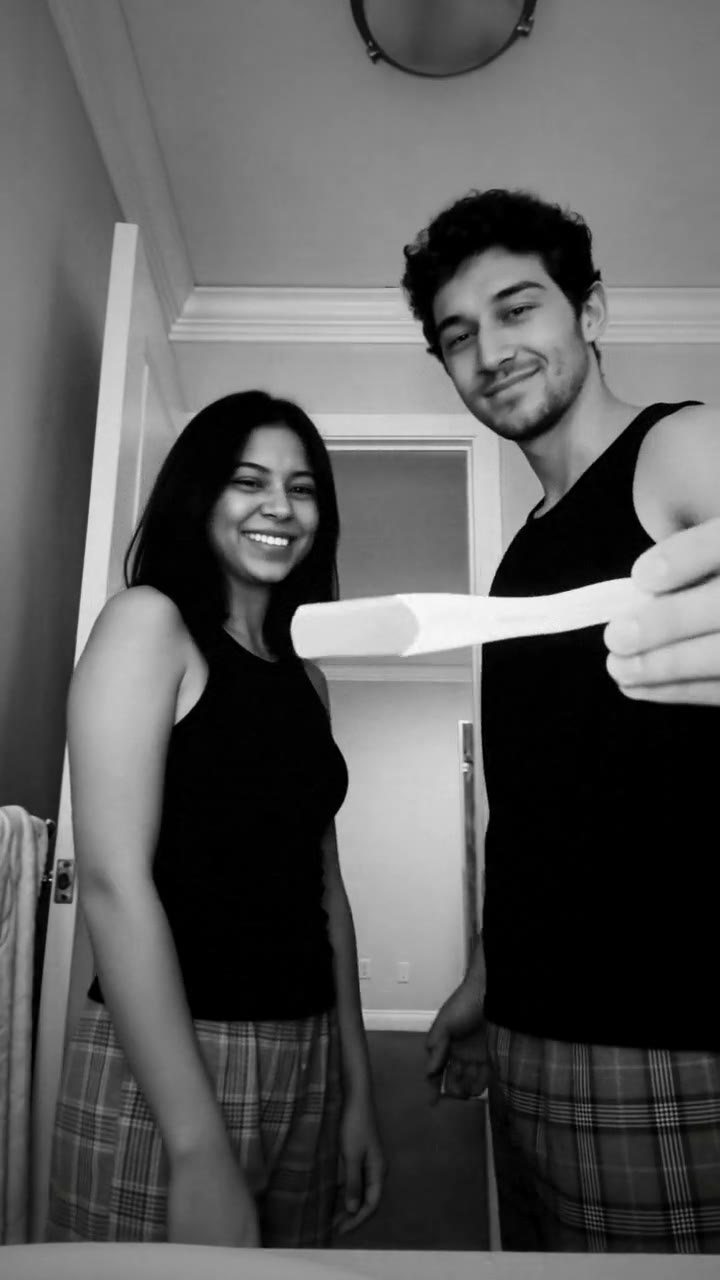
The pregnancy reveal trend comes from a CapCut template that went viral on TikTok in November 2026. Its demo is a real couple's home video: a phone resting on the bathroom counter films them in black and white as one of them holds a positive test up to the camera and the other covers their face, laughs, cries and pulls them into a long hug. Then it cuts to black and an ultrasound picture.
It works because it doesn't look staged. The camera is low and never moves, the room is an ordinary bathroom doorway with an unmade bed behind it, and the black and white makes it feel like a memory rather than a post. The template asks for your own clips, though, and most couples never filmed the moment they found out. That's where the AI version comes in: two photos, and the two of you are in that same clip, ready to send to the family group chat or post as your announcement.
What happens in the video, second by second
Our version follows the viral clip, shortened to 19 seconds. The phone sits on the counter looking up at the doorway, the light is soft daylight, and a few jump cuts skip ahead without moving the camera, just like the original. Both of you wear a black sleeveless top and plaid pajama pants.
- 0 to 3.5 seconds: the partner from your second photo holds the test up close to the lens, while you hide your face in both hands.
- 3.5 to 6 seconds: your hands come down and you laugh behind your fingers. Your partner turns to the camera with a shaky, teary smile.
- 6 to 7 seconds: you back into the doorway with both hands over your mouth, while your partner looks down at the two lines again.
- 7 to 11 seconds: a jump cut, and the test changes hands. You burst out laughing.
- 11 to 14 seconds: the hug, long and tight, your partner's back to the camera.
- 14 to 16.5 seconds: your partner turns to the camera alone and covers their face, then leans in with a teary grin while you stand behind them holding the test.
- 16.5 to 19 seconds: cut to black and an ultrasound picture of a tiny baby.
Three ways to make the AI pregnancy reveal video
1. The CapCut template, with your own footage
The trend started as a CapCut template, so the original way is to use it. Search CapCut's Templates tab for "pregnancy reveal", pick the black-and-white bathroom one, and add your own clips. The template adds the black and white, the cuts and its music.
Good: it's your real moment, it costs little or nothing, and it's quick if you already have the footage.
Not so good: you need real video of the moment, filmed from low down the way the template expects. Most couples didn't record themselves finding out, and acting it out again for the camera can feel forced. Templates also come and go, and some add the app's ending card or need a paid plan to remove it.
Best for: couples who did film the moment and want it in the trend's style.
2. A general AI video tool like Kling or Runway
You could build the scene yourself: upload both photos as references and describe the bathroom, the low camera, the test, the reactions, the handover, the hug, the black and white and the ultrasound at the end.
Good: full control over the room, the clothes and the length.
Not so good: two people touching is the hardest thing for AI video. In a hug, faces and arms can merge, and across several cuts the two faces drift or even swap. You'd also need to make the ultrasound card and edit the cuts yourself. These tools usually give a few free credits, then sell monthly plans or credit packs, so every retry counts.
Best for: people who already pay for an AI video tool and want a version of their own design.
3. A two-photo generator (Try a Trend)
Try a Trend has the bathroom, the camera, the clothes and every beat already set up. They come from our own reference video, a recreation of the viral clip with fictional AI actors, and the two of you take their places.
- 1Add a clear, front-facing photo of yourself and one of your partner, one person per photo; the second photo is the one who holds up the test.
- 2Tick the boxes to confirm the photos are of the two of you, that you both agreed to be in the video and that you were both 18 or older when they were taken.
- 3Check your free preview. If you like it, get the full video.
- 4Your 19-second video is ready in a few minutes. It comes with the clip's original sound, plus a silent version for posting on TikTok or Reels with the sound added in the app.
You get a 19-second vertical video in soft black and white, from the test held up to the lens to the ultrasound at the end. Your faces, hairstyles, glasses and beards stay yours. The video comes with the clip's original sound, and you also get a silent version for posting on TikTok or Reels. Each video is $7.99.
Good: the same room, camera and moments as the viral clip, with the two of you in it. You don't need a photo of you together, the sound is included, and the free preview shows the moment with the test before you pay. The video is ready in about five minutes.
Not so good: one room and one outfit for every couple, and both photos are required. It's shorter than the original, which runs longer in the middle while the couple takes it in. The ultrasound is a generic AI picture, not your scan. And it's an AI-made video of the two of you, not footage of your real moment. The full video is paid.
Best for: couples announcing to family and friends who didn't film the moment, or who want their news in the trend everyone is watching.
Tips for photos that work
- Use two separate photos, one person in each, with the face clear and looking at the camera. Selfies are fine.
- You don't need a photo of the two of you together. The video puts you in the same room.
- The second photo is the person who holds up the test. Swap the photos to swap places.
- Pick good, even light, like daylight from a window. Skip sunglasses, heavy beauty filters and group shots.
- Both of you need to agree to be in the video, and both photos have to show you at 18 or older.
What to post it with
- Sound: to send the video straight to family, use the version with the original sound. For TikTok or Reels, post the silent version and add the trending pregnancy reveal sound in the app (search #pregnancyreveal), so your post shows up on that sound's page.
- Caption idea: "we've got some news" or "the moment we found out, AI edition".
- Hashtags: #pregnancyreveal, #pregnancyannouncement and #babyontheway.
- If you have your real scan, add it as a photo after the video. People love seeing the real thing too.
- Turn on the platform's AI-generated content label when you post. It's an AI video of the two of you, and saying so keeps it honest.
FAQ
Is this the official CapCut pregnancy reveal template?
No. Try a Trend is an independent AI tool, and this is our own version, made from your two photos. We're not affiliated with CapCut, TikTok, the creator of the original template or the couple in it.
Is the ultrasound at the end our real scan?
No. It's a generic picture made by AI, the same idea as the one in the viral clip, so it isn't anyone's real scan and isn't a medical image.
Can we choose who holds the test?
Yes. Whoever is in the second photo holds the test up to the camera; whoever is in the first photo covers their face and reacts. Any couple can make it, as long as you were both 18 or older in the photos.
Make yours
Upload one photo of each of you, check the free preview, and share your news in the trend everyone's watching. Make your pregnancy reveal video here.