How to Make the Oh My Carne Asada AI Video (the Singing Dog Meme)
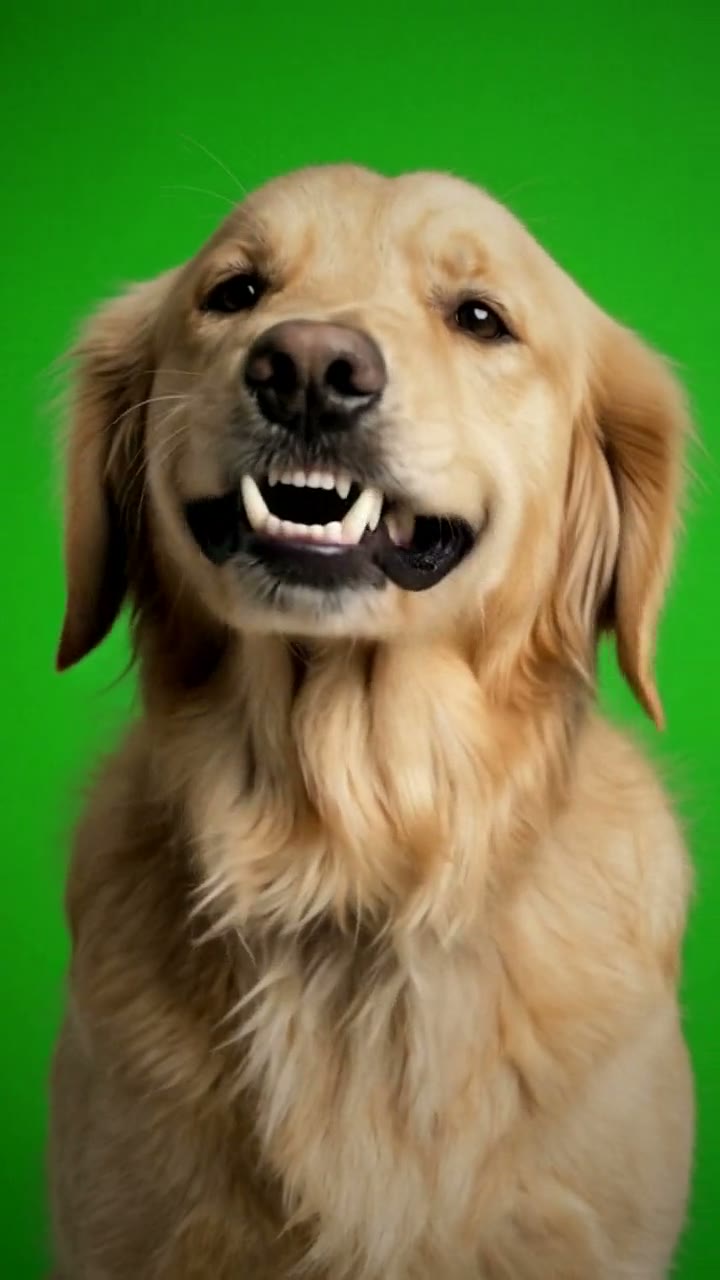
The fastest way to make the Oh My Carne Asada AI video is to upload one photo of your dog or cat to Try a Trend: your pet takes over the singing dog clip in front of the same green screen, howling with its head thrown back and then staring into the camera for the big note, and you get a 13-second vertical video with a free preview before you pay.
Oh My Carne Asada AI Video Generator
1 pet photo, 13-second vertical video, free preview before you pay. Your first video is $4.99, then $5.99 each.
What is the Oh My Carne Asada trend?
Oh My Carne Asada is a TikTok meme from November 2026, also searched as "carne asada dog" or "oh my carne asada dog". It is a single close-up of a small brown dog sitting in front of a bright green screen. The dog throws its head back and howls along to a song, then snaps its head down, stares straight into the lens with bulging eyes and bared teeth, and "sings" a line that everyone hears as "oh my carne asada". Hearing the line that way is half the joke.
Because the background is a flat green screen, the clip was made to be reused: people dropped it into their own edits, then a CapCut template and the TikTok meme tools turned it into a format. Within a few days pet owners were asking the obvious question in the comments: how do I make my dog sing it?
What happens in the video, second by second
The original is one fixed shot with no cuts, framed from the dog's chest up:
- 0 to 1 second: the dog looks into the camera, then starts to tip its head back.
- 1 to 5 seconds: a long, dramatic howl with the head thrown all the way back and the mouth wide open, the ears swinging.
- 5 to 8 seconds: the head snaps down. Wide eyes, teeth showing, it belts the "oh my carne asada" line straight at you.
- 8 to 11 seconds: a squint and a second howl, head tilted back and to the side.
- 11 to 13 seconds: it comes back to the camera with a small, cheeky grin.
The snap from the howl to the wide-eyed stare is the moment people recognise, so that is the part to get right.
Three ways to make the Oh My Carne Asada AI video
1. A CapCut template
CapCut is the free video editor from the company behind TikTok, and its templates usually appear within days of a meme. For this one, most templates put the original green-screen dog over your own background or next to your photo, so it is the original dog that sings, not yours. Search the Templates tab for "oh my carne asada" and watch the preview before you pick one.
Good: free or cheap, quick, and the timing and sound are already set up.
Not so good: in most of them your pet is not the singer. Templates also come and go quickly, and some add the app's ending card or need a paid plan.
Best for: a quick reaction edit where you don't need your own pet's face in it.
2. A general AI video tool like Kling or Runway
You can upload your pet's photo to a general AI video generator and describe the clip yourself: the green screen, the close-up, the howls with the head thrown back, the stare and the open-mouth singing. Some tools also have a video-to-video mode that can swap an animal in a clip, if you have a clip you are allowed to use.
Good: full control over the background, the length and the look.
Not so good: written prompts rarely land the howls and the stare on the same beats as the original, and pets' faces tend to drift: the coat changes colour, the ears change shape, or the mouth turns into a human-like grin. Expect a few retries. These tools usually give you some free credits, then sell monthly plans or credit packs.
Best for: people who already pay for an AI video tool and like to experiment.
3. A one-photo generator (Try a Trend)
Try a Trend has the clip already set up. Your video is AI-generated: it follows the viral clip shot for shot, with the dog swapped for your pet, so every howl, head turn and stare lands at the same moment as the original.
- 1Upload one clear photo of your pet, with its face visible and no people in the shot.
- 2Confirm it's your pet (or you have permission to use the photo).
- 3Check your free preview. If you like it, get the full video.
- 4Download in a few minutes: one with the original sound, one silent for adding the sound on TikTok.
You get a 13-second vertical video in one fixed close-up in front of the green screen. Your pet keeps its breed, coat colours, markings, ears and eye colour from your photo. The download comes with the original sound of the clip, plus a silent version for posting. Your first video is $4.99, then $5.99 each.
Good: your own pet is the singer, the timing matches the meme, it works for dogs and cats, and the free preview shows your pet mid-song before you pay. The video is ready in about five minutes.
Not so good: one scene for every pet: the green screen and the close-up never change. The howls follow the original dog's movements, so a big, long-nosed dog does the same small-dog head moves, which can look a little stiff. The full video is paid.
Best for: pet accounts, funny posts for friends, or anyone who wants their own dog or cat in the meme while it is still on everyone's feed.
Tips for a photo that works
- Use one clear photo of your pet with its whole face visible and its eyes open, in good light. Daylight near a window works best.
- The video is a close-up from the chest up, so a photo taken at your pet's eye level, from the front or at a slight angle, works better than one taken from above.
- Make sure both ears are in the shot. Ears move a lot in the howls, and the AI copies their shape from your photo.
- One animal per photo and no people in it. Crop out other pets, hands and leads if you can.
- If your pet has patches, a mask or eyebrow spots, pick a photo where the markings are easy to see, so they carry over.
- Skip heavy filters, costumes and hats that hide the face or ears. Use the original photo rather than a screenshot.
- Only use photos of your own pet, or photos you have permission to use.
What to post it with
- Sound: your download already has the original sound. For TikTok or Reels, post the silent version and add the "oh my carne asada" sound inside the app, so your post shows up on that sound's page. Start it at the beginning, so the first howl lands on time.
- Caption idea: "my dog has been practising" or "he only knows one song".
- Hashtags: #ohmycarneasada, #carneasadadog and #singingdog.
- Turn on the platform's AI-generated content label when you post. It is an AI video, and saying so keeps it honest.
FAQ
Is this the official Oh My Carne Asada video?
No. Try a Trend is an independent AI tool that puts your own pet into the singing dog meme. We're not affiliated with the creator of the original clip, the song in it, TikTok or CapCut.
Can my cat sing it?
Yes. It is called the carne asada dog because a dog started it, but cats and other pets work the same way: your pet throws its head back, howls and belts the line in the same green-screen close-up.
Can I put my pet on a different background?
Not in our version: the bright green screen is part of the meme, and it stays in every video. Because it is a clean green screen, you can still key it out yourself in an editor like CapCut and put your pet anywhere you like.
Make yours
Upload one photo of your dog or cat, check the free preview, and get your pet's Oh My Carne Asada video in about five minutes. Make your Oh My Carne Asada video here.