How to Make the GTA 6 Jet Ski Dog AI Video With Your Own Pet
The fastest way to make the GTA 6 Jet Ski Dog AI video is to upload one photo of your dog or cat to Try a Trend: your pet takes the dog's place in a real GTA 6 gameplay clip of the Easter egg, in the same orange life vest and green goggles, picking up the player far out at sea and riding off with them, and you get a 10-second vertical video with a free preview before you pay.
GTA 6 Jet Ski Dog AI Video Generator
1 pet photo, 10-second vertical video, free preview before you pay. Your first video is $4.99, then $5.99 each.
What is the GTA 6 Jet Ski Dog trend?
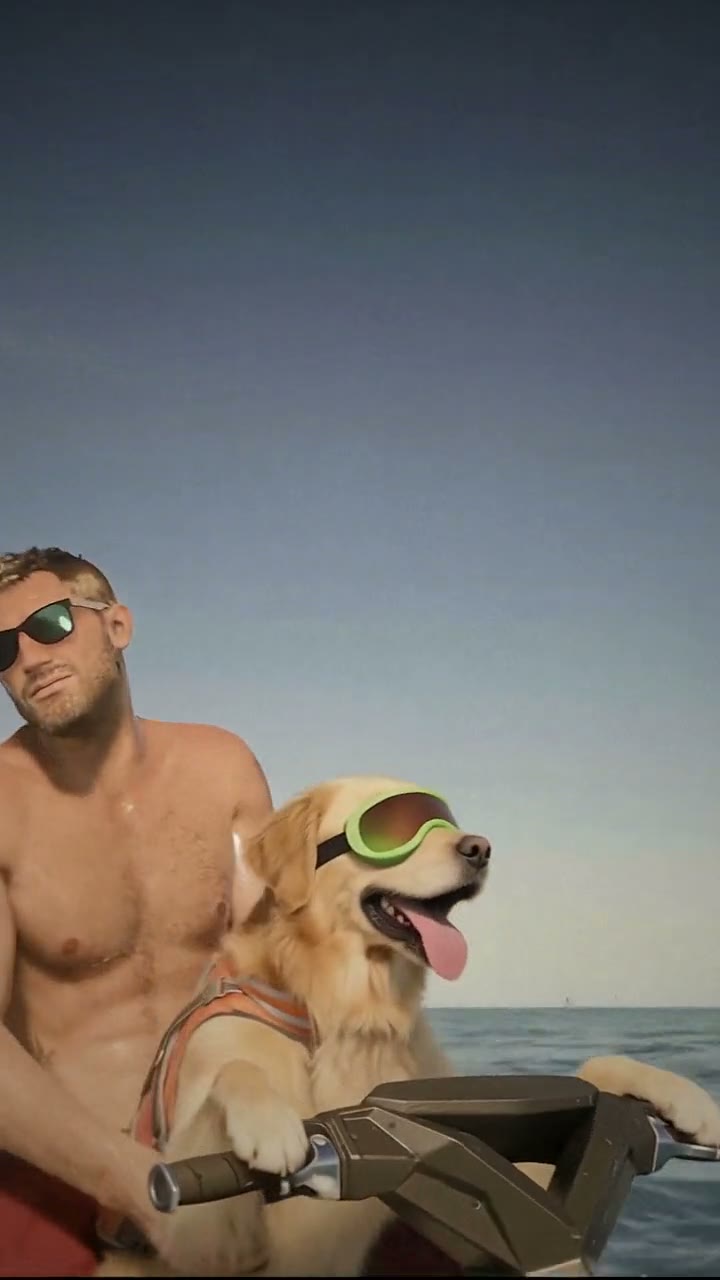
The GTA 6 Jet Ski Dog is the first Easter egg from GTA 6 to go viral. In the week the game came out in November 2026, players started posting clips of the same strange moment: they swim far out into the ocean, away from the coast, and a dog turns up on a jet ski. Dressed in an orange life vest with green goggles over its eyes, it sits up straight at the handlebars, waits while the player climbs onto the back seat, and then drives them back to land.
Players say you only have to swim out far enough for it to appear. We haven't tested that in the game, so treat it as what players report rather than a guide to finding it.
What made it a meme is the dog's face. It is completely calm and focused, like a lifeguard who has done this rescue a hundred times. Within hours the clips were all over TikTok, people were calling it game of the year, and pet owners started asking the obvious question in the comments: can I make my own dog the jet ski dog?
What happens in the video, second by second
The viral clips are recorded from the game and run anywhere from ten seconds to most of a minute. They all hit the same beats. Our version is cut from one of those gameplay clips, keeping the game's own camera and the order of the shots, down to ten seconds:
- 0 to 2 seconds: open sea, seen from above and behind the player as he swims. The jet ski bobs a few metres ahead with the dog sitting up at the handlebars, life vest on, goggles down, waiting.
- 2 to 4.5 seconds: the player reaches the jet ski, grabs the side and hauls himself up out of the water.
- 4.5 to 6 seconds: he sits down behind the dog, the camera swings round, and they set off.
- 6 to 10 seconds: cut to a low close-up as they ride across the sea: the dog at the handlebars with its goggles on and its mouth open in the wind, the player in sunglasses right behind it.
The close-up at the end is the part people screenshot, so that is where your pet needs to look like your pet.
Three ways to make the GTA 6 Jet Ski Dog AI video
1. A CapCut template
CapCut is the free video editor from the company behind TikTok, and its templates usually appear within days of a meme. For this one, look for templates under "jet ski dog" or "gta 6 dog". Most of them use the game clip itself and put your photo on top or next to it, so the dog on the jet ski is still the game's dog, not yours.
Good: free or cheap, quick, and the timing is already set up.
Not so good: your pet usually isn't the one driving. Templates come and go quickly, and some add the app's ending card or need a paid plan.
Best for: a quick reaction post where you don't need your own pet in the scene.
2. A general AI video tool like Kling or Runway
You can upload your pet's photo to a general AI video generator and describe the scene yourself: the open sea, the jet ski, the orange life vest and green goggles, the swimmer climbing on, the drive-off and the close-up. Some tools also have a video-to-video mode that can swap an animal in a clip you are allowed to use.
Good: full control over the scene, the length and the style.
Not so good: getting a swimmer to climb onto a moving jet ski in the right order is hard to prompt, and pets' faces tend to drift between shots: the coat changes colour, the ears change shape, or the goggles melt into the face. Expect several retries. These tools usually give you some free credits, then sell monthly plans or credit packs.
Best for: people who already pay for an AI video tool and like to experiment.
3. A one-photo generator (Try a Trend)
Try a Trend has the clip already set up. Your video is AI-generated from a real GTA 6 gameplay clip of the Easter egg: it follows that clip shot for shot, and only the dog on the jet ski is swapped for your pet. The sea, the jet ski, the player and the camera are the game's own, so it really looks like your pet is in GTA 6.
- 1Upload one clear photo of your pet, with its face visible and no people in the shot.
- 2Confirm it's your pet (or you have permission to use the photo).
- 3Check your free preview. If you like it, get the full video.
- 4Download in a few minutes and add the trending sound on TikTok.
You get a 10-second vertical video in two shots, the same as the gameplay clip: the pick-up at sea, then the ride with your pet up close. Your pet keeps its breed, coat colours, markings, ears and face from your photo, and wears the meme's orange life vest and green goggles. Your first video is $4.99, then $5.99 each.
Good: your own pet is the rescuer inside real GTA 6 footage, the beats match the meme, it works for dogs and cats, and the free preview shows your pet at the handlebars before you pay. The video is ready in about five minutes.
Not so good: one scene for every pet, and the goggles stay on, so a little of the face around the eyes is always covered. Your pet copies the game dog's movements, so a much bigger or smaller animal can look a little stiff. The full video is paid.
Best for: pet accounts, gaming friends, and anyone who wants their own dog or cat in the meme while everyone is still playing GTA 6.
Tips for a photo that works
- Use one clear photo of your pet with its whole face visible and its eyes open, in good light. Daylight near a window works best.
- The video ends on a close-up of the face, so a photo taken at your pet's eye level, from the front or at a slight angle, works better than one taken from above.
- Make sure both ears are in the shot. They blow back in the wind on the jet ski, and the AI copies their shape from your photo.
- The goggles cover part of the face, so markings on the muzzle, cheeks and forehead matter a lot. Pick a photo where they are easy to see.
- One animal per photo and no people in it. Crop out other pets, hands and leads if you can.
- Skip heavy filters, costumes and hats that hide the face or ears. Use the original photo rather than a screenshot.
- Only use photos of your own pet, or photos you have permission to use.
What to post it with
- Sound: the video is silent. Add a sound inside TikTok or Reels: a popular jet ski or GTA 6 sound from the trend's videos works, or a dramatic rescue song.
- Caption idea: "swam out too far, he came for me" or "my dog has been playing GTA 6".
- Hashtags: #jetskidog, #gta6 and #dogsoftiktok.
- Turn on the platform's AI-generated content label when you post. It is an AI video, and saying so keeps it honest.
FAQ
Is this the official GTA 6 Jet Ski Dog?
No. Try a Trend is an independent AI tool that puts your own pet into the jet ski dog meme. We're not affiliated with Rockstar Games, Take-Two Interactive or GTA 6, and the name is only used to say which meme this is.
Is it real footage from GTA 6?
It starts from a real GTA 6 gameplay clip of the jet ski dog, and the AI then swaps the dog for your pet. Everything else, the sea, the jet ski, the player and the camera, stays as it was in the game.
Can my cat be the jet ski dog?
Yes. It is called the jet ski dog because a dog started it, but cats and other pets work the same way: your pet sits in the driver's seat in the life vest and goggles and does the rescue.
Make yours
Upload one photo of your dog or cat, check the free preview, and get your pet's GTA 6 Jet Ski Dog video in about five minutes. Make your GTA 6 Jet Ski Dog video here.