How to Make the Dog Pool Party AI Video (Dancing Dog in Goggles)
The fastest way to make the dog pool party AI video is to upload one photo of your dog or cat to Try a Trend: your pet puts on pink swim goggles, a ruffled swimsuit and arm floaties and does the whole poolside dance from the viral clip, move for move, and you get a 13-second vertical video with a free preview before you pay.
Dog Pool Party AI Video Generator
1 pet photo, 13-second vertical video, free preview before you pay. Each video is $7.99.
What is the dog pool party trend?
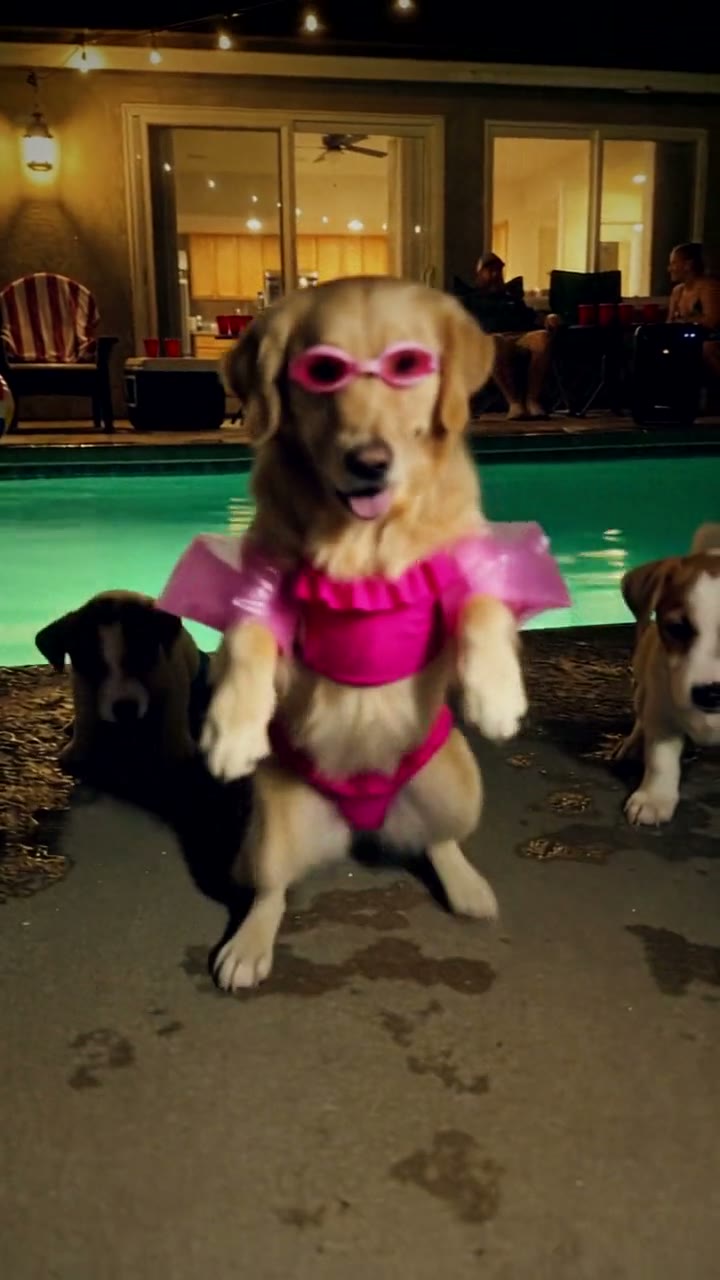
The dog pool party is a TikTok clip from November 2026 of a pug at a night pool party. It stands on its hind legs in pink goggles, a hot-pink ruffled two-piece and see-through arm floaties, and dances beside a glowing turquoise pool while two puppies sit at the edge and watch. String lights hang overhead, guests lounge on striped chairs across the water, and at the end someone walks up with a phone flashlight to film the star of the party.
The clip was made with an AI video tool in the first place, so nobody thought a pug really danced like that. What people wanted was to see their own pet do it, and pet owners quickly started asking how to put their dog in it.
What happens in the video, second by second
The viral version is one handheld shot filmed from low down, at about the dog's eye level, with no cuts:
- 0 to 1 second: the dog's face fills the screen, goggles almost touching the lens. Then it jumps away from the lens and rises onto its back legs, and the two puppies come into view on either side.
- 1 to 4 seconds: it dances on two legs, swaying its hips, bouncing and waving its front paws, so the floaties flap like little wings.
- 4 to 5.5 seconds: it rushes back toward the camera with one paw reaching out and kicks a back leg up high.
- 5.5 to 9 seconds: a quick spin, then the wiggle: back to the camera, hips swinging to the beat, glancing over its shoulder at you.
- 9 to 13 seconds: a guest steps in with a phone, flashlight on. The dog lights up and casts a long shadow over the wet poolside, the hand holding the phone fills the foreground, and the dog turns toward the light and keeps wiggling.
The face in the lens at the start, the wiggle and the flashlight at the end are what people recognize.
Three ways to make the dog pool party AI video
1. A CapCut template
CapCut is the free video editor from the company behind TikTok, and its user-made templates follow most viral trends. Some of them use AI to animate a photo. Search its Templates tab for "dog pool party" or "dancing dog" and watch the preview before you pick one.
Good: free or cheap to try, and quick, with the timing, text and effects already set up.
Not so good: each template is someone's own take, so the scene, the outfit and the moves change from one to the next and may not follow the viral clip beat for beat. Many dance templates are built for people, so a pet photo can come out strange. Templates also come and go quickly, and some add the app's ending card or need a paid plan.
Best for: pet owners who want a quick edit in the trend's spirit and don't mind if the dance is different.
2. A general AI video tool like Kling or Runway
The original came out of an AI video generator, so you can try the same route. Upload your pet's photo and describe everything yourself: the night pool and the string lights, the goggles, swimsuit and floaties, the dance on two legs, the kick, the spin, the wiggle and the guest with the flashlight. Some tools also have a motion-control mode that copies the moves from a dance clip, if you have a clip you're allowed to use.
Good: full control over the setting, the outfit and the length.
Not so good: an animal dancing on its hind legs is hard for AI video. Paws can turn into hands, the swimsuit slips, and the face drifts away from your pet's. From a written description alone, the moves won't land at the same moments as the viral clip, so expect retries. These tools usually give you a few free credits, then sell monthly plans or credit packs, so every retry counts.
Best for: people who already pay for an AI video tool and enjoy experimenting.
3. A one-photo generator (Try a Trend)
Try a Trend has the pool party and the dance already set up. The moves come from our own reference video: a recreation of the viral clip with a fictional AI dog as the dancer, same moves, same timing. Your pet takes over the lead.
- 1Upload one clear photo of your pet, with its face visible and no people in the shot.
- 2Confirm it's your pet (or you have permission to use the photo).
- 3Check your free preview. If you like it, get the full video.
- 4Download in a few minutes and add the trending sound on TikTok.
You get a 13-second vertical video in one handheld shot, from the face in the lens at the start to the phone flashlight at the end. Your pet keeps its breed, coat colours and markings from your photo and gets the goggles, the swimsuit and the floaties. The two puppies, the guests and the hand with the phone are AI characters, the same in every video. Each video is $7.99.
Good: the same moves at the same moments as the viral clip, it works for dogs and cats, your pet never has to wear anything, and the free preview shows your pet at the party before you pay. The video is ready in about five minutes.
Not so good: one pool party and one outfit for every pet. The dancer is drawn at the size of the small dog in our reference video, so a big dog can come out looking like a half-grown pup. In the last second or two your pet is backlit by the flashlight and its face goes dark, just as in the original. The video is silent, so you add the sound yourself, and the full video is paid.
Best for: pet accounts, birthday posts for your dog, or anyone who wants their dog or cat in the trend today.
Tips for a photo that works
- Use one clear photo of your pet with its face visible and its eyes open, in good light. Daylight near a window works best.
- Front-on or a slight angle is ideal. Your pet can be sitting, standing or lying down in the photo; it doesn't need to stand on two legs.
- One animal per photo and no people in the shot. Crop out other pets, hands and leads if you can.
- If your pet has patches, spots or a mask, pick a photo where the markings are easy to see, so they carry over.
- Skip heavy filters, costumes and hats that hide the face or ears, and blurry action shots. Use the original photo rather than a screenshot.
- Only use photos of your own pet, or photos you have permission to use.
What to post it with
- Sound: the viral clip uses its own original sound. Open a dog pool party post you like on TikTok and use its sound, added inside TikTok or Instagram, where it is licensed. Start it at the beginning, so the hop back lands on the first beat.
- Caption idea: "they said it was a pool party so i dressed for it" or "my dog has a better social life than me".
- Hashtags: #dogpoolparty, #dancingdog and #aipet.
- Turn on the platform's AI-generated content label when you post. It's an AI video, and saying so keeps it honest.
FAQ
Is this the official dog pool party video?
No. Try a Trend is an independent AI tool that makes its own pool party dance video from a photo of your pet. We're not affiliated with the creator of the original clip, the AI tool it was made with, or TikTok.
Can my cat do it?
Yes. It's called the dog pool party because a dog started it, but cats and other pets work the same way: your pet gets the same goggles, swimsuit and floaties and does the same dance. The two puppies watching from the side stay the same.
Does my pet have to look like a pug?
No. Any breed, any size, any coat. The AI keeps your pet's own face, colours and markings; only the outfit and the dance come from the trend. Check the free preview to see how your pet looks before you pay.
Make yours
Upload one photo of your dog or cat, check the free preview, and get your pet's pool party dance in about five minutes. Make your dog pool party video here.