How to Make the Catch Santa on Camera AI Video in Your Living Room
The fastest way to make the Catch Santa on Camera AI video is to upload one photo of your living room, your Christmas tree or your front door to Try a Trend: you get a 10-second vertical clip that looks like night footage from a security camera in your own home, where Santa tiptoes in, leaves presents, spots the camera and puts a finger to his lips, and you see a free preview of Santa in your room before you pay.
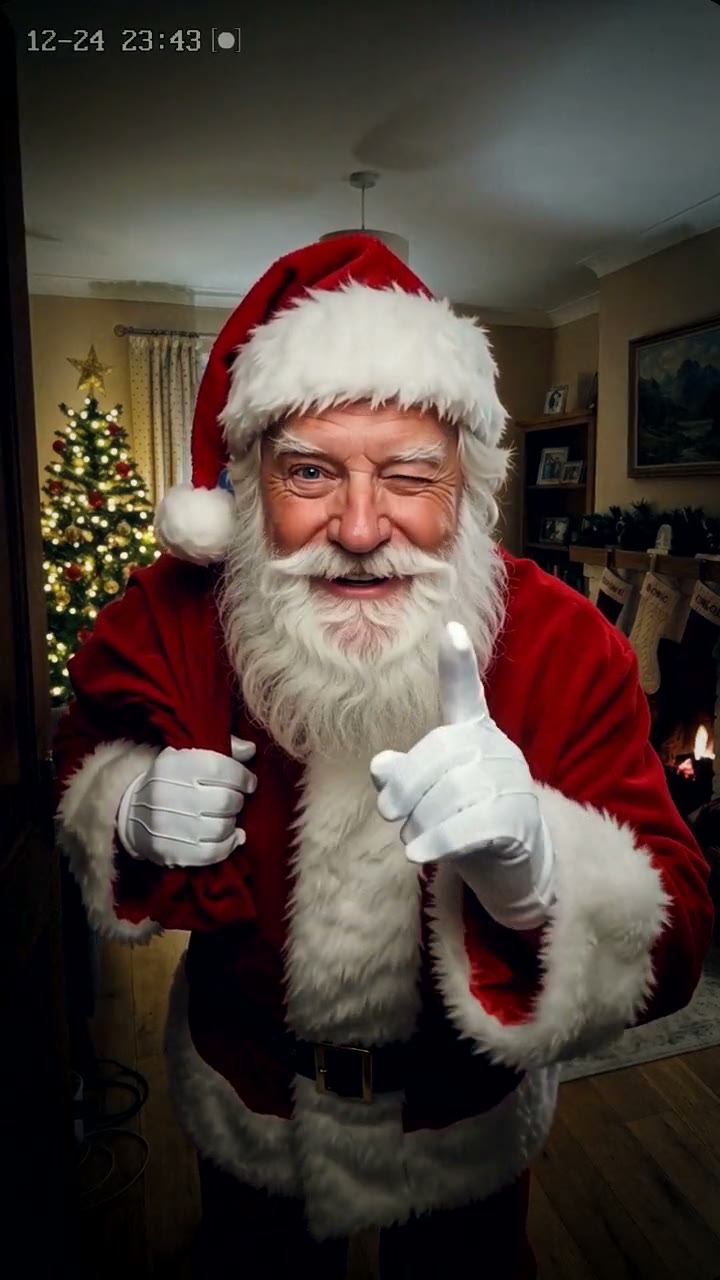
Catch Santa on Camera AI Video Generator
1 home photo, 10-second vertical video, free preview before you pay. Each video is $7.99.
What is the Catch Santa on Camera trend?
Santa caught on camera is a Christmas video format on TikTok and YouTube Shorts: grainy night footage from a doorbell or home security camera that seems to catch Santa Claus in the act. Parents look for it as "catch Santa in my house", "Santa caught on camera" or simply "Santa video", and searches start climbing in November and peak in the week before Christmas.
The clip most people remember is a doorbell video from Christmas 2024. The front porch is empty, then Santa walks into view with his sack, notices the doorbell camera, puts a finger to his lips and waves before he heads off. The parent who posted it wrote that they couldn't wait to show their kids on Christmas morning, and that is exactly how the format gets used: as proof that Santa really came. Earlier versions go back years, from "Santa cam" apps to AI clips of Santa in a living room by the tree.
The Catch Santa on Camera video moves the camera inside: it's your own living room, with your tree, your sofa and your fireplace, the way your kids know it.
What happens in the video, second by second
The video is one steady shot of 10 seconds from a fixed camera, in the dim light of a house at midnight:
- 0 to 1.5 seconds: your room at night, lit only by the tree lights, the fire or a candle, with a small time stamp in the corner. Nothing moves except the twinkling lights.
- About 1.5 to 4 seconds: Santa tiptoes in from the side with his big red sack, trying not to wake anyone.
- About 4 to 6.5 seconds: he kneels by your tree and sets down a few wrapped presents in red and gold paper. No tree? He leaves them by the fireplace or the sofa.
- About 6.5 to 8 seconds: he stands up, spots the camera and looks straight into it, surprised for a second, then smiling.
- About 8 to 10 seconds: a finger to his lips, a wink, and he tiptoes back out, leaving the presents behind.
Three ways to catch Santa in your house
Parents who want "proof" usually find three kinds of tools. Here's what each one gives you.
1. A Santa photo app
Several apps let you take a picture of your living room and drop a picture of Santa into it, standing by the tree or caught mid-step with his sack.
Good: quick, often free to start, and it uses your real room.
Not so good: you get one still photo, not a video, and it usually looks like a sticker on top of the picture: the light on Santa rarely matches your room at night. Many of the nicer poses and the watermark-free versions sit behind an in-app purchase.
Best for: a quick picture to print or send in a family chat.
2. A free AI assistant or a general AI video tool
General AI tools, including free chat assistants with image or video features, can put Santa in a scene if you describe it well. Some can animate a short clip from your photo.
- Upload a photo of your room and describe the look you want: night, a fixed security camera, dim tree lights, grain.
- Describe the action in order: Santa coming in, the presents, the moment he notices the camera.
- Try again until the room still looks like yours and Santa looks friendly.
Good: free or cheap to try, and you can ask for anything.
Not so good: you write and rewrite the prompt yourself. These tools often redraw the room, so the furniture moves or the tree changes, the camera may drift, and free versions limit the length, the quality or the number of tries.
Best for: people who enjoy tinkering and don't mind a few attempts.
3. A one-photo generator (Try a Trend)
Try a Trend has the whole scene set up, so you only upload one photo of your room.
- 1Upload one photo of your living room, your Christmas tree or your front door, with the lights on and nobody in the shot.
- 2Confirm it's your home (or you have permission to use the photo).
- 3Check your free preview. If you like it, get the full video.
- 4Download in a few minutes and play it for the kids on Christmas morning.
Your 10-second video follows the shots above in one steady view, from the empty room to the wink. Each video is $7.99.
Good: no Santa suit, no hidden camera and no editing. The video keeps your room's furniture, layout, tree and decorations from your photo, so the kids recognise it, and you see a free preview of Santa in your room before you pay. Santa is an AI-made character, and he's jolly, never scary.
Not so good: the story is fixed (Santa comes in, leaves presents, shushes the camera), and small things like books or picture frames can come out a little different. The video is silent, so you add the sound yourself, and it's an AI-made video, not real camera footage. Santa doesn't say anyone's name.
Best for: parents who want a finished Santa video in their own living room, in time for Christmas morning.
Tips for a photo that works
- Take it from a doorway or a corner so most of the room is in the shot, with the tree or the fireplace in view.
- Turn the lights on and the tree lights too. The video turns it into night, but a clear photo keeps the furniture recognisable.
- Nobody in the shot, kids included. Framed family photos on the wall, the TV and your pets are fine.
- A photo of your front door or porch works as well if that's where Santa should be caught.
- Use the original photo from your camera roll, not a screenshot. Only use a photo of your own home, or one you have permission to use.
Showing it to the kids on Christmas morning
Have it ready on the TV or a tablet before the kids come down. Let them find the presents first, then say the living room camera picked something up last night and press play. Pause on the moment Santa looks into the camera: that's the bit they'll want to see again.
If you put presents out, put a few under the tree in the same spot as in the video, and leave the cookie plate with crumbs and the empty glass of milk nearby. Grandparents love getting it in the family chat, too.
It's an AI-made video, so you decide how you tell the story, and when.
What to post it with
- Sound: the video is silent, so add something soft from TikTok's or Instagram's sound library, where it's licensed. Sleigh bells, a quiet Christmas piano or a classic carol all suit the midnight camera feel.
- Hashtags: #santacaughtoncamera, #catchsanta and #christmas.
- A caption like: "Caught Santa on our living room camera last night. He knew we were watching."
- When to post: on Christmas Eve or Christmas morning, after the kids have seen it.
FAQ
Is this an official Santa video or app?
No. Try a Trend is an independent AI tool that makes its own Santa caught on camera video from a photo of your room. We're not affiliated with any Santa video app or website, any security camera or doorbell company, TikTok or CapCut.
Do I need a security camera at home?
No. You upload an ordinary phone photo, and the night look, the camera angle and the time stamp are made by the AI.
Can Santa leave a present for my dog or cat instead?
Yes, that's a different video: Santa in Your House is made from one photo of your pet, and Santa stops to give them a present on the front walk. For more festive ideas, see all Christmas videos.
Make yours
Take one photo of your living room tonight and check the free preview of Santa's visit. Make your Catch Santa on Camera video here.