How to Make the Cat Singing Happy Birthday AI Video With Your Pet
The fastest way to make the cat singing happy birthday AI video is to upload one photo of your cat or dog to Try a Trend: your pet takes over the viral singing birthday cat clip, standing on its hind legs with a candlelit cake and singing the whole Happy Birthday song, and you get a vertical video to send as a birthday card, with a free preview before you pay.
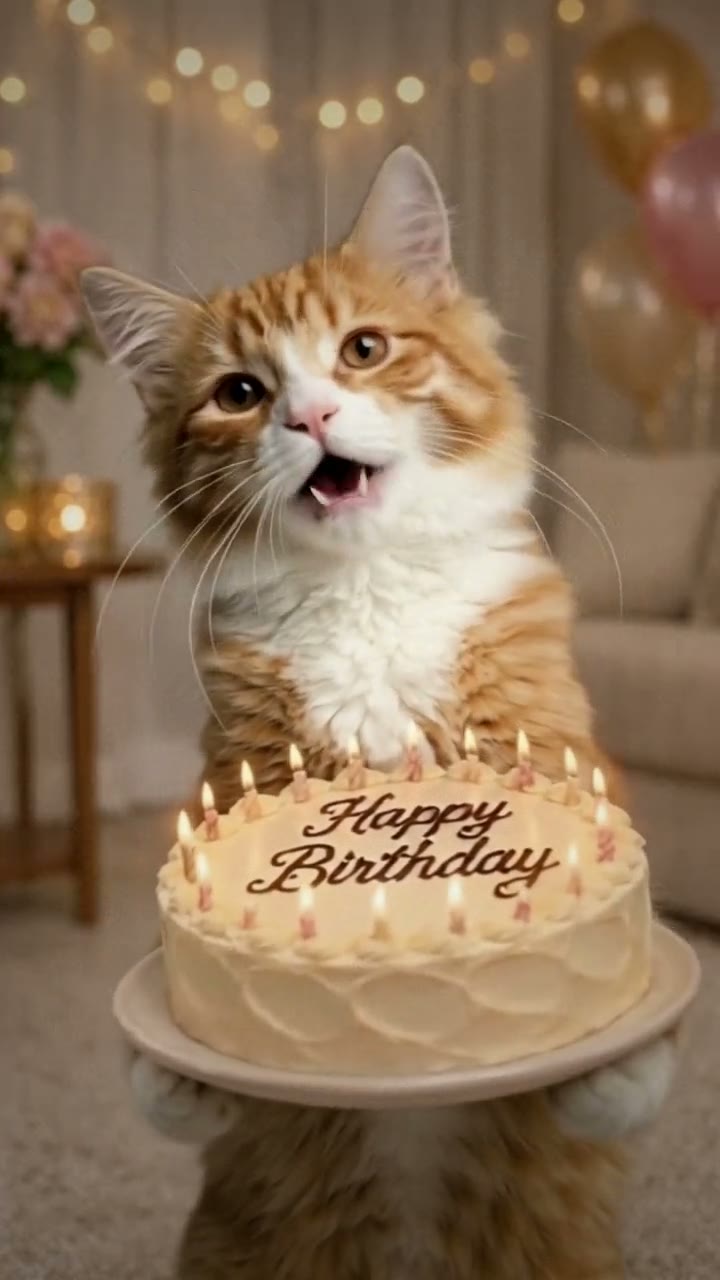
Cat Singing Happy Birthday AI Video Generator
1 pet photo, 19-second vertical video, free preview before you pay. Each video is $7.99.
What is the cat singing happy birthday trend?
Cat Singing Happy Birthday, also searched as the "singing birthday cat" or "happy birthday cat", is an AI pet video that took off on TikTok in November 2026. It is one continuous shot: a cat stands on its hind legs in a cosy living room, with warm fairy lights strung along the wall, gold and pink balloons, roses on a side table and a sofa behind it. In its front paws it holds a white plate with a round cream cake covered in lit candles, with "Happy Birthday" piped across the top. Then it sings the whole birthday song to the camera.
The original was posted as a birthday card, with a caption asking people to send it to a friend celebrating today, and that is how it spread: people forward it to family, friends and group chats instead of a text. The same creator made versions with a kitten and a small dog, and a CapCut template followed within days. Now pet owners want the obvious upgrade: their own cat or dog holding the cake.
What happens in the video, second by second
The original runs for about 19 seconds, one line of the song after another, in a fixed medium shot from the cat's hips up:
- 0 to 4 seconds: the first line. The cat sings with its mouth wide open, swaying its head from side to side, and lifts its chin with its eyes closed at the end of the line. The camera eases in a little.
- 4 to 9 seconds: the second line, sung straight into the camera, with a couple of head tilts and squints.
- 9 to 14 seconds: the "dear…" line. The cat tips its head right over to one side and sings with its eyes shut, rocking its head like a crooner.
- 14 to 19 seconds: the last line. One more big tilt and a wide-open final note, then it closes its mouth and looks straight at you, cake still held up.
The cake never moves out of the shot and the writing always faces the camera, which is why it works as a card: whoever opens it sees "Happy Birthday" the whole time.
Three ways to make the cat singing happy birthday AI video
1. A CapCut template
CapCut is the free video editor from the company behind TikTok, and a template for this one appeared within a few days of the original. You pick the template, add a photo, and the app renders a version with the song already set up. Search the Templates tab for "birthday cat" or "singing cat" and watch the preview first: in the most shared one the singer is a tabby kitten in a room full of party balloons, not necessarily your pet.
Good: free or cheap, quick, and the sound and timing are built in.
Not so good: results vary a lot with the photo, and in some templates your pet barely looks like your pet. Templates come and go, and some add the app's ending card or need a paid plan.
Best for: a quick, free birthday message when it doesn't have to look like your own animal.
2. A general AI video tool like Kling or Runway
You can upload your pet's photo to a general AI video generator and describe the scene yourself: the cosy room, the fairy lights, your pet standing up with the cake, the singing. Some tools also have a video-to-video mode that swaps an animal into a clip you are allowed to use.
Good: full control over the room, the cake, the length and the look.
Not so good: written prompts rarely keep a pet singing through a whole 19-second song, and faces drift: the coat changes colour, the cake melts into the paws or the candles move around. Expect a few retries. These tools usually give you some free credits, then sell monthly plans or credit packs.
Best for: people who already pay for an AI video tool and like to experiment.
3. A one-photo generator (Try a Trend)
Try a Trend has the clip already set up. Your video is AI-generated: it follows the viral clip shot for shot, with the cat swapped for your pet, so every head sway, tilt and long note lands at the same moment as the original song.
- 1Upload one clear photo of your pet, with its face visible and no people in the shot.
- 2Confirm it's your pet (or you have permission to use the photo).
- 3Check your free preview. If you like it, get the full video.
- 4Download in a few minutes: one with the original sound to send as a birthday card, one silent for adding the sound on TikTok.
You get a 19-second vertical video in the same cosy room with the fairy lights, the balloons and the candlelit cake. Your pet keeps its breed, coat colours, markings, ears and eye colour from your photo. The download comes with the original sound, the whole Happy Birthday song, so you can send it straight to the birthday person, plus a silent version for posting. Each video is $7.99.
Good: your own pet is the singer, the whole song is there, you can use a cat or a dog, and the free preview shows your pet holding the cake before you pay. The video is ready in about five minutes.
Not so good: one scene for every pet: the room and the cake are the same in every video, and the cake says Happy Birthday, not a name. Your pet follows the original cat's movements, so a big, long-legged dog stands and sways like a cat, which can look a little funny. The full video is paid.
Best for: a birthday card that the birthday person will actually watch twice, especially if they know your pet.
Tips for a photo that works
- Use one clear photo of your pet with its whole face visible and its eyes open, in good light. Daylight near a window works best.
- Your pet faces the camera for the whole song, so a photo taken from the front, at your pet's eye level, works better than a side view or one taken from above.
- Make sure both ears are in the shot. The head tilts a lot, and the AI copies the ear shape from your photo.
- If your pet has patches, stripes or a white chest, pick a photo where the markings are easy to see, so they carry over.
- One animal per photo and no people in it. Crop out other pets, hands and leads if you can.
- Skip heavy filters, costumes and hats that hide the face or ears. Use the original photo rather than a screenshot.
- Only use photos of your own pet, or photos you have permission to use.
What to send it with
- As a birthday card: send the version with sound straight to the birthday person in a message, and put their name in the text: "Someone wanted to sing you something" works well.
- For TikTok or Reels: post the silent version and add the sound inside the app, so your post shows up with the others using it.
- Caption idea: "happy birthday from the one who loves you most" or "he practised all week for this".
- Hashtags: #catsinginghappybirthday, #singingcat and #happybirthday.
- Turn on the platform's AI-generated content label when you post. It is an AI video, and saying so keeps it honest.
FAQ
Is this the official singing birthday cat video?
No. Try a Trend is an independent AI tool that puts your own pet into the singing birthday cat meme. We're not affiliated with the creator of the original clip, TikTok or CapCut.
Can my dog sing it?
Yes. A cat started it, but you can use a photo of your dog: it stands on its hind legs, holds the cake and sings the whole song in the same cosy room. Check the free preview to see how your dog looks standing up before you pay.
Can it say their name?
Not in the video itself: the cake says Happy Birthday in every video. Put the name in your message when you send it, or add it as text in your phone's editor before you post.
Make yours
Upload one photo of your cat or dog, check the free preview, and get your pet's singing birthday video in about five minutes. Make your Cat Singing Happy Birthday video here.