How to Make the This Generation Rules the Nation AI Video (Trio Dance)
The fastest way to make the This Generation Rules the Nation AI video, the TikTok trio dance where one person walks into the middle and two more step out from behind them, is to upload one photo of yourself to Try a Trend: you see a free preview, then get a 9-second vertical video that follows a viral clip of the trend move for move, with you as the dancer in the middle. Add a second photo and a friend or family member steps out beside you.
This Generation Rules the Nation AI Video Generator
1 photo, 9-second vertical video, free preview before you pay. Your first video is $4.99, then $5.99 each.
What is the This Generation Rules the Nation trend?
This Generation Rules the Nation is a TikTok dance trend that took off at the end of October 2026. The sound is the opening line of Pass the Dutchie, the 1982 reggae hit, so a lot of people search for it as the "Pass the Dutchie dance" or the "this generation rules the nation dance". Others look for the original video, the song itself, or a version for two people.
The idea is a small magic trick. Three people line up one behind the other, so from the front it looks like a single dancer. The one in front walks into the middle of the frame and starts to move, then on the beat the other two step out from behind, one to the right and one to the left, as if they appeared out of nowhere. Once all three are side by side they clap and roll their hands in front of their chests in sync, and the middle dancer launches into the first big move of the routine.
It spread because it is easy to learn and works anywhere: a living room, a basement, a car park, a school field. Friend groups, siblings, and parents with their kids filmed it. Now people put themselves into a clip of the trend with AI instead of rounding up two friends and rehearsing the timing.
What happens in the video, second by second
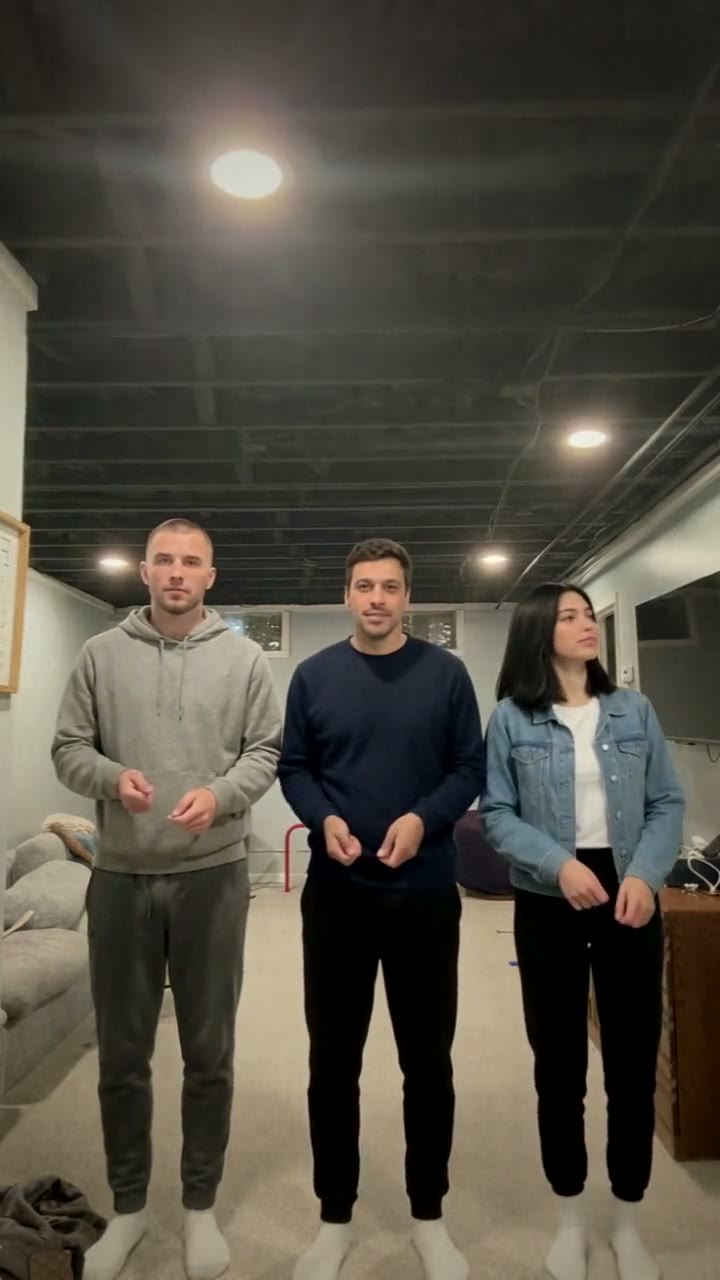
Try a Trend's version follows a single-shot TikTok clip filmed from a low, fixed camera in a finished basement with a black ceiling and round lights. The camera never moves, so the reveal reads clearly:
- 0 to 2 seconds: you walk into the middle of the room and face the camera, apparently alone.
- 2 to 4 seconds: a dancer slides out from behind you on the right, then a second one on the left.
- 4 to 8 seconds: all three of you stand in a row and clap and roll your hands in front of your chests on the beat, a little head bob and shoulder bounce included.
- 8 to 9 seconds: you break into the first big move: a knee lift and a wide arm swing while the other two keep the beat.
The original clip runs for about 28 seconds; we keep the opening, the reveal and the hand claps, which is the part everyone recognises.
How many people do you need?
The classic version is three people: one in the middle and two hiding behind. Two-person versions exist too, where a single friend steps out, and families often do it with a parent and kids. With Try a Trend you can do it alone (two fictional AI dancers step out beside you), or with one friend or family member, kids included (they take the spot on the right, and the dancer on the left stays a fictional AI person).
Three ways to make the This Generation Rules the Nation AI video
1. A CapCut template
Many trend videos start from a CapCut template linked in a TikTok post. You pick photos and the app swaps faces into an existing clip.
- Find a This Generation Rules the Nation template post on TikTok and tap the CapCut link.
- Choose a photo for each dancer.
- Export and post.
Good: it's quick, and basic templates are free.
Not so good: templates usually swap only the faces, so the bodies, clothes and hair stay as they were. Because two of the dancers are hidden behind the first one at the start, face swaps can flicker or land on the wrong person during the reveal. Watermarks and export limits depend on the app and your plan.
Best for: people who already use CapCut and want something fast and free.
2. A general AI video tool like Kling or Runway
General AI video tools can make a dance clip from a photo and a prompt, and some can edit a reference video.
- Upload your photo and, if the tool allows it, a reference video of the dance.
- Describe the room, the three dancers, who hides behind whom and when each one steps out.
- Generate, check faces, hands and timing, and try again.
Good: full control over the setting, the outfits and the style.
Not so good: the reveal is the hard part. Text-to-video models like to show all three people from the first frame, or merge the hidden dancers into the one in front. These tools usually sell credits, so every retry costs something.
Best for: people who already pay for an AI video tool and enjoy tuning prompts.
3. A one-photo generator (Try a Trend)
Try a Trend has the dance already set up, so there is nothing to film and no prompt to write. It starts from our own reference video, a recreation of a TikTok clip of the trend with three fictional dancers, and swaps you into the middle spot: your face, hair and glasses, and the top from your photo with black joggers and white socks, in the same room, from the same low camera, with every step on the same beat. Add an optional second photo and your friend or family member becomes the dancer who steps out on the right; leave it empty and both side dancers are fictional AI people.
- 1Upload one clear, front-facing photo of you or your kid, ideally full body or from the waist up. Want a friend or family member in it too? Add their photo, or leave it empty and an AI dancer steps out in their spot.
- 2Confirm the photos are of you or people who agreed. If anyone is under 18, confirm you're their parent or legal guardian.
- 3Check your free preview. If you like it, get the full video.
- 4Download in a few minutes: one with the original sound, one silent for adding the sound on TikTok.
You get a 9-second vertical video ready to post, with the original sound and a silent copy. Your first video is $4.99, then $5.99 each.
Good: no friends to round up and no takes to repeat. The walk-in, the reveal and the claps land on the same beats as the clip it follows, and you see a free preview photo before paying. The video is ready in a few minutes.
Not so good: the scene is fixed: the same basement, the same camera and the same moves every time. It covers the opening of the dance, not the full routine. Only one extra person can be added, so a group of three real friends isn't possible yet. The full video is paid, and it's AI, so it's a take on you rather than real footage of you.
Best for: anyone who wants the clip today, alone or with one friend.
Tips for a photo that works
- Use one clear photo of you facing the camera, ideally full body or from the waist up so your top shows.
- You are filmed from a few metres away, so good light on your face matters. Daylight near a window is ideal.
- Skip sunglasses, heavy beauty filters and photos where your hair or a hand covers your face. Use the original photo rather than a screenshot.
- Your top carries over to the video, so pick a photo in something you like.
- Adding someone? Their photo follows the same rules: one person, face to the camera.
- Only upload photos of yourself or of people who agreed to it. Photos of kids are fine if you're their parent or legal guardian, as long as everyone is fully dressed.
What to post it with
- Caption: keep it short, like "this generation rules the nation", or tag the friend who stepped out with you.
- Sound: use the silent version and add the This Generation Rules the Nation sound inside TikTok or Reels, so your post shows up on that sound's page. The download with sound is there for sharing anywhere else.
- Hashtags: #thisgenerationrulesthenation, #passthedutchie and #triodance.
FAQ
Is this the official This Generation Rules the Nation video?
No. Try a Trend is an independent AI tool that recreates the look of the trend with your own photo. We're not affiliated with the song's artists or rights holders, the creators of the viral TikToks, TikTok or CapCut. Your video is AI-generated: it follows a TikTok clip of the trend move for move, with you swapped in, and the other dancers are fictional AI people unless you add a friend's photo.
Can I make the family version with my kids?
Yes. Upload your photo and your kid's photo, or put your kid in the middle and step out beside them. If anyone pictured is under 18, you confirm you're their parent or legal guardian, and every photo needs everyone fully dressed. The dancer on the left is always a fictional AI person.
Make yours
Want the This Generation Rules the Nation reveal without rehearsing it three times over? Upload one photo, add a friend if you like, and check the free preview. Make your This Generation Rules the Nation video here.